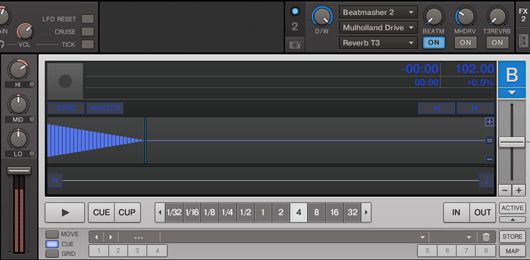
As a follow up to last Fridays post demonstrating live recording here are the steps required to set up live loop recording inside Traktor. Why would you want to record loops in Traktor live? Well, for a number of different reasons including sampling snares and kicks from tracks to recording controllerism routines to build songs on the fly. The technique is really quite simple and involves a beat masher set to a 4 count length. As soon as the beat masher is engaged it grabs anything that comes through the FX slot in the next 4 counts. So, you could have 3 decks all set to one FX slot record and 4 bar loop and continue to mix on those decks. In theory, with this technique, you could actaully mix up to 12 tracks at once from just 4 decks! Read on for a video tutorial on how to set up live loop recording.


Step One: Understand the Master Tempo
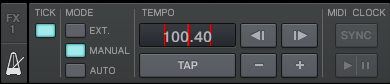
The masher will record 4 counts,  quantized to the master tempo so you need to know what that tempo is and where the rhythm is. You can use the internal mode, and set the tempo manually but then you will need to hear the tempo’s rhythm cycle if you want to start with a juggle. This can be done by turning on tick and playing along with a metronome, or by syncing up a track to the master tempo. Setting the master tempo to auto will work as well. In this mode, the master tempo tracks the “master deck” but this is less reliable and can cause complications when doing a lot of cue point jumping.

Step Two: Put a BeatMasher into a FX slot
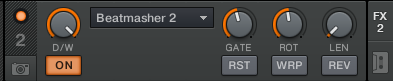
This will work in advanced or Chained FX slots but if you using Chained put it in the first space. This will allow you to manipulate the loop with the other FX in that slot.

Step Three: Assign the Deck to that FX
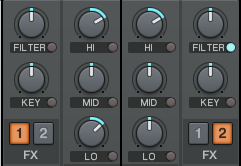
Route the deck or decks to that FX slot (these will be the source for the recording)

Step Four: Turn on the Sampler
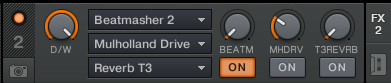
You will want to turn the wet dry to 100%, set the sampler length to 4 counts (far left) and turn on the masher. Our latest TSI, 1_6, which you can try out for free here, does all of this in one click on the “sampler” button.
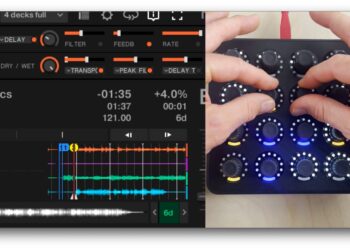

Step Five: Get Creative and Rock it!

  • http://www.myspace.com/robinhirte robinspace

    Hi ean,

    thanks for this fantastic tipp – i will test it when I am back at home

    Question: in your picture above there is another T Pro Skill – with BLUE buttons and deck design – is this just a photoshop FX or is there any option to get this skill ? In T3 I also tooked the blue design for the decks – in T Pro there is no option

    thanks in advance

    rob

  • http://www.djtechtools.com/author/bentosan/ BentoSan

    Ive been waiting for these videos ! Nice work Ean :)

    Hopefully NI will increase the length that the beatmasher can capture aswell which would let this technique rock out even harder.

  • http://misterhonk.de/blog/1043/live-samples-erstellen-mit-traktor-pro/ Live Samples erstellen mit Traktor Pro : misterhonk.de

    [...] Originalbeitrag bei djtechtools.com 0 Kommentare Interssante Beiträge die dazu passen:Ean Golden presents Live [...]

  • http://www.misterhonk.de honki

    Nice One! This Technique is really nice for sampling Scratches on-the-fly and use them instantly. I also translated your Post into german.

    Keep Going on such posts. I love them.

  • michiel

    I love playing around with the beat masher 2, makes me feel really artsy and creative ;)

    I've looked around in the manuals of Tpro, but it would be awesome if they really went in depth about the new effects.

    As you said Ean, it kinda feels like you're missing out on great functions of these effects, even though you're playing around a lot with them…

  • DJLp

    Ean,

    I've noticed that the last couple of video have been with you using Traktor Scratch Pro as opposed to T-Pro. Any special reason or performance difference?

    With your "Pitch n Scratch" concept…I noticed that a similar effect is achieved by using a cue trigger like s sample while doing similar hand motions on the pitch bend side of the jog wheel. The pitch variations aren't as wide or drastic but it still leaves the inside of the wheel open for traditional scratch-like functionality. I don't know if that helps your concept or not but if you weren't already hip, maybe that will birth some more ideas. I like what I'm seeing with it so far.

  • Sheph

    Nice Work Ean, Once again.

    so could one forseeably record 6 loops using 3 beatmashers on each FX channel in chained mode?

    S.

  • Anonymous

    [quote comment=""][...]

    Hopefully NI will increase the length that the beatmasher can capture aswell which would let this technique rock out even harder.[/quote]

    And hopefully, they add sampler banks like Deckdance!

  • BentoSan

    [quote comment=""][...] Originalbeitrag bei djtechtools.com 0 Kommentare Interssante Beiträge die dazu passen:Ean Golden presents Live [...][/quote]

    [quote comment="16403"]Nice Work Ean, Once again.

    so could one forseeably record 6 loops using 3 beatmashers on each FX channel in chained mode?

    S.[/quote]

    Nope because second beatmasher in the chain would cancel out the first and the third would cancel out the first and second.

    What you can do is recapture the beatmasher + effects into another beatmasher which is the next step up from this technique :)

  • http://tos.network.in.rs DJ ToS

    great ideas.

    NI should add sampler system if they plan to keep up the pace with other vendors.

  • MichielyGil

    [quote comment=""][...] Originalbeitrag bei djtechtools.com 0 Kommentare Interssante Beiträge die dazu passen:Ean Golden presents Live [...][/quote]

    [quote comment="16405"][quote comment=""][...] Originalbeitrag bei djtechtools.com 0 Kommentare Interssante Beiträge die dazu passen:Ean Golden presents Live [...][/quote]

    [quote comment="16403"]Nice Work Ean, Once again.

    so could one forseeably record 6 loops using 3 beatmashers on each FX channel in chained mode?

    S.[/quote]

    Nope because second beatmasher in the chain would cancel out the first and the third would cancel out the first and second.

    What you can do is recapture the beatmasher + effects into another beatmasher which is the next step up from this technique :)[/quote]

    Think about the funkyness that would create ;)

  • Anthony More

    Played a little bit around, and must say Very impressive..

  • http://role.art.br Cauê Ito

    it's like learning mixing again. I got addicted to DJTT. Thanks for sharing, Ean.

  • http://role.art.br Cauê Ito

    Would be great if we could see small dj sets of all kinda of music using your set up.

  • luv2xra

    I have to say a pretty selfish thing right now. Please keep updating your site as much as your doing right now. I know its a one man crew, right now. But I cant get enough

  • dj erik t

    Im gonna have to agree with the post above. I can't get enough, Im a djtt.com junkie. Rad that you asked readers for input on the last post.

    Where are these visual mods coming from (blue buttons, level metters that are segmented)?

  • http://dj3du.com DJ3DU

    Nice technique. Something similar was discussed some days ago in the forums.

  • jaff

    HI, EAN

    all new features work find , accpet the jog wheel. doesn't controlling the pitch +/- 50%

  • aiden

    You're a champion among challengers, Mr. Golden.

  • Ean Golden

    [quote comment="16396"]Hi ean,

    Question: in your picture above there is another T Pro Skill – with BLUE buttons and deck design – is this just a photoshop FX or is there any option to get this skill ? In T3 I also tooked the blue design for the decks – in T Pro there is no option

    [/quote]

    good old photoshoop :)

    [quote comment="16419"]Would be great if we could see small dj sets of all kinda of music using your set up.[/quote]

    that makes a lot of sense- if only I could get around to spending the time to bust one out.

    [quote comment="16432"]You're a champion among challengers, Mr. Golden.[/quote]

    thank you sir!

  • groovemixer

    works great with my evo 5, thanks

  • http://kundabuffer.org Kundabuffer

    Why not add some actual "recording" into this–remember that Traktor automatically adds recorded sessions straight into the track collection.

    With a quick hit of "REC" and the technique described here, you can quickly build interesting beat stems up and then bring them back into a single deck.

  • Dave

    [quote comment=""][...] Originalbeitrag bei djtechtools.com 0 Kommentare Interssante Beiträge die dazu passen:Ean Golden presents Live [...][/quote]

    Slightly off subject, but i notice the waveform setup on the pic linked to this post is blue, how can u change the colour settings in Traktor?

    I’ve seen a few threads regarding this but nothing seems to offer a solution.

First Time?

This site is dedicated to digital djs. We develop performance tools and teach cutting edge techniques that enable creative expression. Visit tutorial videos on youtube, equipment reviews in the blog and a very helpful community in the forum. New articles every Mon, Wed, Fri.
Subscribe with one million others

Featured Article

DJ TechTools Traktor Kontrol S4 Mapping

The long awaited Traktor S4 Mapping is here and totally FREE. Continue reading for a full video and the download link.

Categories:

RSS DJ TechTools Forums

  • Using S2 with Ext. Mixer
    Currently Im using a ddm4000, (yeah i know. not the best, but hey its affordable) And im very seriously considering buying a S2. I would love to use... […]
  • RIP Whitney Houston
    http://abcnews.go.com/Entertainment/wireStory/whitney-houston-superstar-records-films-dies-15565063 http://www.youtube.com/watch?v=q_bP1SiZltg […]
  • Konvection 16: Dark Progressive Techno and Electronica
    A 100 minute progressive journey through techno heaven and hell. I love putting this kind of mix together; taking the time to choose the right tracks... […]
  • Audio/Recording in Ableton
    Hey guys Just got a copy of Ableton, have it installed, now trying to hook it up to my studio monitors with my Audio 8 sound card. In... […]
  • How to do a remix
    Hey guys just wondering how a remix is done? Do u have to get all the individual parts separate like the kick etc? thanks […]