Every knob, button and fader on your controller has a function assigned but there are still more things you need control over! What to lose? How do you cram in more functions? Then it hits you- wait a minute, some of these buttons I only use a few times during a set, what if they could serve 2 purposes? Fortunately, Traktor pro introduced a powerful feature that makes it easier to do that. Lets take a basic look at modifiers and show you how to make a jog wheel work for both scratching and track browsing.

The most basic modifier can also be called by a more familiar name- shift. With shift engaged then the “a” key becomes “A” or a fine pitch becomes coarse pitch. Usually, its best to group similar actions that relate to each other making it easy to remember which does what. For example, a jog wheel works really well for scrolling through both a song or a play list. By creating a modifier you can use assign one jog wheel to both functions.

To use a basic modifier you need 2 things:

  • a button to act as the modifier or shift button
  • a control you want to use for 2 purposes

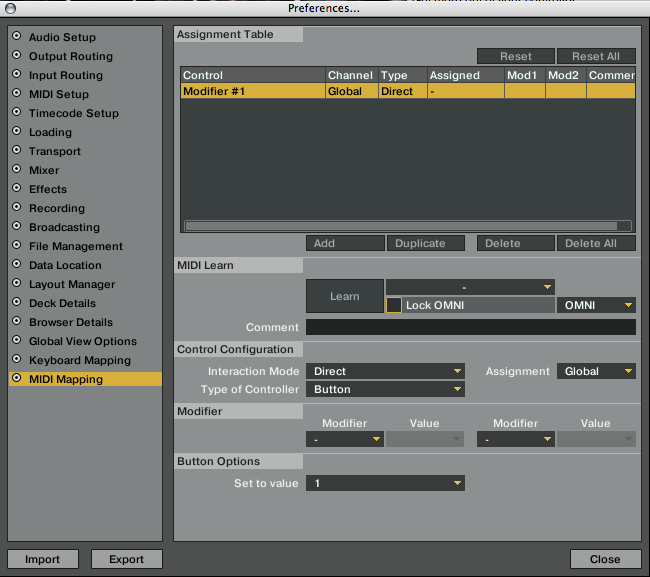
First map the button to a free modifier

Since this is your first try we will just use modifier #1- it does not matter which you choose, as long as its not already in use.
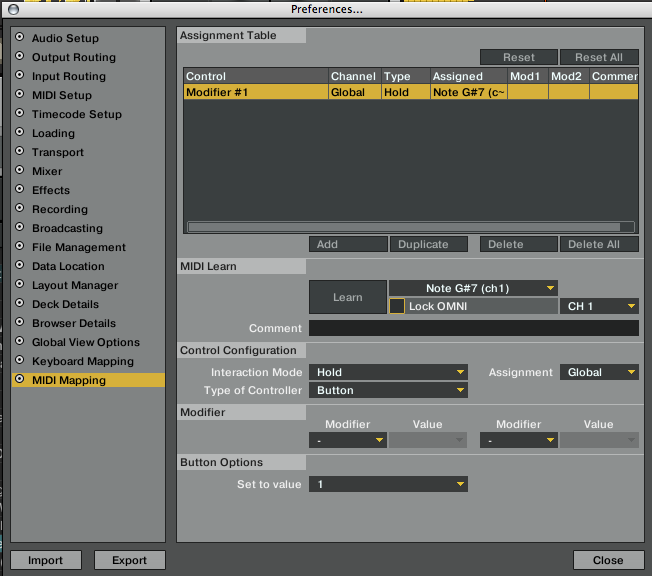
  • Set the type of control to Hold
  • Set the value to 1

This is basically saying: “”when I hold down this button its turns modifier #1 on. When I am not pressing it then the value returns to 0.”

Next Map a jog wheel to 2 functions

Since scratch is the main function then we will do that first. You need to associate this assignment to the modifier we just created by adding M1 to the modifier section. Now this assignment is dependent on the state of that modifier. Since Scratch is the always on function we are going to set the value to 0, essentially saying- “as long as the modifier is off then this mapping will apply”

Finally add the shift state

We will also associate the “scroll through tracks” assignment with that modifier but now the value will be set to 1. This means that the jog wheel will only work for track scrolling when the modifier is at value 1. Since that value is only sent when the button is pressed then your jog wheel will always scratch unless you hold down the shift button.
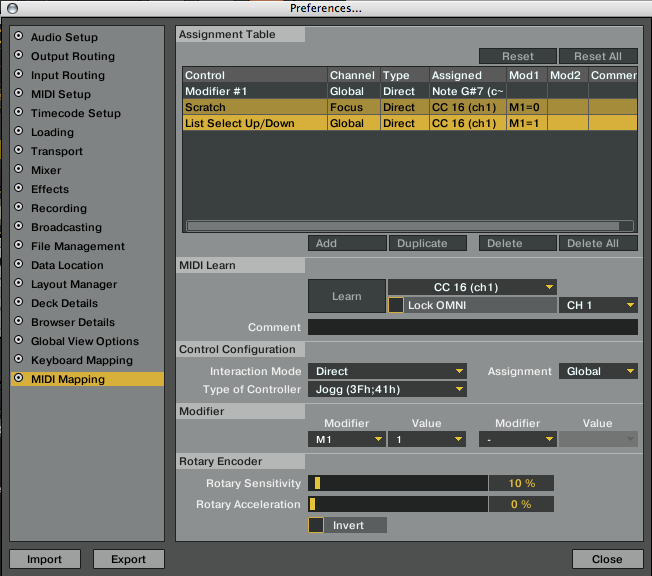
There you go, now you can execute some basic modifiers. Next we will take it a few steps further and show you how to do things like turning the modifier off when a track has been loaded, not when the button is released.

Want to take a closer look at the example TSI used here?

Download the file

Curious how this works in a full set up?

then sign up for the Dj TT VCi-100 TSI file which uses a more complex version of this concept.

  • http://www.myspace.com/djkloseline Kloseline

    hey ean, i was wondering if those modifiers also work for midi control. im thinking about gettong the korg nanopad (right now i have the nanokontrol but the buttons are tiny, however it has lots of knobs to fiddle) if i could use the korg nanopad and assign different effects knobs to the x-y pad whilst one of the buttons is pressed, the xy pad could be used for different effects and different twiddle knobs by the easy hit of a button. ive already checked the software but the xypad seem to only send two midi signals (one for the x axis and one for the y axis) so it would be necesary to interpret these two midi signals differently when one of the buttons is pressed and hold… do you have an idea if this could maybe be realised with bomes midi translator?

    Dan

  • http://www.myspace.com/djavx avx

    This will help, I wondering how modifiers work, seen them used on your TSI file but wasn’t exactly sure how to use em.

  • Drumfired

    [quote comment=""]Kloseline[/quote]

    if you want your x,y pad to work two different functions

    you'll need to assign the first set of x,y functions along with the modifier set to zero M1=0.

    Now the primary function is only on when the modifier is not.

    now assign the same two midi notes a different function, only now set the modifier to 1. M1=1

    and these will only work once the mod button is pressed.

    you dont need bomes at all.

  • http://www.myspace.com/djkloseline Kloseline

    the ting is im not using traktor atm, however im consider a switch in the near future. i found same ways in bome to achieve the same, using variables and if else expressions. its a lot of work but it might work… thanks anyways

  • Anton Nonny-Mouse

    What a handy little article. I've been too slack to look this stuff up in the surprisingly bad traktor pro manual, concentrating on getting the rest of it working as well as 3- getting there. Thus, this clear, no-messing little article is really helpful, cheers :)

  • cahukk

    If you want to get deeper in MIDI control, check this site and grab a PDF file. It actually fills missing things from Traktor manual with examples

    http://www.traktorbible.com/pages/midiguide.en.html

  • michiel

    Great post Ean! I wanted to remap the whole thing this Christmas and this saves me a lot of time :)

    Maybe this will actually force me to watch Scrooge… dammit

  • Frogski

    Thanks Ean, great post again. Keep it coming for all the Traktor and VCI freaks in 2009!

    http://www.youtube.com/watch?v=TmYYBvDMnW0

  • http://www.youtube.com/user/alien2k46 Dj Alien2k

    Thanks Ean, I was so frustrated I had spend many many hours setting the vci midi map for traktor 3 so I could use 4 deks plus effects. Then Traktor pro arrived and my mapping (and all the hours of setting) were trash. I was very happy with having multiple midi pages and to be honest I was not getting the idea of the modifyers. This article as many others that you have written saved me hours of trial and error and frustration. I still not sure if modifyers are better than multiple midi pages, but I know that I can re-map my vci in order to work as I want with Traktor Pro.

    Thanks!

    Native instruments is owing you big time!

  • Scooby

    Ean, Great article to help out with people wrapping their heads around modifiers!

  • Installator

    Hi Ean, thanks a lot for this clear & concise article and this extremely helpful site

    Happy holidays from Paris France

    Cheers

    Steve

  • stet

    Is there a way that Traktor can recognise if a loop is active or not? I've tried using a key that acts as both loop start/stop and as a modifier, modifing it's own value, but this doesn't work. My situation is this: I am using a MIDI keyboard as a controller and I want to set it so that the 'Move' function moves the loop when active but beatjumps when not. I have considered using the loop start/stop key to change the move type, but the will not work as Traktor does not recognise an on/off state for MIDI keyboard keys.

    I thought I might be able to somehow use my Presonus Faderport, but that doesn't work at all.

    Any ideas?

  • http://www.youtube.com/djdivinejustice dj divine justice

    [quote comment=""]Is there a way that Traktor can recognise if a loop is active or not? I've tried using a key that acts as both loop start/stop and as a modifier, modifing it's own value, but this doesn't work. My situation is this: I am using a MIDI keyboard as a controller and I want to set it so that the 'Move' function moves the loop when active but beatjumps when not. I have considered using the loop start/stop key to change the move type, but the will not work as Traktor does not recognise an on/off state for MIDI keyboard keys.

    I thought I might be able to somehow use my Presonus Faderport, but that doesn't work at all.

    Any ideas?[/quote]

  • http://www.youtube.com/djdivinejustice dj divine justice

    Thanks so much. I had skipped by the mods in the tsi settings but now I see how valuable they are.

    Check out my traktor + ableton on my youtube and let me know if you have any suggestions.

    http://www.youtube.com/djdivinejustice

    http://www.myspace.com/djdivinejustice

  • http://www.youtube.com/djdivinejustice dj divine justice

    [quote comment=""]Thanks so much. I had skipped by the mods in the tsi settings but now I see how valuable they are.

    Check out my traktor + ableton video on my youtube and let me know if you have any suggestions.

    http://www.youtube.com/djdivinejustice

    http://www.myspace.com/djdivinejustice/quote

  • http://www.youtube.com/djdivinejustice dj divine justice

    noob!

  • AJ Guerra

    I'm still using Traktor 3 (cuz I love it!) .. But,

    How do you set a function for the High, Mid, and Low knobs to be used to control the different parameters on the FX, while holding the scratch button..

    Like when you hold the scratch button and hit the Kill buttons, it will go to different set Cue Points.. And if you hold the Scratch Button and press one of the numbered "loop" buttons, it will turn on and off the different FX options like Quant ..

    So then how would I set it to where if I hold the scratch button, than turn the High nob, it may turn up the amount of the effect I am using.

    Thank you for your help!

    p.s.

    I am talking about only for Deck Effects control, not master effect.

  • http://www.eangolden.com Ean Golden

    [quote comment="16073"]I'm still using Traktor 3 (cuz I love it!) .. But,

    How do you set a function for the High, Mid, and Low knobs to be used to control the different parameters on the FX, while holding the scratch button..

    Like when you hold the scratch button and hit the Kill buttons, it will go to different set Cue Points.. And if you hold the Scratch Button and press one of the numbered "loop" buttons, it will turn on and off the different FX options like Quant ..

    So then how would I set it to where if I hold the scratch button, than turn the High nob, it may turn up the amount of the effect I am using.

    Thank you for your help!

    p.s.

    I am talking about only for Deck Effects control, not master effect.[/quote]

    honestly, modifiers are much harder in traktor 3. If you want to get really complicated, I reccomend you upgrade to pro.

  • Red Unicorn

    I was wondering if I can use the modifers to make my vci-100 control 4 decks. set it up so the modifer changes all deck a to deck c and the same fro deck b. is this possible?

  • higgins

    alright so i have my 2 gain knobs and what i really want is to press a button that will toggle the 2 gain knobs into being pan/deck balance knobs

    i can get this to happen by creating a hold modifier, i can also make it so that the button toggles the gain into being a pan/deck balance, but i cant get the button to toggle the pan/deck balance back into being a gain

    help please?

  • PatSPLIT

    Could we now have a post on Advanced Modifiers? I feel so much more could be done. There is the option for 2 modifiers on each action and the modifier value can go up to 7! Does anyone use these other features and for what? Just curious…

  • http://www.gudowski.pl/2009/03/20/vci-100se-mapping-update/ Gudowski » Blog Archive » VCI-100SE Mapping Update

    [...] loop buttons are accomplished through modifiers which have been covered in previous articles. The exit browse mode is a very simple but elusive mapping trick. Just assign any button in the [...]

  • http://djlogic.es/?p=2584 Modificadores en Traktor Pro 1ª Parte |

    [...] English Basic Tutorial [...]

  • Anonymous

    [quote comment="16191"]I was wondering if I can use the modifers to make my vci-100 control 4 decks. set it up so the modifer changes all deck a to deck c and the same fro deck b. is this possible?[/quote]
    I wanna do exactly the same thing, but I don’t want a hold butten to control my modifier state.
    Ain’t it possible to get a toggle button ??

  • http://www.djtechtools.com/2011/02/08/tracking-super-combos-with-advanced-modifiers/ DJ TechTools  |  Tracking Super Combo’s With Advanced Modifiers

    [...] Get More Controls – Modifier Basics [...]

  • http://digitaldjtools.net/news/traktor-2-touchosc-midi-mapping-tutorial/ Traktor 2 / TouchOSC MIDI Mapping Tutorial – Digital DJ Tools

    [...] we start, I suggest you read these first: Modifier Guide 1 | Modifier Guide [...]

  • http://kidsandfamilyproducts.com/all/knight-total-control-3/ KNIGHT TOTAL CONTROL | Kids and Family Products

    [...] knight total control djtechtools.com [...]

  • http://www.djtechtools.com/2011/11/20/djing-with-four-sample-decks-in-traktor/ DJ TechTools  |  How to run Traktor like Ableton with only Loops

    [...] This basically equates to 16 buttons to control playback and 16 for loading, plus the same amount of knobs for volume & filter, unless you use modifiers. [...]

First Time?

This site is dedicated to digital djs. We develop performance tools and teach cutting edge techniques that enable creative expression. Visit tutorial videos on youtube, equipment reviews in the blog and a very helpful community in the forum. New articles every Mon, Wed, Fri.
Subscribe with one million others

Featured Article

DJ TechTools Traktor Kontrol S4 Mapping

The long awaited Traktor S4 Mapping is here and totally FREE. Continue reading for a full video and the download link.

Categories:

RSS DJ TechTools Forums

  • laptop for TSP2...will it be enough??
    hi there... im buying this laptop http://www.notebookcheck.net/Review-Lenovo-ThinkPad-Edge-E320-i3-2310M-Subnotebook.60200.0.html only... […]
  • $120 / E100 voucher from NI for S2 owners
    have received an email form NI offering a voucher for their store due to buying the S2 just before the new price. anyone else got this? "Today we... […]
  • DNS 3700 and time code
    Last night was the first night I have ever djed using these decks and cd timecode and I can honestly say that is was the most disappointing... […]
  • Rain / Filter Tip - (drip-hop)
    Here are a couple of tracks I have been working with on and off for about two years. Recently acquired my own pair of studio monitors, so finally got... […]
  • Blogging for DJ MAG CANADA!
    Hey guys. I've got a semi weekly bit blogging for DJ MAG CANADA! The blog is gonna be on Mondays and Thursdays! If you know any Canadian DJs or... […]