Korg Nano Reviews

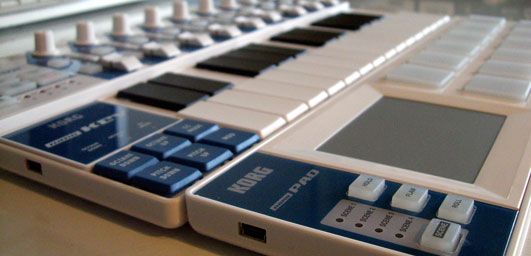
Perhaps you’re looking for a convenient way to add a little functionality to your existing dj controller? Building your own is easy and low cost but at $60 its hard to pass up the nifty Korg Nano series for a quick controller add-on. They have 3 models that each target a different typical dj/producer scenario in a convenient footprint. The shape and size is designed to fit perfectly in front of a 13″ mac book. That’s enough to get me excited as there is almost always enough room in front of the laptop for a thin line of controls. While the Nano pad is the most promising of the 3, the other 2 also could be very handy for many djs out there. They look great in the photos but was Korg actually able to make a robust product for around $50?

The Pad
USB powered, $59 – available now in stores worldwide

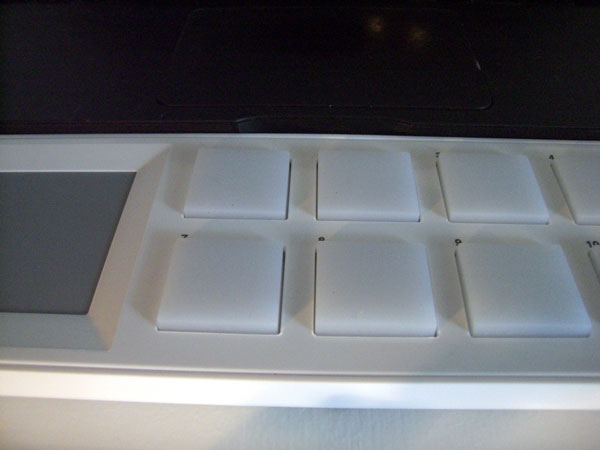
For direct cue point access and some quick FX control this X/Y pad combo is a easy sell. Each pad is slightly smaller than a MPC but has ample area to really go to town. The response and hit detection was snappy and consistent making it easy to do various cue point juggling routines. Lining up Deck A and B on top of each other made musical phrasing particularly fun to explore. Add in a little FX through the X/Y pad and you have an expressive surface. Look for a Dj TT template for this controller some time in the next few weeks. The pads themselves are equipped with velocity sensitivity but I was unable to get them to detect anything below 50% with very little variation between hits- so you should not plan on really using that. The clear coating suggests that perhaps they might have some LED back lights but sadly they are not there. It would have been killer to display cue point and loop status but at this price point LEDS might be asking a bit much.

Thumbs Up

The pads have a good solid feel and as long as its on a solid surface you can really pound away without it moving at all. The X/Y pad has a good response and works as expected. You can customize how the pad works with various response curves, attack and release times inside the free midi editor librarian. This program allows you to further customize all the note values and scenes so that there are no conflicts with your current midi controller.

Nicht so gut

On the unit I received, striking or really pressing the first 4 pads resulted in some extra ghost data being sent from the X/Y pad. The values were all zeros (resets) so you would probably never even know it was there unless you happened to be using a midi monitor which does not make this a mission critical problem. It did make me wonder though if there might be some construction problems that could cause other issues later. Apparently there are several thousand of these out in the market already, so perhaps one of our readers could plug one in and test theirs out as well?

I really wish the pads were back lit- its becoming more and more important to get visual feedback from controllers so we can spend less time checking screens and more time banging beats.

Extras

along with 4 scenes for different mapping layers, the pad also has

  • HOLD: to hold the X/Y position (similar to a chaos pad)
  • FLAM: auto double hits
  • ROLL: holding down a button sends out rolls of notes with the X axis controlling the speed.

Conclusion

If you need more cue point access, some pads or a X/Y controller- this is a good buy. Its size and shape make it easy to interface into your existing set up in a convenient location.

The Kontrol
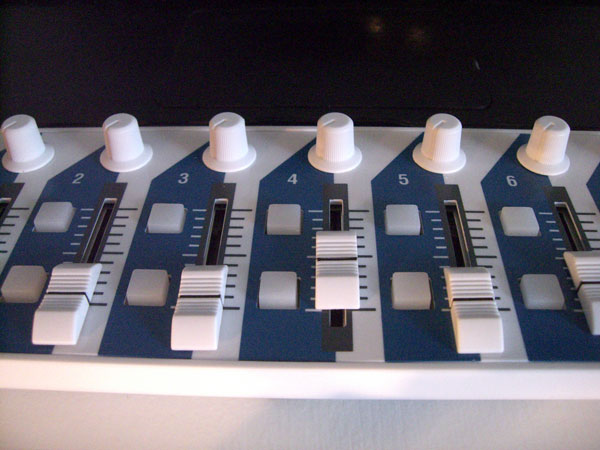
usb powered, $49 -available now

The pad unit is a respectable looking controller that feels like something you might have paid more than $60 for. The Kontrol, on the other hand, starts to belie its price point with a plastic feel to its sliders, knobs and buttons. The layout is absolutely set up with Ableton in mind and in that vein it could be a very useful controller. Now that Traktor Pro has improved their midi SYNC capability, its not unrealistic to run Ableton in the background and this would be a great surface for controlling those extra channels.

The Good

They have supplied everything you need to run Ableton including volume, one FX knob per channel, start/stop clips and global session control. All of the buttons are back lit so they can display critical info and so Albeton can live in the background.

Nicht so gut

For slowly blending in loops and tweaking subtle FX controls the knobs and faders are fine but don’t expect to start doing crab scratches and fader throws. They have plastic knobs and fader caps which, while smooth, don’t afford the space or surface area to really get a good grip.

Conclusion

As an auxiliary Ableton controller, this could work very well but I would not get it to control Trakor FX or any other high performance tasks.

The Key
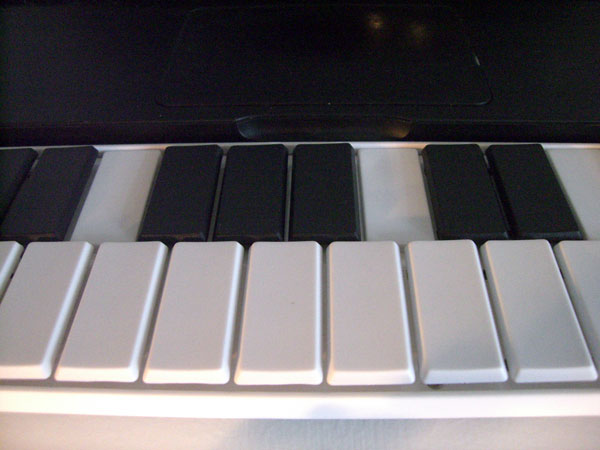
usb powered ,$49 -available now

This is my least favorite of the 3 and I am hard pressed to find a use for it in the Dj world. The keys themselves are the same construction type, feel and size as the enter key on a mac laptop. That gives them a fast crisp response without requiring the depth of a standard midi keyboard but it does not really give you anything better than, well- the keyboard that’s already on your computer. You could use the keys to trigger loops and cue points but to be honest the feel of the pads is so much better, I would personally take less controls in exchange for better performance. Once might argue that you can use them to trigger certain non performance functions like screen changes and track loading but then again- this controller does not improve on your existing keyboard which can easily trigger the same functions through keystrokes.

A tip from the pro’s

Did you know you can use your computers keyboard as a midi controller in logic and other programs already? check out this video for more info- its great for producing on the plane!

This guys seems to be killing it on the nano keys but I would personally prefer this one

70 Responses to “Korg Nano Reviews”

  1. tekki

    November 24th, 2008 at 12:20 am Quote

    w00t, first review that really talks pros and cons!

    Thanks, these beauts open some new perspectives.

  2. Anrew

    November 24th, 2008 at 12:40 am Quote

    I don’t think I’d mind adding in the pads and the keyboard to my setup. Does anyone who already owns it know if they can be powered via a powered hub?

  3. Mr. Tunes

    November 24th, 2008 at 1:29 am Quote

    i’m posting around town tonight because i bought nanoKey today and it’s not working at all. it powers up but the computer doesn’t recognize it. when i unplug it it causes a blue screen of death on windows xp.

    this is very important info for a DJ blog because these drivers appear to be crappola at the moment and i will not use anything like this for a gig until it’s resolved as stable.

    will try to post back here when i have an update on what the problem is. i wanted to love these things but man bumpy start over here

  4. ed courageous

    November 24th, 2008 at 1:34 am Quote

    Really tempted to grab the pads to use with Serato!

  5. Dudu P

    November 24th, 2008 at 2:31 am Quote

    Really tempted to grab the pads to use with Serato!

    Same here, but I’m thinking on the FXs on Traktor Scratch Pro.

  6. Kloseline

    November 24th, 2008 at 2:36 am Quote

    dope article ean, i made a little review video of the korg nanokontrol by myself and mainly the way im using it along with m-audio Torq

    http://au.youtube.com/watch?v=ZtuyAJFA_fw

    check it out

  7. Duke Slydaz

    November 24th, 2008 at 7:12 am Quote

    –Ean,

    Yo Ean good review!

    Nice SHIRT! When can we get ours? I can wait to show of my DJTT love on my chest!

    Duke Slydaz

  8. B33SON

    November 24th, 2008 at 7:23 am Quote

    I already got my NanoPad on order and I’ve asked for the NanoKontrol for Christmas. Seems like these are some of the best deals our there when you look at the price per control… That should be a standard measurement for this stuff. Price/oz. Price/pound. Price/control. :)

  9. Michael

    November 24th, 2008 at 9:24 am Quote

    I use the nanoKEY for cuepoints, loops, samples and effects (on/off), because I didn’t really like all that stuff mapped to the keyboard of my MacBook and using a mouse to click around.

  10. This guy?

    November 24th, 2008 at 11:23 am Quote

    That’s not just ‘this guy’. That’s Jordan Rudess. Nuff said.

  11. DJ PAtch

    November 24th, 2008 at 5:19 pm Quote

    What’s the technique Ean is using with the X/Y pad at the beginning? I really like the stutters/transforms that he’s doing. How did he do that? (I see he’s using traktor – but can this effect be recreated in Ableton using a multi effects rack???)

    Nice vid/cool routine…

  12. Ean Golden

    November 24th, 2008 at 5:40 pm Quote

    What’s the technique Ean is using with the X/Y pad at the beginning? I really like the stutters/transforms that he’s doing. How did he do that? (I see he’s using traktor – but can this effect be recreated in Ableton using a multi effects rack???)

    Nice vid/cool routine…

    thanks- i am sure it can. Thats a combination of a distortion and a gater effect. you would just need to crank up the distortion enough so there is constant feedback to gate and have something controlling the off/on of the entire effect.

  13. Anonymous

    November 24th, 2008 at 6:42 pm Quote

    Really tempted to grab the pads to use with Serato!

    Same here, but I’m thinking on the FXs on Traktor Scratch Pro.

    same here! :D

    also available in black:
    http://www.dv247.com/news/Korg%20nanoKONTROL,%20nanoKEY%20and%20nanoPAD/131777

  14. Anonymous

    November 24th, 2008 at 7:15 pm Quote

    Really tempted to grab the pads to use with Serato!

    Same here, but I’m thinking on the FXs on Traktor Scratch Pro.

    same here! :D

    also available in black:
    http://www.dv247.com/news/Korg%20nanoKONTROL,%20nanoKEY%20and%20nanoPAD/131777

    OOo nice, deffo will get a black one to go with my VCI 300. Need a good tsi for traktor pro now!

  15. DJ Patch

    November 24th, 2008 at 7:28 pm Quote

    thanks- i am sure it can. Thats a combination of a distortion and a gater effect. you would just need to crank up the distortion enough so there is constant feedback to gate and have something controlling the off/on of the entire effect.

    What is being distorted? When you’re tweaking the X/Y over the beat at the beginning the dist/gate is not being applied to any of the playing sound. I think I could put a rack together with a single knob to control the on/off (wet/Dry knob) and a 2nd knob to control the gate rate… Now you’ve got me thinking…

  16. BentoSan

    November 24th, 2008 at 8:29 pm Quote

    Cool Video !

    Dj Patch – be sure to share that rack with us on the forums :)

  17. Kyran

    November 24th, 2008 at 10:33 pm Quote

    Ean, what are the faders like on the Kontrol? Could I beatmatch with them or are they too jittery? Are they too slow for effects/EQ?

  18. RCUS

    November 25th, 2008 at 12:10 am Quote

    ahhh crap…the black one sold me now! when I woke up this morning I didn’t even know I wanted this thing…thanks alot Ean. I mean $50? that’s $50 less than a cover charge and a night of drinks…SOLD! i wonder if I can fit two of those in my miko tim instead of the typing keyboard?

  19. Anonymous

    November 25th, 2008 at 2:53 am Quote

    i wonder if I can fit two of those in my miko tim instead of the typing keyboard?

    NOPE! grrr… about a half an inch too short width wise and an inch to short depthwise for two nanoPADS (thats what she said). i don’t think i could bring myself to harming my miko to make the space, but i don’t mind breaking the korgs i guess…we shall see…

  20. Kama

    November 25th, 2008 at 2:56 am Quote

    Looking to hire midi programer to modify vci-100se djtt current TSI to include 4 decks and nanoKontrol – know what I want but just can’t get it to work yet. Will give credit and share with community when finished.

    (Don’t need smart ass comments – just results)

    As always a huge thanks to DJTT –

    http://www.djtechtools.com/forum/showthread.php?t=437&highlight=kama&page=2 #20

  21. Kama

    November 25th, 2008 at 3:28 am Quote

    A heads up on the nanoKontrol. I think the thing rocks for its price but unless I am missing something – the scene button only goes forward and is pretty slow. So you can’t toggle between scenes – You have to step through them all to get back to your first one. Which makes the scene feature really slow and more or less useless for DJing. A work around may be to duplicate scene 1 to 3 and 2 to 4.

    Happy Holidays – smart ass comments welcome

  22. flowmad

    November 25th, 2008 at 8:36 am Quote

    Congrats Ean!!!

    very nice review. Guess I will order a nanopad soon as

    THE BLACK ONES come out !!!

    look here:
    http://www.korg.co.uk/products/software_controllers/nano/sc_nano.asp

    Hopefully before Christmas!

    scratchworx.com told the world 3 weeks ago.

    Thanks for the article and keep on…

  23. Kama

    November 25th, 2008 at 10:51 am Quote

    Never mind on the midi programer thing – figured it out. 4deck and nanokontrol tsi on the way.

    Thanks again

  24. JimmyJam

    November 26th, 2008 at 10:20 pm Quote

    i’m posting around town tonight because i bought nanoKey today and it’s not working at all. it powers up but the computer doesn’t recognize it. when i unplug it it causes a blue screen of death on windows xp.

    this is very important info for a DJ blog because these drivers appear to be crappola at the moment and i will not use anything like this for a gig until it’s resolved as stable.

    will try to post back here when i have an update on what the problem is. i wanted to love these things but man bumpy start over here

    Tunes,

    Have you spoken to someone at Korg about your issue?

    Jam

  25. Jared

    November 27th, 2008 at 9:45 pm Quote

    [...] Tech Tools has put together a video to go along with its review of the new Korg Nano [...]

    Ean, I’ve been waiting a long time for the pad and glad to hear you think its worth while. I am personally tired of traveling around with my big akai mpd24 and have been looking for something exactly like this. I’ve thought about running two of them so that I have one for each deck. Also do you know how to set up midi control for the stutter functions in scratch 1.8.2?

  26. destin jacobus / SILK WOLF

    November 28th, 2008 at 1:16 pm Quote

    call me picky, but i won’t be buying until i see the black ones come out. it makes them look like toys.. the black ones however… oh lala! those will go nicely with my black macbook and akai mpd32! i’ve been hoping someone would make a cheap controller with xy. now if only they would make them into modular pieces that you could buy and arrange/put together in lots of combinations..

  27. Lance Blaise

    December 1st, 2008 at 4:06 pm Quote

    dope article ean, i made a little review video of the korg nanokontrol by myself and mainly the way im using it along with m-audio Torq

    http://au.youtube.com/watch?v=ZtuyAJFA_fw

    check it out

    [...] Tech Tools has put together a video to go along with its review of the new Korg Nano [...]

    cool video, do you know if the buttons can be programed to trigger loops in the track playing?

  28. Jay Cee

    December 1st, 2008 at 11:06 pm Quote

    I have been mapping my nano pad over the weekend and I have to say the extra features it has added to my vci 100 is great also the 4 scene’s really help, I use one for fx and looping another for hot cues now I am just trying to work out what else I can map into it in the uk they cost £41.99 and its well worth it.

  29. Kloseline

    December 2nd, 2008 at 2:46 am Quote

    [...] Tech Tools has put together a video to go along with its review of the new Korg Nano [...]

    dope article ean, i made a little review video of the korg nanokontrol by myself and mainly the way im using it along with m-audio Torq

    http://au.youtube.com/watch?v=ZtuyAJFA_fw

    check it out

    [...] Tech Tools has put together a video to go along with its review of the new Korg Nano [...]

    cool video, do you know if the buttons can be programed to trigger loops in the track playing?

    yes. however in torq you have to setup the buttons to send midi note data instead of midi cc messages. everythign works smooth then!!!

  30. Kundabuffer

    December 2nd, 2008 at 8:03 pm Quote

    the scene button only goes forward and is pretty slow. So you can’t toggle between scenes – You have to step through them all to get back to your first one. Which makes the scene feature really slow and more or less useless for DJing. A work around may be to duplicate scene 1 to 3 and 2 to 4.

    I played my first set out with the Kontrol at my regular monthly night in San Francisco last Saturday. I had mapped cue and smart FX to pairs of channels for use with TSP. I had all 4 decks available in one scene with loop length and filter controls on the knobs when shifted with the deck focus button. When not shifted, the top knobs all controlled FX1 and FX2.

    The 9th channel was used for master tempo control and pitch bends. The transport controls were all mapped to focus deck for cue jumps, play and loop in/out.

    It worked well but definitely feels it’s price, particularly when used along with a professional-level DJ mixer (DJM-800 in this case).

    Since the set, I’ve started to tweak the mapping much as you mentioned: two-deck (A&B) control on channels 1-3 and 4-6 on scenes 1 & 3, two-decks (C&D) on scenes 2 & 4. I duplicate master control items across channels 6-9 for all scenes. I’m still tweaking the mapping, but I’d be happy to post it when I’m done for anyone who is interested in using the Kontrol as well. I’m thinking it will mostly be my backup due to size for gigs where I don’t have the space to bring the Remote SL with me.

  31. Wondering DJ

    December 3rd, 2008 at 1:58 am Quote

    How to i load sound effects into the nano pad?

  32. Anonymous

    December 3rd, 2008 at 2:25 am Quote

    How to i load sound effects into the nano pad?

    You don’t load them into the pad–it’s not a sound source, just a MIDI controller. You use it to trigger samples in your host application or other sound module.

  33. qwerty

    December 3rd, 2008 at 8:05 am Quote

    could one who has zero experience with music/zero gear (outside of accousic) purchase one of those nanopads and entertain themselves? not looking into it seriously but trying to put a loop together sounds fun and all. how does it compare to the other cheaply priced korg kaoss pads?

  34. KrysSME

    December 4th, 2008 at 1:15 pm Quote

    Good post, I bought mine at http://www.smeaudiosolutions.co.uk, they have them all in stock in white and black.

  35. Delo

    December 16th, 2008 at 7:01 pm Quote

    [...] Tech Tools has put together a video to go along with its review of the new Korg Nano [...]

    For some reason I am having a very tough time maping my xy in traktor 3 any one with ideas???
    -Delo

  36. Pzzy

    December 28th, 2008 at 4:46 am Quote

    So is the template done for the nano pad? Also can you use it with Virtual DJ? I must say it was worth the price!

  37. Pzzy

    December 28th, 2008 at 4:49 am Quote

    One more question… Ean, any tips for mapping the pad?

  38. refriend

    December 30th, 2008 at 9:44 am Quote

    heeeyaa people.. i just bought korg nano kontrol- but– have anyone of u experience with nano kontrol and Reason?? i am trying to map it to mixer in reason but i have some probs here… pleeease heeelp.. thnx

  39. clive

    January 4th, 2009 at 11:13 am Quote

    Hi there…. great discussion page, nice one ;o)

    Q: my nano Kontrol LED channel buttons only stay ‘on’ with scene 4.

    Scene’s 1-3 do not stay lit (the two square button LED’s per channel).

    Has anyone else had this problem?

  40. Kundabuffer

    January 5th, 2009 at 2:16 am Quote

    Q: my nano Kontrol LED channel buttons only stay ‘on’ with scene 4.

    The default configuration has the scene 4 buttons set to toggle, but scenes 1-3 all set to momentary. If you run the Korg editor and set the others to toggle, they will stay lit.

    Note that for Traktor Pro, buttons which are configured as toggle on the controller need to be set to “hold” within Traktor to function properly. If set to toggle they requires two presses to change the Traktor state and the buttons get out of alignment with the setting they are controlling.

    I really wish the button lights would respond to the Traktor output LED, but I suppose for the price I can’t grumble!

  41. clive

    January 5th, 2009 at 3:30 am Quote

    Hey, thanks Kundabuffer

  42. duck

    January 6th, 2009 at 8:19 pm Quote

    hi,
    do you know if I can work with wav samples using NanoPad? drums (snares, hihats) and other choped samples modifing, pitching the keynote or tune. Sorry for the dumb question. I am new in this kind of music.
    Thanks

  43. Kundabuffer

    January 6th, 2009 at 8:38 pm Quote

    hi,
    do you know if I can work with wav samples using NanoPad?

    The Nano PAD is not a sound module, just a MIDI controller. You have to be running some software it can control on your host computer. As long as your host software supports WAV samples, you could use the pad to do everything you listed. Almost all DJ or DAW software would allow this.

  44. Aaron

    January 11th, 2009 at 1:18 am Quote

    he pads themselves are equipped with velocity sensitivity but I was unable to get them to detect anything below 50% with very little variation between hits- so you should not plan on really using that.

    What horrible advice! This is designed to be a drum pad thing! You’re saying that it shouldn’t be used for velocity sensitive drumming?? I was thrown off by your review but got one anyway. They DEFINITELY CAN PLAY A FULL VELOCITY RANGE. To get low velocities though, you can’t just lightly touch it from the air, you have to lightly touch it initially (which gives no sound) and then lightly push into it. This is totally doable and like any instrument, you get used to it once you get the idea. I think this review is misleading and almost irresponsible to say what I quoted. It almost kept me from buying what is really a reasonable device, even for velocity sensitivity, even if it isn’t the best pro thing ever made.

  45. izzy loh

    January 16th, 2009 at 4:41 am Quote

    hey ean! sweet review!
    im wondering if anyone can help me out on this

    my dads taking me out tomorrow to get some midi equipment for a late Christmas gift and i need something with nobs to control all the effects in traktor pro; do the nobs on the Kontrol nano rotate 360 and if they dont how do they correlate to the nobs on the software effects? sorry if my question is poorly worded =D

  46. Kloseline

    January 16th, 2009 at 5:26 am Quote

    hey ean! sweet review!
    im wondering if anyone can help me out on this

    my dads taking me out tomorrow to get some midi equipment for a late Christmas gift and i need something with nobs to control all the effects in traktor pro; do the nobs on the Kontrol nano rotate 360 and if they dont how do they correlate to the nobs on the software effects? sorry if my question is poorly worded =D

    they are not endless rotaries but they go pretty far. the thing with midi is is that there is a value send, the value goes from 0 to 127 whcih equals 100% thus no matter how far the rotary can be turned it equals the amount of the software knob.

  47. Terry

    January 23rd, 2009 at 4:44 am Quote

    I saw the Korg nanoKey on Kelly’s Cool Tools at

    http://www.kk.org/cooltools/archives/003452.php

    Right away I went to Sam Ash Music and bought one for $49. When I plugged it in it would not work with Bome’s Mouse Keyboard or anything else. I unplugged it — and my PC crashed with a blue screen! This happened three times!

    I searched Korg’s website and, with some difficulty, found and installedthe Korg USB-MIDI driver.

    http://www.korg.com/uploads/Download/KORG_USB-MIDI_Driver_for_Windows_V1.11_633652151011540000.zip

    After telling it to install the nanoKey, no more blue screens. Great. But even though the Korg program recognized the nanoKey, it still wouldn’t work with anything else. When I saw on the internet that lots of others were going crazy with with the same problem, and no solutions, I decided to return it.

    But then I found the article and the utility below that made it work. The reason it would not work is that XP has a 10 MIDI driver limit, which I had exceeded some time in the past. The cure was to modify the registry and delete old drivers. Not for me. But much better was to use M-Audio’s MIDIFIX utility, a one-click fix. The nanoKey is now working perfectly, I love it, and hope this helps others with the same problem!

    This article explains the problem:

    http://www.eqmag.com/article/fixing-windows-xp/aug-07/30616

    M-Audio has this run-once utility that fixes it:

    http://www.m-audio.com/index.php?do=support.drivers&f=84

    I called Korg Product Support at (631) 390-8737, and they were perfectly nice. Tech support understood the problem, mentioned the article above, and offered to walk me through the registry change process. But the MIDIFIX program did the job.

  48. J

    January 28th, 2009 at 2:32 am Quote

    “Look for a Dj TT template for this controller some time in the next few weeks.”

    Curious when this template for the Pad is going to come out. I don’t think I saw anything on the site. Thanks for your help man. – J

  49. Ean Golden

    January 28th, 2009 at 7:52 pm Quote

    “Look for a Dj TT template for this controller some time in the next few weeks.”

    Curious when this template for the Pad is going to come out. I don’t think I saw anything on the site. Thanks for your help man. – J

    Thanks for the reminder! I totally forgot.

  50. J

    January 28th, 2009 at 7:57 pm Quote

    You got it man. I’m looking to get mine in about a week or so. Gonna pair it up with Traktor scratch, a Mackie d.2 and a couple 1200s. Really looking forward to getting started.

    PS Nice mix w/the Queen drops on the video. Keep up the great work man, seriously.

    J

  51. Kloseline

    January 28th, 2009 at 7:59 pm Quote

    i bought mine nanopad yesterday ater being unsatisfied with the nanokontrol. i will program a template for the usage along with bomes midi controller which will extend the usability of the pad to something way better than everything. have a look at the forum the next few weeks

  52. J

    January 28th, 2009 at 8:22 pm Quote

    Right on, I’ll keep an eye out. Thanks – J

  53. sickVisionz

    January 31st, 2009 at 3:43 am Quote

    I’ve already ordered the pads and plan on getting the keys. Pads should be nice for drums and percussion and the keys seem like they’ll be perfect for dropping an idea in between classes or when i’m away from my home setup.

  54. J

    January 31st, 2009 at 2:53 pm Quote

    I’m looking to assign one Pad to each deck on Traktor Scratch (2 of them anyway). Has anyone done this or would there be any reason the program would not support 2 Pads? I saw earlier that there was a patch for if 1 crashes your system. Little worried about what 2 might do….

    Thanks for any feedback,

    J

  55. Kloseline

    January 31st, 2009 at 2:58 pm Quote

    why are you thinking about getting two? isnt one with 4 scenes enough?

  56. J

    January 31st, 2009 at 3:03 pm Quote

    I wanted to use each to control the cue points, loops, effects, etc. for each channel and still be able to juggle between tracks.

  57. Kloseline

    January 31st, 2009 at 3:15 pm Quote

    you have 4 scenes available so with the basic setup you have access to 48 sample pads and 4 trackpads, howeve rim working on a solution along with bomes midi controller which gives you alot more options for the trackpad. it might be interesting for you too and you would only need one nanopad.

  58. J

    January 31st, 2009 at 5:04 pm Quote

    Nice, would I check back here to keep posted on how that develops? I’m not as worried about the flexability of the system to expand as needed, really just wanting to have dedicated pads to each deck so I can physically flip back and forth for creative juggles on the fly without having to toggle too much. Of course this could all change when I actually get the equipment and start seeing how my ideas flesh out…we’ll see. Should be getting everything in by end of next week. Keep me posted man, appreciate the feedback.

  59. Pablo

    March 5th, 2009 at 8:00 am Quote

    Ok.. I have my Korg nano Pad..I’m a rookie in to the new wave to make music and all that..ok I see your videos and there are so good….but if you can help me out to hook up my pad with live 7…how to used?…also I been using live version windows

    I really appreciated if you can help a brother out!

  60. toinkz

    April 28th, 2009 at 8:06 am Quote

    can i use it with denon dns1200? and can i use it without my laptop? and when i use it with a laptop, do i need a software for that or it comes with some software?

  61. DjDZ1

    May 4th, 2009 at 8:58 pm Quote

    Do the nanopads work with Traktor Scratch? I saw a great review about the Traktor Scratch Program on YOUTUBE! Type in Traktor Scratch Presentation on YOUTUBE!! This dj uses some kind of usb midi controller and i was wondering if im better off buying the nanopads when i get my Traktor Scratch? Please Help!!

  62. DjDZ1

    May 4th, 2009 at 9:16 pm Quote

    Do the nanopads work with Traktor Scratch? I saw a great review about the Traktor Scratch Program on YOUTUBE! Type in Traktor Scratch Presentation on YOUTUBE!! This dj uses some kind of usb midi controller and i was wondering if im better off buying the nanopads when i get my Traktor Scratch? Please Help!! Sorry about the doublepost

  63. Kundabuffer

    May 5th, 2009 at 2:00 am Quote

    Do the nanopads work with Traktor Scratch? I saw a great review about the Traktor Scratch Program on YOUTUBE! Type in Traktor Scratch Presentation on YOUTUBE!! This dj uses some kind of usb midi controller and i was wondering if im better off buying the nanopads when i get my Traktor Scratch? Please Help!! Sorry about the doublepost

    Yes, the Nanopads work with Traktor Scratch as well. You can find videos on You Tube of them being used with Traktor. You’ll probably want to set things up to turn-off vinyl control or set it up in relative mode if you start to do cuepoint triggering.

  64. J

    May 5th, 2009 at 12:53 pm Quote

    Here’s a link to another post that has a TSI file for you to setup the Nano in TSP.

    http://www.djtechtools.com/forum/showthread.php?t=2370

    Also, to answer your question, the Nano does work (and well I might add) with Traktor Scratch. I’ve got one setup and am using it mostly for cueing, sampling, etc. However, there’s some really cool mixing you can do w/a bunch of sample pads and the ability to scratch them in real time…. =)

  65. Mike

    June 25th, 2009 at 9:52 pm Quote

    Ok, so the Kontrol is not so great. I’m looking for something as cheap as that to control my effects with. Any ideas? I’m desperate to have something better than my mouse but I’m quite broke, so any suggestions would be welcome.

  66. john

    July 31st, 2009 at 11:27 am Quote

    hi ean i was plannig on buying the nano pad control, but it seems that people is having problems with the sound.
    may you give me an idea or an explanation of what you’ve done when you got it?

  67. DonPaco

    January 10th, 2010 at 7:49 pm Quote

    Does anyone have a map for the korg kontrol & traktor Scratch pro

Leave a Reply

  1. Quote selected text

First Time?

This site is dedicated to digital djs. We develop performance tools and teach cutting edge techniques that enable creative expression. Visit tutorial videos on youtube, equipment reviews in the blog and a very helpful community in the forum. New articles every Mon, Wed, Fri.
In the Store
 

Categories:
Follow us:
You're going to need Flash 8+ and JavaScript to use this site. How'd you get this far without it?

Dig through the Crates

Readers are Saying

  • junejhunkie: vibration is like one of my biggest enemies. mpetersen3 used his hoodie, i used a windbreaker once and put my vci...
  • J450N N4ME: [quote post="5161"]Can you talk a little more about this or show a picture, please, thank you. Or give a...
  • onemikefitz: party startin problem solver! get em mei!
  • ToS: My Baggy (note that I’m a diggital DJ): - Windows XP setup CD - Buch of cables and connectors (1/8″TRS...
  • Wil: [quote comment="28259"][quote comment="28258"]I use lemons all the time. still thinking how to implement them into my...
Contributing-Writer-Ad