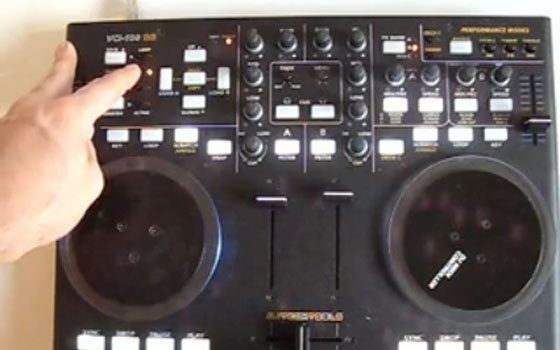
VCI-100 Pro Edition Video


What would a TechTools mapping be without a you tube video? Well it wouldn’t be up to our standards, so we made one to explain the new features of our VCI-100 pro edition. A few things in terms of work flow have changed so if you downloaded the TSI file from this post on Monday then watch the film to get a good run down. Like what your seeing? Want to make a few changes or suggestions? Get off the bench, join the forum and jump in the game buddy!

26 Responses to “VCI-100 Pro Edition Video”

  1. DirtyCache

    November 12th, 2008 at 6:23 am Quote

    Great stuff, just need to get my ass of the bench.

  2. dIm

    November 12th, 2008 at 6:29 am Quote

    Thanks Ean cool video. Thanks!

  3. Guust-Fi

    November 12th, 2008 at 8:59 am Quote

    Awesome, as always.
    + All that work for free!
    Great effort Ean.

  4. Vinz

    November 12th, 2008 at 10:58 am Quote

    Hi,

    What is the name of the first track you playing ?

    thanks

  5. Anonymous

    November 12th, 2008 at 1:01 pm Quote

    Awesome demo, Ean. Looking forward to trying out the new mappings.

  6. Rick

    November 12th, 2008 at 2:49 pm Quote

    Great Demo. Explains alot…Thankyou! Question: What would some options be so that we wouldn’t have to load the other effects up manually and could call them up quicker on the fly. Would something like an m-audio trigger finger be useful to get at the Traktor Pro’s FX chain. How would something like that that be mapped in to Traktor Pro?

  7. RjW

    November 12th, 2008 at 6:50 pm Quote

    Looks good! It would be even better if there was a way of cycling through all the effects…

    For example: Hold down the fx button for the slot you want to change.
    Then (still holding the fx button down) use the up & down buttons (near the loop section) to cycle through the effects until you find the one you want!

    Is this kind of thing possible now? maybe with the use of modifiers?

  8. Ean Golden

    November 12th, 2008 at 7:42 pm Quote

    Great Demo. Explains alot…Thankyou! Question: What would some options be so that we wouldn’t have to load the other effects up manually and could call them up quicker on the fly. Would something like an m-audio trigger finger be useful to get at the Traktor Pro’s FX chain. How would something like that that be mapped in to Traktor Pro?

    in the same way the other FX slots are loaded, you just need another button.

    Looks good! It would be even better if there was a way of cycling through all the effects…

    Is this kind of thing possible now? maybe with the use of modifiers?

    yes- thats very possible and would be easy to combine with the current layout. I can add that to the next version.

  9. RjW

    November 12th, 2008 at 8:14 pm Quote

    Nice one… Now! That’s what I call customer service :-D

  10. shedg

    November 12th, 2008 at 10:36 pm Quote

    Nice one… Now! That’s what I call customer service :-D

    Well we arn’t really customers since we haven’t payed for anything. Just great service. The best service.

  11. Ean Golden

    November 12th, 2008 at 10:55 pm Quote

    Nice one… Now! That’s what I call customer service :-D

    Well we arn’t really customers since we haven’t payed for anything. Just great service. The best service.

    Thanks- we strive to do everything we can. If you like the files, supporting Dj TT by buying the overlays is a great way to say thank you and keep more mappings coming.

  12. shedg

    November 13th, 2008 at 12:33 am Quote

    Thanks- we strive to do everything we can. If you like the files, supporting Dj TT by buying the overlays is a great way to say thank you and keep more mappings coming.

    Way ahead of you already bought the range as soon as it was available. Worth every penny.

  13. TJP

    November 13th, 2008 at 3:47 am Quote

    Wow, you really did transform Dubfire’s track Road kill there, awesome!

  14. trigitaliz

    November 13th, 2008 at 1:35 pm Quote

    i did shop a firmware kit and owerlay… i call it custumer service at platina level.

    thank u Ean .. u rock my mix.

  15. Sjaak

    November 13th, 2008 at 6:59 pm Quote

    So you only need another overlay and dont nead 1.3 firmware if u want to do the things showed in this video?
    Great video by the way!

  16. Ean Golden

    November 13th, 2008 at 7:31 pm Quote

    So you only need another overlay and dont nead 1.3 firmware if u want to do the things showed in this video?
    Great video by the way!

    yes that is correct. There are a few extra things that 1.3 offers but you can do everything shown in the video with any vci-100.

  17. dwd

    November 14th, 2008 at 9:23 am Quote

    1st of all, thx for this great .tsi !!!

    i would like to know why i can’t do the joggle mode like in ur video of the original vci100 SE on utube? when i hit my jog with vinyl mode desactivate nothing happened… does i need the 1.3 firmware to do that?

    thx for all ur good stuff!!!!

    DWD

  18. Sjaak

    November 14th, 2008 at 12:55 pm Quote

    Whic firmware was used in this video??

  19. Ean Golden

    November 14th, 2008 at 6:44 pm Quote

    Whic firmware was used in this video??

    1.3

    i would like to know why i can’t do the joggle mode like in ur video of the original vci100 SE on utube?..

    DWD

    we changes around the mapping a little bit. no more juggling on the jog wheels so you can use them as FX with juggling at the same time. Its easy to change the mapping though.

  20. Paul

    November 18th, 2008 at 12:03 pm Quote

    Hey Ean! I have a question.I’m an owner of the vci 100b.I’m still using Traktor3.3…but on your vci 100b the LEDs are white and blue.On my they are green and blue… how can i solve this problem?

    Sorry if my problem doesn’t fit to the topic.

  21. polocorp

    November 18th, 2008 at 1:06 pm Quote

    hey Ean, do you have a topic that deals with 1.3 firmware update ?

  22. Ean Golden

    November 20th, 2008 at 5:49 am Quote

    hey Ean, do you have a topic that deals with 1.3 firmware update ?

    Absolutely, there is an entire section of the forum dedicated to the VCI-100SE and firmware update. That can be found here:
    http://www.djtechtools.com/forum/forumdisplay.php?f=2

  23. Carlos Fragoso

    November 24th, 2008 at 12:17 am Quote

    Hi,

    I have just installed Traktor Pro and loaded latest TSI file. My problem is that effects are not working properly. I see the effects change as I move knobs but the output sounds doesn’t change.

    Any ideas about why it doesn’t work?

    Thanks in advance!

  24. Oskar Rough

    November 24th, 2008 at 5:23 pm Quote

    Hey,

    I see a lot of things going on with the vci-100 since it still seems to be the popular one. Is the VCI-100 still “better” ? I mean, naturally the 300 has some new features but you also lose buttons as well as all of the things being developed for 100.

    I’m in doubt.

    Seems everyone still prefers the 100.

  25. Ean Golden

    November 27th, 2008 at 4:50 am Quote

    I have just installed Traktor Pro and loaded latest TSI file. I see the effects change as I move knobs but the output sounds doesn’t change.

    is it our tsi file? they must be on to work- make sure the on buttons are clicked and you have the FX slot assigned to that deck. watch this video

    http://www.youtube.com/watch?v=N160Ayyy0ag

  26. Ean Golden

    November 27th, 2008 at 5:02 am Quote

    Hey,

    I see a lot of things going on with the vci-100 since it still seems to be the popular one. Is the VCI-100 still “better” ?
    Seems everyone still prefers the 100.

    for Traktor pro the 100 is still the stronger contendor in terms of control options.

Leave a Reply

  1. Quote selected text

First Time?

This site is dedicated to digital djs. We develop performance tools and teach cutting edge techniques that enable creative expression. Visit tutorial videos on youtube, equipment reviews in the blog and a very helpful community in the forum. New articles every Mon, Wed, Fri.
In the Store
 

Categories:
Follow us:
You're going to need Flash 8+ and JavaScript to use this site. How'd you get this far without it?

Dig through the Crates

Readers are Saying

  • Double DutchDj: Right, here’s why the zero 4 is simply the best for what I want, firstly I can control Traktors Clock...
  • PlanetDJ.com: [quote comment="30788"]What happened to the Stanton 680? They were the industry or club standard… now...
  • azunderg: Do I download the firmware upgrade software directly from renesas or do you have link to it?
  • Anonymous: [quote comment="34512"]Too bad soo many entries do have other songs then listed. I thought it would be a great...
  • Dude: I’ve owned most of these products, and the AKAI LPD8 is by far my favourite. I use 2 LPD8s, though an LPD8 coupled...

RSS Hot Topics in the Forum

  • Hercules RMX Traktor DUO Mapping PLZ (MacBook Pro)
    I cant find a mapping for my hercules and plus i dont if the buttons are suppose to light up? HELP? :confused: […]
  • mac mini with dual monitors..
    hello everybody! i plan to sell my tower pc and to buy a mac mini. i really want two monitors because of vsts beeing inside my arrangement view... […]
  • Beatgridding help on a track.
    Dear all, Can someone give me some tips on beatgridding whith traktor this track : Image:... […]
  • Drugs
    I once joked that cause I was pill'n on ADHD meds all threwout my childhood I was simply graduating to the extra strength stuff with adulthood (with... […]
  • Track Selection Question
    This is a question i've had for a while and with Ean's posting recently about the "time line of the dance floor" it seems like a good time to ask. If... […]