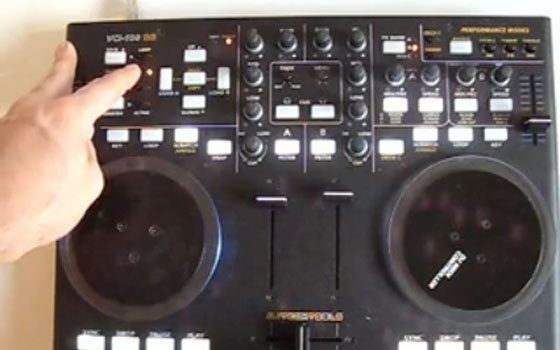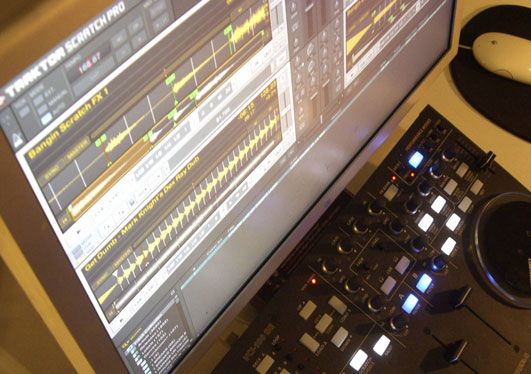
VCI-100SE + Traktor Pro = sweetness!

12 months ago I set out to create a mapping for our readers that would tap into the hidden powers of Traktor 3 without requiring a giant controller interface. Using the VCI-100 as a template, I designed a layout that made working with controllerism creative, fun and straight forward by combining many functions on single buttons knobs and faders. That work caught the eye of Vestax and became the VCI-100 special edition controller, which 100 lucky people own today. After that limited run sold out almost immediately we created a firmware upgrade kit and overlay package that allowed regular VCI-100’s to upgrade their own controllers and get the special edition performance.

With Traktor Pro, Native instruments has included many of our custom features including direct FX selection and dual filters into their software directly. This allowed me to duplicate and even improve on all of the functions that we created for Traktor 3 but with one major difference. The new mapping will work with every single VCI-100 out there including firmware versions 1.2 and 1.3! That means if you own ANY VCI-100, you can download the TSI file and try out our performance concepts of our VCI-100SE layout for free.

GET THE TSI FILES

You can immediately download the basic TSI file which matches our Traktor 3 overlays here in this post:

http://www.djtechtools.com/forum/showthread.php?p=29478#post29478

I also recommend you sign up on the TSI beta list bellow. Once signed up, you will receive a download link via email for the newest high performance TSI files and notification of when basic updates are made.

Traktor Pro midi mappings

(Required fields are bold)

Installation

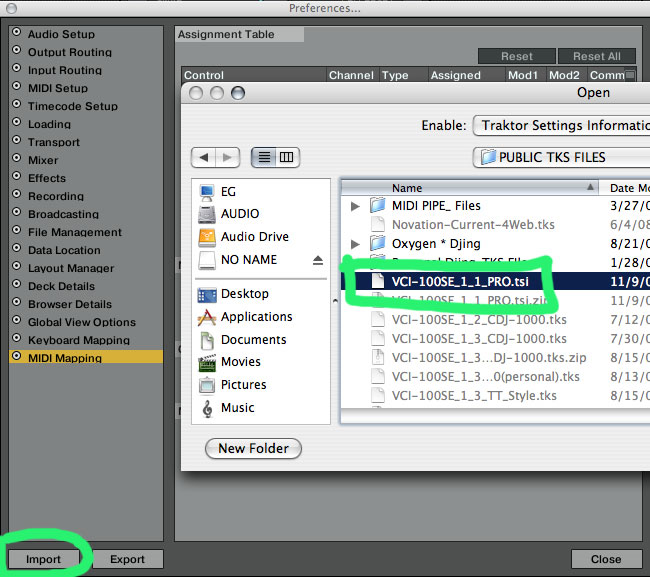
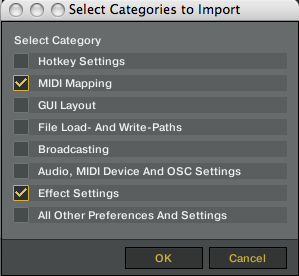
You want to import the TSI file inside Traktor’s prefrences window under midi mapping. The files contains the midi mapping and effects settings that match the VCI-100SE. Its important that you load both so the FX slots match up. You do not need to load any other settings.
Cool new Stuff

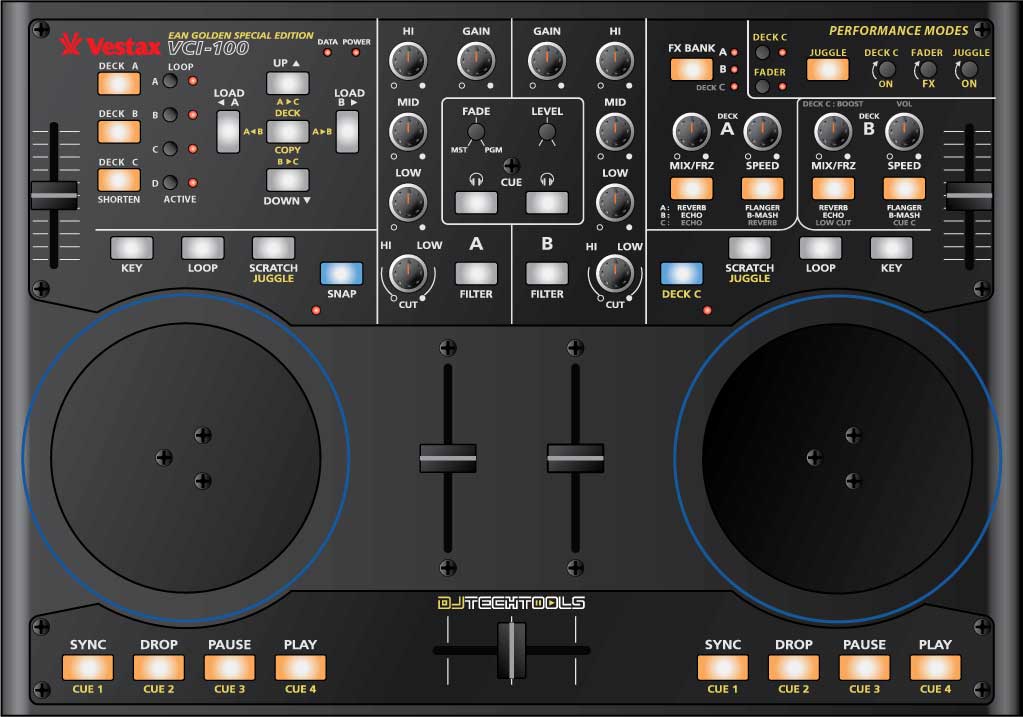
  • you can use 4 FX at one time on each deck with direct access to all of them
  • visual indication if an effect is on
  • deck C control is expanded to all deck controls
  • deck copy ALWAYS works
  • juggle mode and fader fx mode can be used at the same time
  • all modes are more obvious visually when engaged
  • all VCI-100 owners can use the file
  • always on filters!
  • you can enable/disable fader FX above the faders
  • pitch bending is working much better in CDJ/JOG mode
  • You can now shorten and lengthen loops in the loop section
  • SCRATCH/JUGGLE are now SCRATCH/CDJ-JOG


Overlays


If you enjoy the TSI and want to have your VCI-100 properly labeled then check out our overlays in the store. They are back in stock but going fast so get one while you can. In the mean time check out the image bellow for a complete list of the functions.
Known Bugs if using firmware 1.2

  • The Flanger ON button on Deck B controls Deck A Cue
  • The B-Masher On button on Deck B also controls Juggle mode
  • The Cue C monitor is the same and Cue B

these are NOT bugs with our Special Edition mapping but a hardware issue that has been in the VCI-100 in firmware versions 1.2 and 1.1

this is a brand new file so there are chances that you may find errors. If so please please report them here where you can contribute your own changes and ideas on how to make these mappings better.

What about Firmware 1.3?

We managed to duplicate almost all of the SE functions in PRO using the 1.2 firmware but there are still a few things that 1.3 uniquely offers. For example, the freeze function at the top of the faders and knobs is not possible in pro without 1.3. The problem of duplicated buttons (mentioned above) was also fixed in 1.3. Those that have an SE or recently upgraded will get the full SE performance on the effects section. Remember you can always switch back and forth using the technique found in this video.

The TSI file is backwards compatible so we will continue to support the 1.3 firmware in our TSI files in the coming months but eventually 1.3 will be phased out as I work with NI to implement all the unique functionality directly into the software.

67 Responses to “VCI-100SE + Traktor Pro = sweetness!”

  1. fred

    November 10th, 2008 at 7:55 am Quote

    Hi !!

    There is a bug with mailchimp !
    I can’t register to the the subscribe program, so i can’t download tsi file…

    Bye

  2. Ean Golden

    November 10th, 2008 at 7:59 am Quote

    Hi !!

    There is a bug with mailchimp !
    I can’t register to the the subscribe program, so i can’t download tsi file…

    Bye

    Its working now- I just changed around the code at the last minute.

  3. Anonymous

    November 10th, 2008 at 8:16 am Quote

    Hella good work ;-)

    I just subsribed to the tsi file, and in the second email I got, the subject field says “VCI-300 Patch Download Links”. I guess thats not right…

  4. Flaekiface

    November 10th, 2008 at 8:17 am Quote

    Hella good work ;-)

    I just subsribed to the tsi file, and in the second email I got, the subject field says “VCI-300 Patch Download Links”. I guess thats not right…

  5. luv2xra

    November 10th, 2008 at 8:40 am Quote

    Its working fine now, I will try this and involve myself with bug reporting.

  6. rune hund aka. VoOFA

    November 10th, 2008 at 9:42 am Quote

    SWEEEET Ean! so exited! thinking about skipping the rest of the days work to get home to this :]

  7. Cre

    November 10th, 2008 at 10:11 am Quote

    SWEEEET Ean! so exited! thinking about skipping the rest of the days work to get home to this :]

    Hi Ean . Do you suggest that All VCI-SE owners switch back to firmware 1.2 or can we stay in 1.3 with this TSi???

  8. BB

    November 10th, 2008 at 1:00 pm Quote

    Wonderful Ean! I purchased Traktor Pro last week, but the provided .tsi file for the VCI-100 didn’t work very well (to put it politely). I’m sure your .tsi will be a delight, but…. in the e-mail two links are provided. One links to a .zip file that expands to a .tsi file (so this works okay). If I click on the other link it downloads a .tsi.txt file. I am using Mac OS Leopard and Safari. Any help would be much appreciated.
    Cheers,
    Berend

  9. Anonymous

    November 10th, 2008 at 1:14 pm Quote

    Report any bugs here:

    http://www.djtechtools.com/forum/showthread.php?p=14367&posted=1#post14367

    I just found one although I’ve had that with a few different TSI’s not just Ean’s one.

  10. Blast Master D

    November 10th, 2008 at 1:14 pm Quote

    Report any bugs here:

    http://www.djtechtools.com/forum/showthread.php?p=14367&posted=1#post14367

    I just found one although I’ve had that with a few different TSI’s not just Ean’s one.

  11. Big Al

    November 10th, 2008 at 1:45 pm Quote

    Good work Ean! Thank you!

  12. fcarsana

    November 10th, 2008 at 2:51 pm Quote

    Are the known bugs related only to version 1.1/1.2?
    Is the 1.3 version affected?

  13. Chris combe

    November 10th, 2008 at 2:51 pm Quote

    Ean, awesome work as always – thankyou soo soo much!!!
    We are a demanding community but its cause you set the bar so hi with what you deliver…

  14. BentoSan

    November 10th, 2008 at 2:55 pm Quote

    Wow you put it out for free!
    Heap’s of respect to you for that Ean :)

  15. aiden

    November 10th, 2008 at 3:18 pm Quote

    nice! this is the news ive been waiting for! cant wait to get home and download!

  16. Harry

    November 10th, 2008 at 5:41 pm Quote

    nice! this is the news ive been waiting for! cant wait to get home and download!

    Wonderful Ean! I purchased Traktor Pro last week, but the provided .tsi file for the VCI-100 didn’t work very well (to put it politely). I’m sure your .tsi will be a delight, but…. in the e-mail two links are provided. One links to a .zip file that expands to a .tsi file (so this works okay). If I click on the other link it downloads a .tsi.txt file. I am using Mac OS Leopard and Safari. Any help would be much appreciated.
    Cheers,
    Berend

    Just right click the link and hit save as, or download the ZIP file and extract the .tsi inside it, or rename the .tsi.txt file to just .tsi.

  17. Ean Golden

    November 10th, 2008 at 6:04 pm Quote

    Hi Ean . Do you suggest that All VCI-SE owners switch back to firmware 1.2 or can we stay in 1.3 with this TSi???

    You can stay with 1.3 (and I would) because there are some extra little goodies in there for the 1.3 firmware. :)

    its fine to switch back however if you want the ease of modifying your own mappings.

  18. yosemite

    November 10th, 2008 at 6:30 pm Quote

    Hi Ean,

    Thanks for your excellent work. Impressive how quickly you came up with a customized .tsi that beats the NI in a zillion ways.

    However if I read between the lines there’s very little benefit keeping my VCI-100SE as the .tsi-file will work with the standard VCI-100 just as well. You’ve mentioned that there a some little goodies in 1.3 but you are also mentioning that 1.3 will be phased out sooner or later.

  19. don_kibo

    November 10th, 2008 at 8:30 pm Quote

    Wait, wait… So you are able to reverb, delay, flanger and beat masher? What about those other sweet new effects?
    I have some ideas on remaking SE layout, because Traktor Pro induces it.

  20. Hedgehog

    November 10th, 2008 at 8:45 pm Quote

    How can I choose which decks uses which FX bank?

  21. Ean Golden

    November 10th, 2008 at 9:03 pm Quote

    Wait, wait… So you are able to reverb, delay, flanger and beat masher? What about those other sweet new effects?
    I have some ideas on remaking SE layout, because Traktor Pro induces it.

    They are programmed to match the overlays and labeling of the VCi-100SE but you can easily program the TSI to load the effects of your choice. Just look for the select effects midi command and change them to the FX of your choice.

    How can I choose which decks uses which FX bank?

    its right there on the UI near the filters and EQ.

  22. Anonymous

    November 10th, 2008 at 9:17 pm Quote

    Is there gonna be tks files for novation! I ask because I know you own one!

  23. don_kibo

    November 10th, 2008 at 9:22 pm Quote

    They are programmed to match the overlays and labeling of the VCi-100SE but you can easily program the TSI to load the effects of your choice. Just look for the select effects midi command and change them to the FX of your choice.

    Ok.
    I was thinking for quite a while and my opinion is that if I buy Akai MPD32 alongside Vestax VCI-100 with SE layout, it would be perfect setup. Full control off the all the effects, key changing knobs, possibility of using Xone 4 band EQ, without losing filter knob and so on…
    It’s a little bit complicated, but I will make pictures which will explain everything.

  24. Anonymous

    November 10th, 2008 at 9:29 pm Quote

    Ean, this may be too soon to ask, but do you plan on eventually revising the overlay for new functions in Traktor Pro?

  25. Ean Golden

    November 10th, 2008 at 9:31 pm Quote

    Ean, this may be too soon to ask, but do you plan on eventually revising the overlay for new functions in Traktor Pro?

    absolutely,

    I want to work more with the software and our community to see improve the mapping and see how people want to work. then we release a new overlay dedicated for traktor pro.

    i would not be surprised to see if we release a mapping for the Akai unit as well ;)

  26. don_kibo

    November 10th, 2008 at 9:42 pm Quote

    Ean, this may be too soon to ask, but do you plan on eventually revising the overlay for new functions in Traktor Pro?

    absolutely,

    I want to work more with the software and our community to see improve the mapping and see how people want to work. then we release a new overlay dedicated for traktor pro.

    i would not be surprised to see if we release a mapping for the Akai unit as well ;)

    I found this blog long time ago, but decided to get involved today:)
    I’m really happy that a community like this exists, the one that values the benefits of Traktor and generally digital DJing. Hope I will contribute in making the ultimate Traktor setup, since you have given so much to us.

    Great job Ean. Really great job.

  27. Harry

    November 10th, 2008 at 9:58 pm Quote

    What do the A and B filter buttons do on the new mapping? They used to be the cue buttons on the standard VCI-100, but I don’t see anything changing when I hit them.

  28. Hedgehog

    November 10th, 2008 at 10:05 pm Quote

    How can I choose which decks uses which FX bank?

    its right there on the UI near the filters and EQ.

    The labelled FX-banks do nothing for me, just switch between A, B and Deck C but they do nothing.

  29. cristina

    November 10th, 2008 at 10:15 pm Quote

    How about VCI300, plz Ean.
    I regret so much now buying that stupid NEW controller.
    Stupid ITCH, Stupid Vestax, money deals. I want Traktor!!!!!
    Bye

  30. Anonymous

    November 10th, 2008 at 10:21 pm Quote

    How about VCI300, plz Ean.
    I regret so much now buying that stupid NEW controller.
    Stupid ITCH, Stupid Vestax, money deals. I want Traktor!!!!!
    Bye

    Nothing is stopping you from making your own ghetto-style overlay with paper and markers. :)

  31. Anonymous

    November 10th, 2008 at 10:34 pm Quote

    Hey Ean,
    First, thank you so much for all the effort you put into helping people with all of this, it is very much appreciated. Secondly, I have the overlay and the VCI-100 sitting here. I am debating whether I should put the overlay on or if I should wait until you release a new overlay for Traktor Pro. Do you know when this might be done and ready approximately? A month? More less?
    Thanks again
    Reg

  32. shedg

    November 10th, 2008 at 10:48 pm Quote

    Absolute Legend! Without this community and and a handful of Ean, controllerism would not be where it is today.

  33. Ean Golden

    November 10th, 2008 at 10:51 pm Quote

    Hey Ean,
    Secondly, I have the overlay and the VCI-100 sitting here. I am debating whether I should put the overlay on or if I should wait until you release a new overlay for Traktor Pro. Do you know when this might be done and ready approximately?

    Hey Reg, these overlays are designed and priced with the idea in mind that you can replace them as technology changes and new ideas come out. Put those on now and in 2 months you can just place a new layout on top.
    It will be at least 8 weeks before any new overlays come out. The VCI-100SE is a trusted, tested and solid work flow so the next one will also need some good time in development.

  34. arthur

    November 10th, 2008 at 11:00 pm Quote

    Hi,

    I have a vci-100 with the original firmware in it. Can I use the new .tsi file with it for the equivalent of the v1.3 firmware and Traktor Pro v1.0.1. or should I update the firmware to v1.3 to get the best performance out of the vci-100, Traktor Pro, and your new .tsi file?

    One more question: does the v1.3 firmware solve the problem where I cue up a track and am rocking it like a turntable. When I let it go, I want the track to start at that point just like it does when I’m playing on my 1200s. Right now it will not do that no matter what I tweak.

    By the way, I’m planning on ordering the firmware update kit, jog grips, and the overlay kit as soon as I can.

    thanks.

  35. luv2xra

    November 11th, 2008 at 5:47 am Quote

    Loving the new feature with shortening and lengthening the loops. A lot better!!! Ill report the bugs in the bug section.

  36. DirtyCache

    November 11th, 2008 at 10:04 pm Quote

    Mr. Golden you are the man.

  37. Tyrone Bradley

    November 12th, 2008 at 10:19 pm Quote

    Ean, with pro and Vci 100 i’m not getting full pitch controls, and can you set que points on the fly. What are the orange cue buttons on the Overlay and how do you engage thme.
    Thanks

  38. Ean Golden

    November 12th, 2008 at 11:01 pm Quote

    Ean, with pro and Vci 100 i’m not getting full pitch controls, and can you set que points on the fly.

    the pitch range is set to RELATIVE +/- %4.5 . if you want to change that you need to modify the TSI file and increase the sensitivity of the control in midi mapping.

  39. Tyrone Bradley

    November 13th, 2008 at 2:41 am Quote

    Thanks for repliing so fast, but i’m not getting that.

  40. Rick

    November 13th, 2008 at 6:24 am Quote

    When unzipping vci-100se_1_1_protsi.zip file that was emailed to me: a 46k TSI file appears AND a folder named _MACOSX appears with a 1k TSI file in it. Why the 2 files?

  41. djbroka

    November 16th, 2008 at 12:53 pm Quote

    Hi,

    i imported te tsi files and the mapping work, but not well, there are no changes with the lightup when i press the new fonctions, an also, the effects work but I can’t here them. let me explain, i can see that the effects faders on the screen do waht i’m doing on my vci 100 but there is no change in the audio, i just can’t here the effects …
    can anybody help me out with this ??

  42. Ean Golden

    November 17th, 2008 at 8:55 pm Quote

    Hi,

    i imported te tsi files and the mapping work, but not well, there are no changes with the lightup when i press the new fonctions, an also, the effects work but I can’t here them. let me explain, i can see that the effects faders on the screen do waht i’m doing on my vci 100 but there is no change in the audio, i just can’t here the effects …
    can anybody help me out with this ??

    make sure midi IN and OUT are selected in Traktor for the vci.

    you need to turn on the FX by pressing the button under the knob.

    When unzipping vci-100se_1_1_protsi.zip file that was emailed to me: a 46k TSI file appears AND a folder named _MACOSX appears with a 1k TSI file in it. Why the 2 files?

    you should use the larger one and ignore the 1k file

  43. Pete Medlock

    November 21st, 2008 at 6:11 pm Quote

    [...] Hot Topics Traktor Pro+ VCI TSI [...]

    So just curious if anyone else is having the problems i have. I checked the back and there is a green sticker noting that i have FW 1.2 (Correct?) Installed Traktor Pro and the TSI files and the jog wheels will not work, nor will the loop shorten feature, which i have to say i was super excited about. Anyone have any answers? also , midi in and out for VCI is active. Thanks!

  44. Ean Golden

    November 21st, 2008 at 10:34 pm Quote

    I have not heard anything like that- everything is working perfectly over here.

  45. CauĂȘ Ito

    November 22nd, 2008 at 3:55 am Quote

    I began in digital djying with a crap Behringer BCD 2000. In august 2008, I bought a VCI 100 and started to get into Dj Techtools and Ean knowledge. Now I’ve got an update 1.3 kit and the new tsi files for TK Pro. I just regreted I didn’t ask for the jog grip!

    Thanks Ean and crew for all this fun!

  46. DJ Phaidon

    November 25th, 2008 at 7:51 am Quote

    I posted a 4 deck set up that’s a work in progress, but if you’re interested in the possibilities that traktor pro introduces with the VCI-100, it’s in the forums. Take a look. Cheers!

  47. Hadj

    December 2nd, 2008 at 3:52 am Quote

    Hi Ean,
    Do you think Vestax will sort the problem of duplicated buttons as mentioned above or should i still think of upgrading the firmware?

    Thanks for all the hard work man!

    Hadj

  48. mark

    December 3rd, 2008 at 8:23 pm Quote

    [...] Hot Topics Traktor Pro+ VCI TSI [...]

    So far I like traktor pro with the vci 100. Rock solid

  49. Ean Golden

    December 4th, 2008 at 5:48 am Quote

    Hi Ean,
    Do you think Vestax will sort the problem of duplicated buttons as mentioned above or should i still think of upgrading the firmware?

    Thanks for all the hard work man!

    Hadj

    no- they have not released a firmware that fixes those duplicate buttons

  50. refriend

    December 25th, 2008 at 6:22 pm Quote

    hi people.. is there some way how to import playlists from traktor 3.3 in to traktor pro????
    yeaaah and wish u nice xmast time
    oh aand my leds are not working -well not all of them with traktor pro- the midi out is on.. do u know why?? iam using vci 100- 1.2 firmware with the standard TSI from vestax site.. any idea how to fix it???

  51. refriend

    December 25th, 2008 at 11:20 pm Quote

    oh and another thing– ean– i am trying to map tsi of my vestax- i like the way how u using jog in browser- everything is just fine- but- when i change to full browser wiev- when i am trying to select song- the track stop playing… do u know why??what am i doing wrong???

  52. schlegel

    December 29th, 2008 at 1:47 pm Quote

    Great work with the tsi file! Will definitely order an overlay for my VCI-100 from your web shop!

    Though there is one thing that might be a bug? Everytime i start Traktor Pro my channel faders are not responsive until i move them completely down and up again, then it works fine. Is this a bug or did i miss something ? I’m using fw 1.2 with your tsi file.

  53. schlegel

    January 2nd, 2009 at 12:47 pm Quote

    Dont bother anymore found out this is done by purpose (soft takeover) in Traktor Pro.

    Hope the overlay will be here soon! :) When will the devices for firmware upgrades be available again ?

  54. DJ Cayotic

    January 14th, 2009 at 6:50 pm Quote

    [...] Hot Topics Traktor Pro+ VCI TSI [...]

    Dig your TSI file with Traktor 1.0.2 and VCI-100 1.2!!! I’ve been studying your youtube videos like a freakin’ lab rat. However, my TSI file doesn’t seem to function quite the same as yours. For example; cue point #5 (jog wheel) isn’t functioning when juggle is enabled even though 1-4 do work seemlessly. I pressed “scratch/juggle” thinking that would do it, but no luck.

    I also enjoy the the quick loop button and loop length modifier using the nav buttons. Also, the browser view and scroll via jog wheel is so sick!

    My only conerns:
    I’m spoiled with a couple features in a TSI file modified by “TIMTANGO” over at the NI forum. (1) It allows the quick preview of a track using your big “DECK B” loop button+preview. Then if I want to scrub or fast forward through the track, “DeckB”+FX knob 4. As of yet, I can’t seem to preview any tracks using your settings. (2) Move function; exicuted using TIMTANGO’s modifier, “DeckB”+”cue1-4″. “Cue1-2″ are move length increase/decrease, while “Cue3-4″ is to move back/forward. (If I was to add this feature to your TSI file myself, could I still use “DeckB” as my modifier or will it screw with the loop functionality of deck B?)

    I do a lot of hip-hop so this feature is more productive than looping though haveing both would be ideal. Although, after hearing your music on youtube, I can’t wait to get my hands on some house/techno genres!!!

    I will be purchasing your overlay, knobs, and jogGrips as soon as I get a “grip” on the fx functionality of your “fader fx.” Might need to watch the “UPS ad-based” fx theory video at youtube a dozen more times though ;-)

  55. DJ Cayotic

    January 15th, 2009 at 6:19 am Quote

    I’m using the latest TSI file available via the download link emailed to me. After using it extensively and debating if I want to add a couple functions to it or borrow from yours, heres the issues I came up with, regardless.

    Performance modes
    -Deck C button doesn’t enable Deck C while using FX Bank A, though it does while in FX Bank B and C. Not sure if this is how its suppose to be but if it can perform this function in 2 FX banks, why not all 3.

    FX button #4 aka FX DECK B “Speed” knob button not function properly:

    -While FX BANK A is Active, pressing once enables DECK A “CUE”, pressing again disables it.

    -While FX BANK B is Active, holding enables performance juggle button

    -While FX BANK “DECK” C Active, pressing once enables DECK B “CUE”, pressing again disables it.

    *Conclusion: While DECK A FX buttons 1+2 switch between 2 sets of FX presets (visable above DECK A), DECK B FX buttons 1+2 doesn’t switch between 2 sets of FX presets (visable above DECK B) because the button below FX DECK B “SPEED KNOB” conducts the commands listed above.

    Also, lastly, while viewing my library using the former DECK D loop button (which is awesome BTW), how do I actually preview a track without physically dragging and dropping it using the mouse in the preview player.

    Hope I listed everything as accurate as possible, while avoiding mixing up the nomenclature between the VCI-100 and the VCI-100SE.

    Thanks again Ean, truly an extensive piece of work!

  56. KenKen

    January 26th, 2009 at 9:29 pm Quote

    Hi everyone,
    i’m having some trouble with the tsi i just downloaded from DJ TT. I’m using latest version 1.6. When I try to import the file I can’t load the effect settings, only MIDI mapping is available. I’m using Traktor 1.0.2 and a vci 100 firmware 1.2
    Am i doing something wrong ?
    Keep up the good work Ean,
    peace

  57. Ean Golden

    January 26th, 2009 at 10:12 pm Quote

    Hi everyone,
    i’m having some trouble with the tsi i just downloaded from DJ TT. I’m using latest version 1.6. When I try to import the file I can’t load the effect settings, only MIDI mapping is available. I’m using Traktor 1.0.2 and a vci 100 firmware 1.2
    Am i doing something wrong ?
    Keep up the good work Ean,
    peace

    no, that is correct- there are no FX settings for that one- you directly select the FX manually using the new scroll feature. I will re-introduce fx group loading but for now you can select them yourself manually.

  58. Lukas

    February 6th, 2009 at 3:09 pm Quote

    BTW: is there any reason to get Traktor Scratch Pro for the VCI-100 in terms of software? Or in other words is there any difference in the software bundled with Trakor Scratch Pro compared to just the software you get when buying Traktor Pro?

  59. Ean Golden

    February 7th, 2009 at 7:07 pm Quote

    BTW: is there any reason to get Traktor Scratch Pro for the VCI-100 in terms of software? Or in other words is there any difference in the software bundled with Trakor Scratch Pro compared to just the software you get when buying Traktor Pro?

    no difference at all- they are the same software

  60. Lukas

    February 8th, 2009 at 4:59 pm Quote

    Ok, I was investigating this question myself in parallel to this request. There is a difference, but I do not think it matters for when using just the VCI-100. The timecode support is only enabled in Traktor Pro if you have a serial number that comes out of a Traktor Scratch Pro license. So yes, the software package is the same, but the functionality isnt. Then again since the VCI-100 does not leverage the timecode (since the scratch pads are digital by nature), it should not be relevant for VCI-100 users (unless they of course also want to use timecoded vinyl/cds).

  61. DjFlex(ru)

    February 11th, 2009 at 10:18 pm Quote

    I’m sorry, i’m don’t andersted, how i may set cue(1-5) from vci-100

  62. Lecko

    February 25th, 2009 at 9:43 pm Quote

    [...] Traktor Pro+ VCI TSI [...]

    [...] Hot Topics Traktor Pro+ VCI TSI [...]

    So just curious if anyone else is having the problems i have. I checked the back and there is a green sticker noting that i have FW 1.2 (Correct?) Installed Traktor Pro and the TSI files and the jog wheels will not work, nor will the loop shorten feature, which i have to say i was super excited about. Anyone have any answers? also , midi in and out for VCI is active. Thanks!

    I have this issue, it wont let me select my effects setting when importing my TSI file either, any ideas??

  63. Manuel

    March 19th, 2009 at 10:14 pm Quote

    this is truly amazing – thank you SOOOO much.

    however, here’s a little cry of help:

    i have tried to understand the 1.7 mapping via the various scattered pieces of info – youtube videos, overlay jpgs, forum posts, etc. – and by examining the midi settings in traktor itself.

    i have figured out the loop section and the eq section including headphone controls. however, neither the fx section (especially in fader fx mode) nor the exact functionality of the song select area is understandable for me. in juggle mode i understand the play buttons turn into cue access buttons – but what do the jogwheels do? and what are the sample buttons next to the filter knobs for?

    if anyone could write a tutorial/getting started sheet for these sections or point me to any existing such info i would REALLY grateful!

    thank you so much ean for being the most generous person on the planet
    and thanks to all the users for making this community the best dj place in cyberspace :-)

  64. Anonymous

    June 6th, 2009 at 6:36 am Quote

    Bro, youve got me thinking of adding a VCI to my set; witch is currently, a technics into reaktor/ammobox to translate the timecode and relate it to samples in ableton, out to my line 6 gearbox (ghetto 2 channel guitar sound card, but works), to my korg kaos km2 mixer (lots of ca..), with a 49 key oxygen 8 *custom painted like yr vci :) on the side.. iv found a silver vci for $275 pretty meant, so ill be getting yr DJTT faceplate, Firmware kit, black knobs, as well as the great mapping. one question will i be able to run all three Reaktor 5, Albeton 7 & Traktor Pro.

    I typically ask very few questions this would just save a lot of high hopes crashing down if the answer is something like Ableton can only rewire 1 other application.

  65. Stephen

    June 6th, 2009 at 6:50 am Quote

    Bro, you’ve got me honestly thinking of adding a VCI100 to my set!; witch ill explain what it currently is to help answer 1 question i have, im running 1 technics into Reaktor 5 (w/Ammobox) to translate timecode and relate it to samples in Ableton, sent out to my line 6 gearbox (ghetto 2 channel guitar sound card), into my Korg Kaos km2 mixer (lots of cables, lots of adapters) &a 49 key oxygen 8 *custom painted like yr vci :D So Iv found a silver VCI 100 for $276 pretty beautiful condition, just one question before i buy, will i be able to run all three Reaktor 5, Albeton 7 & Traktor Pro..

    Also if all works out all be ordering yr Faceplate – Firmware kit – Black knobs – &using yr great mappings.. so thanks man you guys are great! – Stephen

Leave a Reply

  1. Quote selected text

First Time?

This site is dedicated to digital djs. We develop performance tools and teach cutting edge techniques that enable creative expression. Visit tutorial videos on youtube, equipment reviews in the blog and a very helpful community in the forum. New articles every Mon, Wed, Fri.
In the Store
 

Categories:
Follow us:
You're going to need Flash 8+ and JavaScript to use this site. How'd you get this far without it?

Dig through the Crates

Readers are Saying

  • Balkadan: [quote comment="28572"]I meant to write this earlier but got carried away. I really think the site would benefit from...
  • Vinicius Hoffmann: ^^^^ It was me above ^^^^ Btw, i forgot to mention that I love this article. Awesome material John!
  • Anonymous: [quote comment="28572"]I meant to write this earlier but got carried away. I really think the site would benefit...
  • Shane: Great article John. I’m a little disappointed that I can’t bite the record though…
  • ovv: I meant to write this earlier but got carried away. I really think the site would benefit from a “About the...
Contributing-Writer-Ad