Upgrade Your VCI-100 CrossFader

Pro X Fade inside a VCI-100

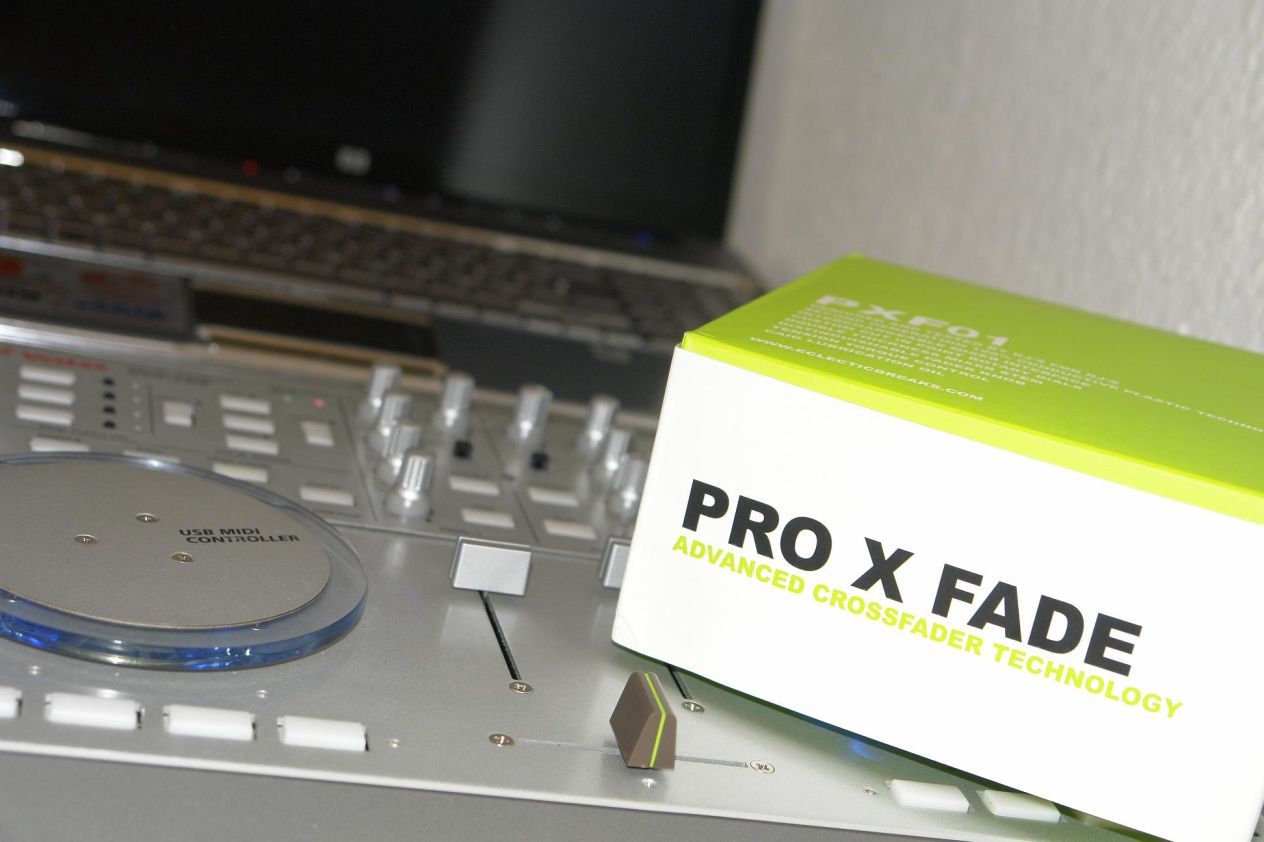
Those who do a lot of heavy scratching and crossfader tricks on their VCI-100′s have some minor complaints about weight of the fader being too light. Luckily however one of the users of our Forum going under the name of PaddyDj has successfully integrated a Pro X Fade into his VCI-100. We were able to get hold of PaddyDj who was kind enough to make a wiring diagram that will make doing this mod just that much easier.

Step One

First you you need to take off the bottom face plate of the VCI-100, this is a simple process just use a small screw driver to remove the 5 screws as shown in the picture.

Skrews to remove VCI-100 lower faceplate

Step Two

Now we need to remove the Two screws either side of the VCI-100 which are highlighted in this picture.
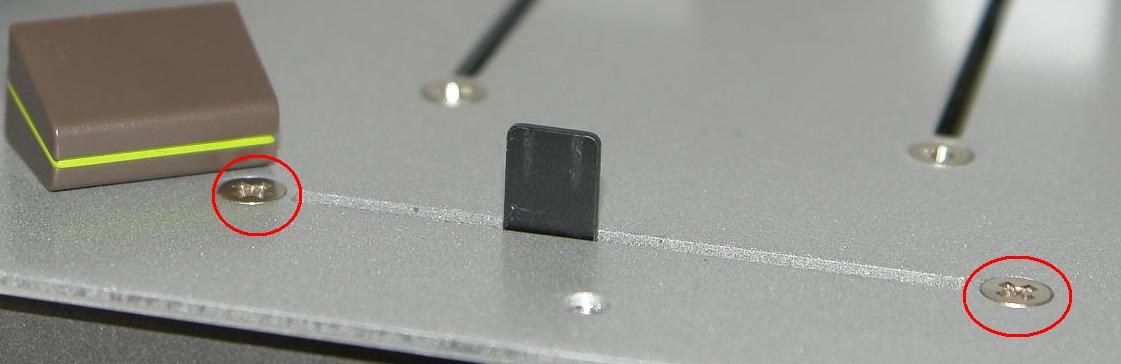
VCI-100 Crossfader Skrews

Step three

Now we need to remove the four screws on the side of the VCI and one screw under the VCI. The process of taking apart the VCI-100 was best described in this video Ean made for the VCI-100 firmware mod. If your doing this mod it also might be a good opportunity to perform the Ean Golden 1.3 firmware mod while the unit is open if you have not already. Either way your going to need to perform the first step in this video:

YouTube Preview Image

Step four

The next step is to remove wires on the VCI crossfader making sure not to damage the wires by pulling them out of the socket they go into . What this picture does not show is that the these wires and the pin connectors are actually housed in a plastic socket, they will have to be removed as described blow.
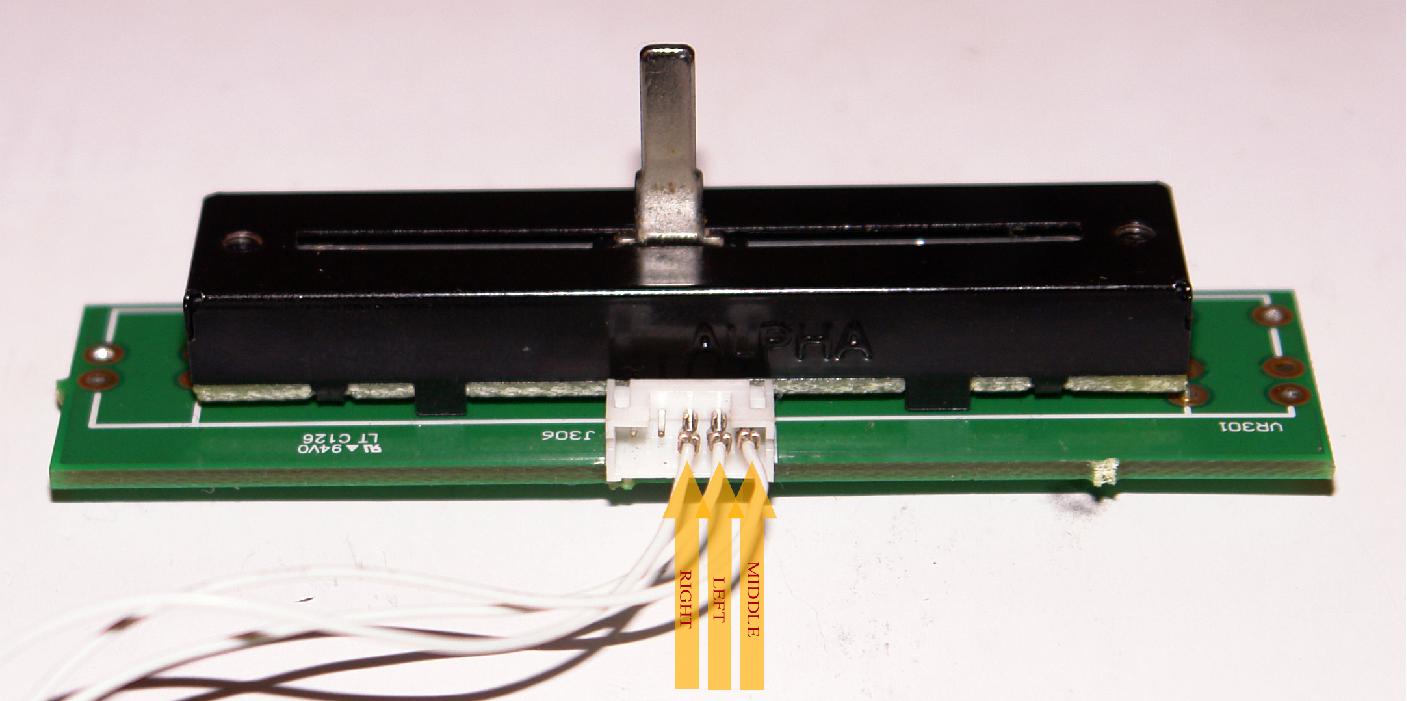
Pins to remove for VCI-100 X Fade mod

Each wire will have to be carefully removed from the plastic sockek using something pointy as shown in the picture below, the aim is to push the connections out of the small plastic housing without keeping the pin conections intact to the wire.
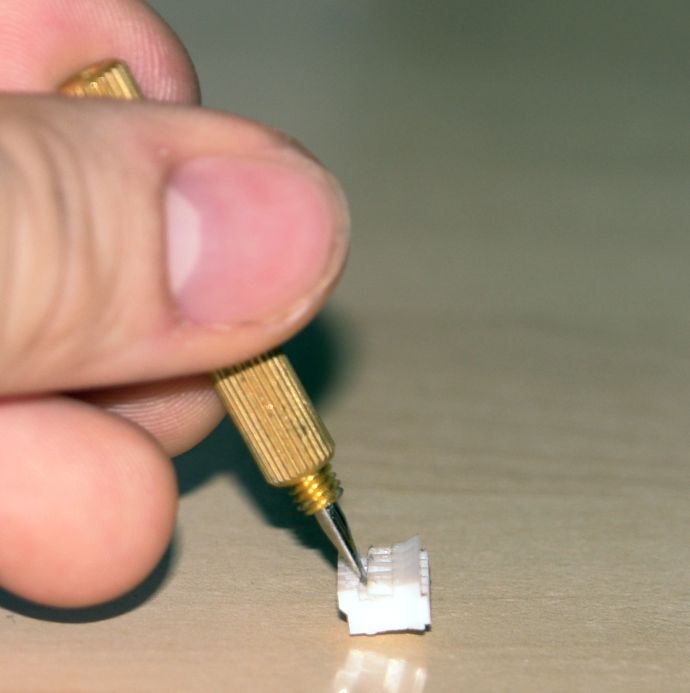
Tool being used to remove wires

Step five

Connect the wires from the previous step to the pins shown on the Pro X Fade pins as shown in the next picture.
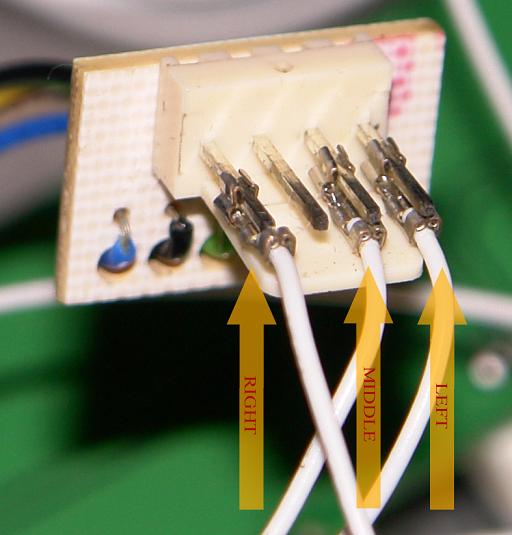
Last Step

The last step is to simply put your VCI-100 Back together. You can use the same screws and same holes you uses to screw in the VCI-100 crossfader to screw in the Pro-100 X Fade.

Once its done it should perform a little something like this:

YouTube Preview Image

Now all is left to do is enjoy your handy work !

A big thanks from DJTT goes out to PaddyDJ for prodiving the pictures, video and details for this mod.



  • Fatlimey

    The crimp pins look like Molex Female crimp pins made to connect to PCB header pins. The "pointy tool" has a real name – a Molex Extractor Tool – which is essentially a *specific type* of point thing. Should you accidentally destroy a connector they are cheap and easy to replace, provided you have the correct crimping tool. Here's more than you ever wanted to know about Molex connectors: http://www.marvin3m.com/connect/

  • FredG

    I wish it would be possible on the VCI-300 too !

  • Ean Golden

    [quote comment=""]I wish it would be possible on the VCI-300 too ![/quote]

    i think they are using the same cross fader so I don't see why it would not be

  • midifidler

    [quote comment=""][quote comment=""]I wish it would be possible on the VCI-300 too ![/quote]

    i think they are using the same cross fader so I don't see why it would not be[/quote][quote comment="14783"]The crimp pins look like Molex Female crimp pins made to connect to PCB header pins. The "pointy tool" has a real name – a Molex Extractor Tool – which is essentially a *specific type* of point thing. Should you accidentally destroy a connector they are cheap and easy to replace, provided you have the correct crimping tool. Here's more than you ever wanted to know about Molex connectors: http://www.marvin3m.com/connect//quote

    The correct tools unfortunatley are stupidly expensive

  • DjLiquit

    [quote comment=""][quote comment=""]I wish it would be possible on the VCI-300 too ![/quote]

    i think they are using the same cross fader so I don't see why it would not be[/quote]

    i just took the crosfader knob off my mackie d.2 and replaced the vci-100 knob and it works just as well, but i like the crossfaders more light than heavy

  • DjLiquitATL

    now for dj's who scratch it would be better to find a channel fader that we could replace the vci-100's with b/c the channel faders are to stiff…any suggestions?

  • paddydj

    [quote comment=""]now for dj's who scratch it would be better to find a channel fader that we could replace the vci-100's with b/c the channel faders are to stiff…any suggestions?[/quote]

    You can replace the line faders as well. I don't know which ones you could use instead, as Pro X Faders are pretty expensive. But it would work the same way as with replacing the crossfader because it's the same bundle of wires just like with the crossfader. Only the CF curve adjustment wouldn't work unless the software allows to adjust it.

  • sgb

    [quote comment=""]You can replace the line faders as well. I don't know which ones you could use instead, as Pro X Faders are pretty expensive. But it would work the same way as with replacing the crossfader because it's the same bundle of wires just like with the crossfader. Only the CF curve adjustment wouldn't work unless the software allows to adjust it.[/quote]

    The line faders on the VCI's are longer than most crossfaders. I think most crossfaders are 50-75mm and the line faders on the VCI are 100mm. This is the fader I would use: http://www.pennyandgiles.com/docGallery/77.PDF

    But I don't know if it will fit or where to even purchase in small quantities.

  • paddydj

    [quote comment=""][quote comment=""]You can replace the line faders as well. I don't know which ones you could use instead, as Pro X Faders are pretty expensive. But it would work the same way as with replacing the crossfader because it's the same bundle of wires just like with the crossfader. Only the CF curve adjustment wouldn't work unless the software allows to adjust it.[/quote]

    The line faders on the VCI's are longer than most crossfaders. I think most crossfaders are 50-75mm and the line faders on the VCI are 100mm. This is the fader I would use: http://www.pennyandgiles.com/docGallery/77.PDF

    But I don't know if it will fit or where to even purchase in small quantities.[/quote]

    The standard crossfader will fit where the line faders are. The screws should have the same distance from each other, only the line faders as such are longer.

  • dzmplz

    Who has this ProX in teh VESTAX VCI 300? Mr. GOLDEN would it fit? I wil try to open teh VCI tonight to see if it would fit in the VCI,….that would be awesome wicked mate!!

  • http://www.corporation.tk corporation

    I have successfully installed a PXF in my vci – thanks to this article!

    it's a big improvement over the stock fader!

  • dzmplz

    [quote comment=""]I have successfully installed a PXF in my vci – thanks to this article!

    it's a big improvement over the stock fader![/quote]

    YOO in WHAT VESTAX VCI 300??? I didn t had a chance to open it yet,..but if it fit ,..I would buy one and make it work,…someone must fixed one in the 300 already

  • http://www.myspace.com/bentosan BentoSan

    I have just been informed that the Pro X Fade also works for the line faders!

    Thats a nice piece of news.

    Id love to see some pics of a VCI-100 modded with 3 pro x fade line faders!

  • http://www.corporation.tk corporation

    [quote comment=""]I have just been informed that the Pro X Fade also works for the line faders!

    Thats a nice piece of news.

    Id love to see some pics of a VCI-100 modded with 3 pro x fade line faders![/quote]

    ohhhh yummy!

    if i find 2 more for cheap, i might do it…

  • http://www.djshyproductions.com DJ SHY

    [quote comment="15365"]

    YOO in WHAT VESTAX VCI 300??? I didn t had a chance to open it yet,..but if it fit ,..I would buy one and make it work,…someone must fixed one in the 300 already[/quote]

    I also have a VCI300 and would like to know if this mod will work!!… anyone!?

    Or do I have to find out for myself..HAHA

  • djdon

    hello i donw know to find replacement for my vci100 line and crossfaders.. anyone could help me?

  • f0tif0

    Got VCI 300 just wondering if anybody moded their VCI to that PRO-X fader.
    Please tell me if it works?
    Also question SINCE VCI 100 fader feels same light as VCI 300 when i tried them both in the store. Just wonder how does this PRO-X feel light or heave?
    thanks f0tif0

  • the darryl

    Are there any other x faders that will fit as a replacement as i can`t afford the pro xfade right now and the cross fader just died on my vci 100?????????

  • http://www.djsirkitbreaker.com kraal

    any news on this working with the vci-300 ?

  • dzmplz

    [quote comment=""]any news on this working with the vci-300 ?[/quote]
    yo nobody??? i cant buy that pro x yet,…

  • djsarasin

    [quote comment=""][quote comment=""]any news on this working with the vci-300 ?[/quote]
    yo nobody??? i cant buy that pro x yet,…[/quote]

    I got my VCI-100 yesterday. Planning on installing the Pro-X-Fade….Overlay and Arcade buttons.

    But that will happen over the next year or so. (when i get over the fact that it will get scratched and bumped at some point)
    :)

    @DZMPLZ

    Mate…Ean has said that its the same fader etc. Why don’t you be the first to pop it in the 300?

    :)

  • djsarasin

    [quote comment=""][quote comment=""][quote comment=""]any news on this working with the vci-300 ?[/quote]
    yo nobody??? i cant buy that pro x yet,…[/quote]

    I got my VCI-100 yesterday. Planning on installing the Pro-X-Fade….Overlay and Arcade buttons.

    But that will happen over the next year or so. (when i get over the fact that it will get scratched and bumped at some point)
    :)

    @DZMPLZ

    Mate…Ean has said that its the same fader etc. Why don’t you be the first to pop it in the 300?

    :)[/quote]

  • dzmplz

    ok
    im going to try,…let you guys know…

  • erpi

    Best mod ever!!!!

    What kind of tool do you use to remove the wires from the housing, the one which comes with the PXF or a molex exctractor tool?

  • erpi

    DONE!!!

    A must have… It changes everything!!!

    Thank you Paddydj…

  • Goldie

    I’m looking at my new Pro X fader now and it doesn’t look like the images on this post and neither does the crossfader in the VCI-100 – what’s going on here.

    someone help me out before I do some serious damage!

  • DJ DON

    I AM TOO MUCH UPSET, I BOOTH VCI 300 AND VCI 100, AND I PROMOTED IT TO ALL OF MY DJ FRIENDS.. BOOTH OF MY UNITS HAD PROBLEMS WITH VOLUME FADERS SPECIALY MY VCI 300.. WHY THERES NO REPLACEMENTS ON THIS ISSUE.. DID THE VESTAX OR ALPHA COMPANY DOESNT CARE ABOUT THERE CUSTOMERS? DAMM… MAYBE I SHOULD STOP SELLING THIS UNITS AND I SHOULD CHANGE IT TO OTHER BRANDS..

  • Muja

    Awesome. Living in China, and needed to replace my vci-100 crossfader. Simple. I suggest using a needle to try and get the wires out of the plastic housing. Just lift up the plastic “legs” that prevent the wires from being removed and carefully remove them. MAKE SURE YOU MARK THEM BEFORE YOU REMOVE THEM. It takes a hell of a long time sorting out which ones go where if you dont. Anyway, props to Paddy for starting this. Pce.

  • DJ DON

    DJ’S ALL OVER THE WORLD USING VCI’S 100/300. I WAS ABLE TO OPEN THE VOLUME FADERS OF MY VCI’S 100 AND 300 COZ THERE NO REPLACEMENT ON THESE FADERS.. I KEEP LOOKING FOR ALPHA FADERS BUT THERE NO STORES HAVE IT.. AND MOST PROBLEMS THAT COUSE THE BROAKEN FADERS WAS A BRUSH THAT CONNECTS THE CARBON OF THE FADER.. I DO CUT THE BRUSH AND MAKE A NEW FORM OF IT AND SHORTEND THE CIRCUIT BOARD TO FUCNTIONED IT AS STEREO AND IT WORKS PERFECTLY.. I PUT AND SPEACIAL GREASE ON THE RAILS TO KEEP IT SMOOTH SAME AS ORIGINAL..

  • http://mattserious.com Matt Serious

    Awesome guys.

    Replaced mine today, and let me say this xfade is awesome.

    I can literally blow on it and it’ll move completely across. Was super easy to install, just took a few minutes to bypass the cables and figure out which one goes where.

    Awesommmmmme!

  • DJ Fitty

    really want to try this with my vci-3oo think, I may

  • http://badmanpress.com/ RedEyz

    [quote comment="15387"]I have just been informed that the Pro X Fade also works for the line faders!

    Thats a nice piece of news.

    Id love to see some pics of a VCI-100 modded with 3 pro x fade line faders![/quote]

    i’d be interested in knowing how seeing as there’s a lot of difference in travel distance.

  • http://www.facebook.com/profile.php?id=73104650 Adam Barnes

    I found your article hot linked here: http://jzenso.tumblr.com/vci100

    I’ve already reported him for attempting to hot link one of my blog posts, but thought you might want to know about it.

  • http://www.facebook.com/profile.php?id=73104650 Adam Barnes

    I found your article hot linked here: http://jzenso.tumblr.com/vci100

    I’ve already reported him for attempting to hot link one of my blog posts, but thought you might want to know about it.

  • http://www.facebook.com/profile.php?id=73104650 Adam Barnes

    I found your article hot linked here: http://jzenso.tumblr.com/vci100

    I’ve already reported him for attempting to hot link one of my blog posts, but thought you might want to know about it.

  • Mahandry

    for vci 300 mkII???

  • http://www.djtechtools.com/2009/01/19/2009-namm-report/ DJ TechTools  |  2009 NAMM Controller Report

    [...] told us they will be creating a high quality replacement fader for the vci-100. Dont forget, we wrote a how-to article on just that subject a few months back but this is will be a very hot product indeed. [...]

First Time?

This site is dedicated to digital djs. We develop performance tools and teach cutting edge techniques that enable creative expression. Visit tutorial videos on youtube, equipment reviews in the blog and a very helpful community in the forum. New articles every Mon, Wed, Fri.
Subscribe with one million others

Featured Article

DJ TechTools Traktor Kontrol S4 Mapping

The long awaited Traktor S4 Mapping is here and totally FREE. Continue reading for a full video and the download link.

Categories:

RSS DJ TechTools Forums

  • Vestax Typhoon beginner DJ
    DJ's out there that who's already used this kind of midi controller, I actually bought this last week, i was likely used it as for recording of my... […]
  • Logic alone?
    hey guys, I'm an electro producer and was just wondering.. will midi fighter run alone without excess software or hardware? i run logic in massive... […]
  • CrossFader Problem
    Im using Traktor Pro 2 with the VMS4.1. I downloaded a mapping and all the controls seem to work fine with the expection of my crossfader. No matter... […]
  • ID these effects/transitions?
    Nicky Romero @ Glow Washington 12.30.11 (PART 1) http://soundcloud.com/nickyromero/nicky-romero-glow-washington Check out Nicky romero's latest... […]
  • How to Fix Jog Wheels
    In regarding the article from djtechtools.com "How to Fix Glitchy Faders and Jog Wheels" ... […]