Last weeks post showed how the SYNC function can help keep multiple loops in time with each other and tighten up a complex mix. The topic brings up a bigger question about how SYNC works and how you can make it work better. If your going to use SYNC, its not enough to just push a button and expect Traktor to keep songs in time. As with Ableton, its essential to also do some prep work if you want perfect results. Here are a few techniques that will help ensure that SYNC keeps tracks aligned perfectly all the time.

A common scenario

You have 2 songs running in time with each other and everything is going well until you drop a loop on one track and after messing around with its size, release the loop. Using the technique in Fridays article, your loop activate/de-activate button also syncs up the phase so even if your release is not perfect the song should snap back into time. The problem is that the feel of the 2 songs is not quite right and you must manually adjust the phase to match up the rythyms. Engaging sync again will recreate the offset until the fundamental issue is corrected. This problem does not just apply to loop timing but the timing of SYNC in general, so in order for sync to work well you must learn how to dial in a beat grid.

Use Beat Grids!

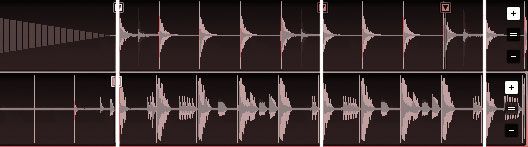
First, if you really want to get serious about working with your songs then its essential you beat grid most of them. In order to learn how to set a proper beat grid check out this video in a digital dj video series. Once you have a beat grid set, this becomes the the master guide for how Traktor lines up your tracks with each other. Its not going to match up the songs but the grids, so in order to improve how well sync actually works then you will need to fine tune the position of the grid itself. Check out the following video for the details:

Just because a track has a beat grid does not mean that it will line up perfectly with other songs grids automatically. Ableton suffers from the same fundamental problem but the solutions are much more flexible and dj friendly in Tratkor. You basically have 3 options:

  1. assign hot keys or midi controllers to move the beat marker position on the fly during a mix
  2. always check your grid against the master click so that the songs should line up
  3. set your beat marker on the peak of the snare so you have the highest probability of all tracks working together.

  • Krilikz

    Can we get any insight about beat gridding in traktor pro? Will it be the same?

    I know a problem i have in traktor is, i some times for get what Cue point i set the beat grid as.

    In traktor pro there's some sort of folder thing for sorting all your cue points? Is there a way to save the beat grid away from the other que points this way?

  • mycole (B33SON)

    [quote comment=""]

    I know a problem i have in traktor is, i some times for get what Cue point i set the beat grid as.

    [/quote]

    This shouldn't be a problem if you always set the beat marker to be the same type of beat as Ean suggested.

    [quote comment=""]

    In traktor pro there's some sort of folder thing for sorting all your cue points?

    [/quote]

    Unless they take away current functionality this should remain the same. Traktor currently sorts your cue points for you. From the Traktor Pro videos it looks like they're now adding loop points with sizes in. So now you can not only define cue points, but loop points…. very handy.

    [quote comment=""]

    Is there a way to save the beat grid away from the other que points this way?[/quote]

    Great question, I'd like the answer to this one too. It's kinda annoying when you have to make sure that your beat marker is something you can use when you also want to be able to beat juggle on the same track. Somehow I doubt Native Instruments thought of this.

  • http://www.eangolden.com Ean Golden

    [quote]

    Great question, I'd like the answer to this one too. It's kinda annoying when you have to make sure that your beat marker is something you can use when you also want to be able to beat juggle on the same track. Somehow I doubt Native Instruments thought of this.[/quote]

    yes, in traktor pro you can map any cue point to one of the 8 hot cue slots. So that means a beat marker can be juggled or not juggled as you like.

  • http://www.myspace.com/bentosan BentoSan

    I can never stress enough how imporant it is to beatgrid and its not just to making syncing spot on.

    Without proper beatgrids loops, beatjumps, fx and sync wont allways be perfectly on time.

  • mycole

    5 days til the miracle of Traktor Pro!

  • http://tos.network.in.rs DJ ToS

    I've been working without grids, in Traktor2 for a few years.

    As Bento said, you NEED grids in T3. Am I wrong or T2 worked more reliably without beat grids (as I don't remember to have had such sync problems with T2).

    Anyway, one of really cool advancements is pre-scanned and gridd-ed beatport songs.

    Not that I'd buy them. Not that it has something to do with T:Pro.

    Love.

  • radon

    [quote comment=""]I've been working without grids, in Traktor2 for a few years.

    As Bento said, you NEED grids in T3. Am I wrong or T2 worked more reliably without beat grids (as I don't remember to have had such sync problems with T2).

    Anyway, one of really cool advancements is pre-scanned and gridd-ed beatport songs.

    Not that I'd buy them. Not that it has something to do with T:Pro.

    Love.[/quote]

    where did you get that info from? i couldn't find anything on the net about pre-scanned and gridded songs on beatport.

    it would be awesome if they integrated something like this.

  • http://www.ome-les.com tekki

    [quote comment=""]

    where did you get that info from? i couldn't find anything on the net about pre-scanned and gridded songs on beatport.

    it would be awesome if they integrated something like this.[/quote]

    Well, I heared some beat- sources are offering or are going to offer tracks with grids.

    (There was an Ableton Live source for that, but I forgot about it, as trackprices were 4 times the price of Beatport, amongst others)

  • gags

    I’ve been playing without grids or synch in 3. A bit old school maybe but I like beat matching and keeping things in time is part of the rhythm I get going when playing dance musxi.

    I have been talking to a bar about playing a non house vibe but was wondering can I use beat grids in Traktor like warping in Ableton? In other words synch up tracks with live drumming and perform mixes with rock, or reggae, for eg. that are just impossible otherwise?

  • mycole (B33SON)

    [quote comment=""]

    I have been talking to a bar about playing a non house vibe but was wondering can I use beat grids in Traktor like warping in Ableton? [/quote]

    Yup. It's essentially the same thing except Ableton has managed to make warping difficult and tedious.

  • gags

    [quote comment=""]Yup. It’s essentially the same thing except Ableton has managed to make warping difficult and tedious.[/quote]

    Nice one. Thanks for the reply.

  • gags

    [quote comment=""]Yup. It’s essentially the same thing except Ableton has managed to make warping difficult and tedious.[/quote]

    Maybe it’s me but I am just not getting it.

    From what I can see Beat Grids are another way of letting Traktor know where the beats are. If you use synch, or loops, then it will use the beat grid as a reference point to execute the command. I can see how this is quite useful if you are doing the type of djing that Ean does with lots of que points to jump to different parts of a song and still have everything sound rhythmic.

    I can’t see how this is like Warping, in fact in my Traktor 3 manual in the section ‘Beat Gridding Tracks With Unsteady Tempo’ it says you have two choices one being ‘Use Albeton’! I was a little suprised there but when I read on the manual says use Abelton to Warp the track, in other words adjust the beats one at a time though the whole track, until they are regular. Then reimport it into Traktor. Whether you are into doing that or not my experiments have shown me so far it is not the same as Beat Gridding. As I don’t use synch, slave decks or jump around in songs I will only need to Beat Grid the occasional song that doesn’t loop properly. I am digging my effect not working in synch with a tempo at the moment so I would actually lose that texture on a Beat Gridded track.

    There was part of your video Ean that seemed to lead me up a wrong path. (Not wanting to take a pop here, your efforts are gladly appreciated, just add on the conversation). When you click through a track adjusting the grid this seems to me like Warping in Abelton, in other words adjusting only a localised part of the grid, the part that you can currently see, but that is not the case as far as I can tell – you are actually adjusting the whole grid.

    If I have this all wrong I will happy be corrected, as this will make playing non house music a great big bag of mash up type laughs, but I think I am going to have to get into some very sneaky short loops with some filter madness to get the job done rather than Beat Grids.

  • http://www.eangolden.com Ean Golden

    [quote comment=""][quote comment=""]Yup. It’s essentially the same thing except Ableton has managed to make warping difficult and tedious.[/quote]

    sorry guys but that is absolutely not true. The way ableton and traktor work are VERy different and you can NOT warp songs in traktor like you can in ableton. Sorry :(

    for those songs its best to warp them in ableton and export for permanent use in traktor.

  • AJ

    hello i liked traktor 3 because i used it on my laptop to dj small parties but the problem with traktor scratch pro on the pc that i am finding is that i use the automatic loop as i did in 3 because it wont catch the beat properly as it starts looping the moment i click it ,, traktor 3 on the other hand always starts looping with the beginning of the bump u know what i mean sorry i dont have the treminology as i am not a pro dj ,, thanks alot @@@

  • http://www.eangolden.com Ean Golden

    that depends on if quantize is on or off in the loop panel. You can configure it in both software.

  • duerr

    i’m just finishing up my first mixtape using beatgridding for all the tracks. I was reluctant to get on board with beatgridding at first, but now that i’ve wrapped my head around the technique I appreciate it’s benefits. Once i saw Ean’s video about dropping the beatgrid on the snare (instead of the bassdrum) everything just made sense and now I’m lockin down tight grids in a matter of moments.

  • http://www.tawagorn.com/webboard/index.php?topic=838.new#new Oren Guttman

    abscisin…

    Well, happy to read that some best practices experimented in the past are still working! Even in the far Italy!Yes, we have a modular help structure that we apply to all our help. We respect the specific feature of each documentad software and target u…

  • http://aldeasocultas.al.funpic.org/foro//viewtopic.php?p=62263#62263 Kelvin Schepker

    abdicate…

    ugg classic tall boots navyMoncler jackets are modish,pandora packages well-cut,kids ugg bailey button boots grey lightweight and extremely warm…

  • http://8wii.com/ Wii Homebrew

    Its hard to find good help…

    I am forever proclaiming that its hard to find good help, but here is…

  • http://www.moneyalerts.co.uk prepaymania voucher codes

    late cruise offers…

    While searching Yahoo I found this page in the results and I didn’t think it fit…

  • http://environmentalsculpturing.com/pondswaterfalls.htm ponds and waterfalls

    Natural Swimming Pools…

    [...]just below you’ll see the actual hyperlink to a few web-sites which we reckon you should take a look at[...]…

  • http://propertyboutiquenv.com/tag/hydrolyze-review Sumiko Epperheimer

    Tumblr article…

    I saw a writer writing about this on Tumblr and it linked to…

  • http://psychics-readings.org/ psychic interactive

    psychic interactive…

    While I was browsing yesterday I saw a great post about…

  • http://anti-aging-information.com/ Anti Aging

    Anti Aging…

    While I was browsing today I saw a excellent post about…

  • http://www.mamanpoulet.com/gone-fishing/ Self Help

    Yahoo results…

    While searching Yahoo I found this page in the results and I didn’t think it fit…

  • http://www.potterchat.net/my-personal-testimonial-on-mira-hair-oil Mira hair oil

    Looking around…

    I like to browse around the internet, regularly I will just go to Stumble Upon and read and check stuff out…

  • http://www.discountofficesuppliesuk.co.uk discount office supplies

    Just Browsing…

    While I was surfing yesterday I noticed a excellent article concerning…

  • http://augustcarr410.newsvine.com/_news/2011/11/16/8837695-discount-office-equipment-from-authorised-dealers-with-70-reductions discount office equipment

    While checking out DIGG {today|yesterday} I {noticed|found} this…

    I saw someone talking about this topic on twitter and it linked to…

  • http://www.financeland.co.uk/communications/ digital tv offer

    webmail from anywhere…

    Wika linked to this website…

  • http://davedyer410.bravejournal.com/entry/84597 photocopiers london

    Informative and precise…

    Its hard to find informative and accurate information but here I noted…

First Time?

This site is dedicated to digital djs. We develop performance tools and teach cutting edge techniques that enable creative expression. Visit tutorial videos on youtube, equipment reviews in the blog and a very helpful community in the forum. New articles every Mon, Wed, Fri.
Subscribe with one million others

Featured Article

DJ TechTools Traktor Kontrol S4 Mapping

The long awaited Traktor S4 Mapping is here and totally FREE. Continue reading for a full video and the download link.

Categories:

RSS DJ TechTools Forums

  • Using S2 with Ext. Mixer
    Currently Im using a ddm4000, (yeah i know. not the best, but hey its affordable) And im very seriously considering buying a S2. I would love to use... […]
  • RIP Whitney Houston
    http://abcnews.go.com/Entertainment/wireStory/whitney-houston-superstar-records-films-dies-15565063 http://www.youtube.com/watch?v=q_bP1SiZltg […]
  • Konvection 16: Dark Progressive Techno and Electronica
    A 100 minute progressive journey through techno heaven and hell. I love putting this kind of mix together; taking the time to choose the right tracks... […]
  • Audio/Recording in Ableton
    Hey guys Just got a copy of Ableton, have it installed, now trying to hook it up to my studio monitors with my Audio 8 sound card. In... […]
  • How to do a remix
    Hey guys just wondering how a remix is done? Do u have to get all the individual parts separate like the kick etc? thanks […]