

beat match multiple Loops

You may have noticed that native instruments recently uploaded a series of interesting videos with Ritchie Hawtin explaining his work flow with Traktor. Mr. Hawtin was legitimately one of the first proponents of digital djing and did some very creative work with music and visuals at Mutek several years back, but he has not shown us anything new in a while. So it was nice to see a fresh take on his current work flow which exhibit 2 excellent techniques that you need to know. Thats brings us to our letter of the week:


I need help with traktor. If you watch this video,

http://www.youtube.com/watch?v=CTDVqrPJJLI&feature=related

Richie Hawtin somehow gets all of his 4 decks to sync up after he kicks out of his loops. How is this done? I know he assigns a sync button to the loop button as a double function, but how is it actually done? Thank you
~Newbie Aj

The technique he is demonstrating in the video is very simple but highly effective as some of the best ones usually are. It involves double assigning any button to “Deck Loop” and “Phase Sync”. This is called a macro command where one key stroke performs several actions. Take a look at this photo and you will see how I have added that technique to our own VCI-100 SE TKS file.
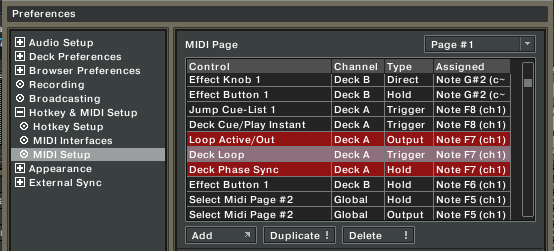
In the above TKS you see that 3 functions are in red which is telling me that they are all assigned to the same midi button. The “Loop Active/Out” command tells my midi controller to light up when the function is engaged. I have deck phase sync set to “HOLD” so it only works as long as the button is held down. Then I can adjust the sync manually to suit the song.

What does Deck Phase Sync do?

It automatically lines up the peak transients (highest points of enegry, usually the kick and snare) of 2 songs. It does not match the tempo but lines up the beats so they are hopefully in time.

Why would you do that?

When you start working with multiple micro loops, things can get confusing. Releasing the loop on time is almost impossible, especially if you want to release several micro loops at once. In Ritchie’s example he has 2 tracks mixing together and just before a build up drops 2 loops, works them into a mush and then releases both loops. Since releasing the loop also engages a temporary sync, the tracks will release on time together- a nearly impossible feat otherwise.

Uh-Oh

You might start playing around with this technique and realize:
“cool, this works great on most tracks but some come back together and are slightly off”. That question brings up a very important topic that we will cover next week on Monday. Its questions of Phase, beat markers and on the fly beat marker position nudging!


14 Responses to “beat match multiple Loops”


  1. 1 BentoSan

    Good write up on an interesting technique :)
    *thumbs up*

  2. 2 Zac Kyoti

    Man, I cannot live without this technique. I’ve got my VCI set to phase sync cue triggers, loop in’s and out’s. Of course if only one deck is playing, the timing is more free (since phase sync is dependent on multiple audio sources), but if many things are playing, this technique achieves a tight, locked feel that keeps things from getting too messy.

  3. 3 Walid Ismail

    what i do is sync on play/pause, and sync on loop, so when i press play, sinc is toggled on, when i loop in, its toggled off, then when i loop out, it resyncs back to the master. works great for me. just be sure to notice when its sync on and when its not. i cant believe i’m going to have to rebuild my custom tks from scratch when traktor pro comes out.

    oh well, autobeat grids

  4. 4 DJ PEP

    I am having troubles working with four decks…ritchie has the ability to use many volume controls using 4 decks. With the VCI-100, we only have two volumes to work with. Is there any way to use the four decks correctly using two volume controls AND I am confused about the sync button while using 4 decks, but mainly volume. Can someone explain this in term that I can understand.

    Thanks! :)

  5. 5 Walid Ismail

    I am having troubles working with four decks…ritchie has the ability to use many volume controls using 4 decks. With the VCI-100, we only have two volumes to work with. Is there any way to use the four decks correctly using two volume controls AND I am confused about the sync button while using 4 decks, but mainly volume. Can someone explain this in term that I can understand.

    Thanks! :)

    yes there is a way, but let me point out that richie is using an exernal mixer, the xone 92, which has 4 channels. i am confident that richie uses traktor externally because there is no way to control everything in 4 decks of traktor using a xone 1d controller, or 2 for that matter. if you want to use solely the vci 100 for controlling 4 decks in traktor INTERNALLY, i would suggest you use midi pages to assign deck c and d. other than that, i don’t see how you can have eq, channel volume, fx, looping, crossfading and the other features. i use one of the black knobs on the top right of the vci to switch to midi page 2 when i want to enable scratching, but the same can be applied to functionality of the 4 decks. of course, it would be impossible to manipulate deck a and c, a and d, b and c, or b and d, at the same time, but it could work like that.

  6. 6 arween

    hi i would like to know how did hawtin in the same video automatically expand his browser list when he searches for tracks and as soon as he loads it into the deck the players expand and the browser window collapses..

  7. 7 Walid Ismail

    hi i would like to know how did hawtin in the same video automatically expand his browser list when he searches for tracks and as soon as he loads it into the deck the players expand and the browser window collapses..

    that one is simply using midi messages to toggle the different views of traktor. like for instance, traktor has set “q” as the default search. you can add to that by also assigning it to the browser view. and when you find the track, you can assign a midi button to load the track and to switch to the 4 deck view or the one you use.

  8. 8 ~Newbie AJ

    Thank you DJTT - You are awesome , and I thank you for answering my questions. I asked everywhere, and no-one either could, or would help. Even the guys on the Forum for Traktor at Native Instruments (pampas so and so’s if you ask me) , wouldn’t help me at all. So I thank you a ton!!!
    ~aJ

  9. 9 ~Newbie AJ

    One more question… Does anyone know the name of the first track in the Hawtin video?? I’m dying to find it, can’t find it anywhere, not even beatport.

  10. 10 Walid Ismail

    One more question… Does anyone know the name of the first track in the Hawtin video?? I’m dying to find it, can’t find it anywhere, not even beatport.

    im not sure which one you’re talking about, in the looping video displayed above, the track is called Ezit, by Frankie, got it off beatport for 1.49

  11. 11 ~Newbie AJ

    God this site is awesome. Thank you so much!!

  12. 12 Cre

    Hi ean

    Is this function also included in the “VCI-100 SE TKS Version 1.4 (TT- Style) PLEASE USE THIS ONE” tks??????

  13. 13 lost_poet

    Hey man! great article. It is amazing how simple the idea is and yet it does wonders! it is just sheer brilliannce! thanks for writing about it.

  14. 14 imalix

    Akai MPD32 Browsing through playlist problem

    Hi, does anybody know how can I assign one of my endless knobs to browse through playlist in traktor 3.4?
    I tried to set it but I can’t control it properly. I wold like that when I turn it left it goes down, and right-up in track browser.

    Akai has option for NRPN functions but when i tried that in Traktor it crashed every time.

    Any help help appreciated!

Leave a Reply

Quote selected text