

Native instruments has announced the newest release in their dj line today. It is called Traktor Pro and will replace Traktor 3 and Traktor Scratch with one unified piece of software. Owners of the audio 8 will still be able to control Traktor Pro via time code but every user will now enjoy the same features and share a common software. The underlining technology behind Traktor has been re-written, unified and improved on a number of different fronts that have resulted in some important changes.
I had the fortune of spending a lot of time with the Traktor team in Berlin this year working with the new software as it was developed and during beta testing. This has gave me the chance to understand more about the concepts that went into the new version and work with the new features extensively.
The Big Picture
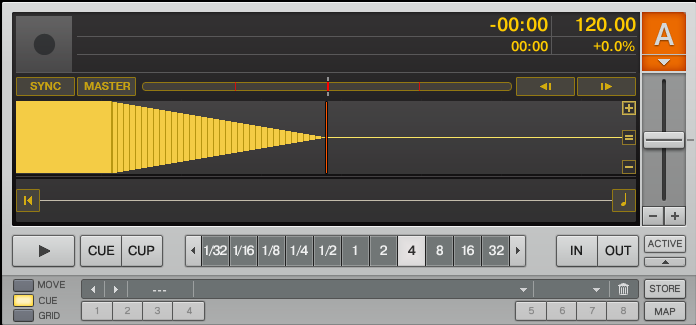
Unify and simplify seems to have been the mantra for the Dj team at NI and they have succeeded on both fronts. Instead of focusing on radical new features, the team has gone back to the drawing board and re-fined many important aspects of their dj tools. Not only did this mean a unification of their 2 dj products, Traktor and Traktor Scratch, but it also unified how users interact with their software compared to industry standard hardware like the CDJ-1000. The user interface, midi mapping area and many other sections have also been re-tooled to make interacting with this impressively flexible environment less daunting for the beginner and pro alike.
Take a look Inside
The New FX
The most radical feature update you will receive with Traktor Pro is the FX section which has been completely overhauled. Not only do you now have 20 amazing new FX to choose from but a very flexible way of working with them.
Dual FX slots
Instead of a single FX engine per deck you now have 2 dedicated FX slots and any of the 4 decks can be routed to those slots. This means that you can dial in your 2 favorite effect settings and send each decks audio signal to those FX at any time. Since there are more than 20 FX you may want to use more than just 2 at one time. To aid you in that process each deck can run in 2 modes, advanced and easy mode.
Easy and Advanced mode
Advanced mode (on the right) only allows a single effect per slot but enables full control over all 4 parameters in that effect. Easy mode (on the left) give you control over 3 effects per slot but you only have one knob per effect. In what appears to be a nod to controllerism each knob in easy mode controls several parameters and creates a musical interaction as you sweep through the full range. the result is fun, easy and similar to the super knob concept we have been pushing for a while here on the blog.
In addition to the 2 effect slots, every single deck comes equipped with a HI/Lo pass filter. The same technique integrated into our own VCI-100SE but now dedicated to each channel.
Audio Destruction
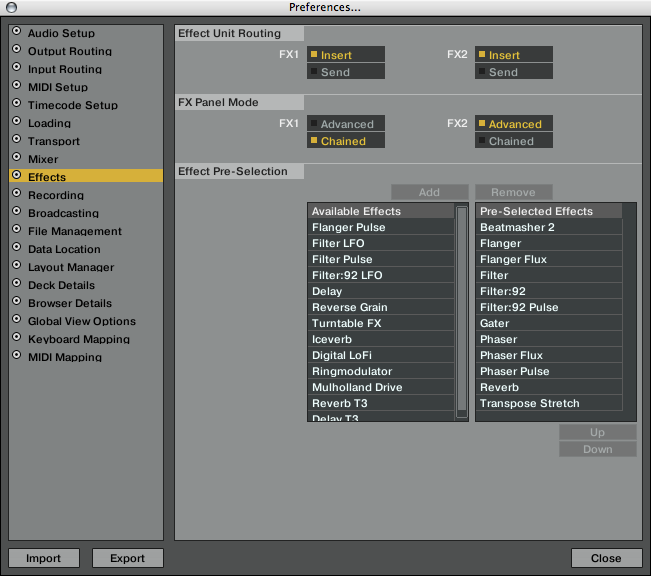
The new effects do not disappoint with a wide variety of incredible sounding tools that live up to the NI name. Native reached out to Tim Exile, who I interviewed several years ago, to help create several of the patches and the results are fantastic. Layer 6 of these effects on top of each other and you can effectively morph any song into an unrecognizable soup. Those that want the flexibility of VSTs may be left out but will not find themselves short of good options to choose from.
Cue Points
The theory behind cue point creation and management has been re-formated and expanded. The biggest difference you will find is the shift towards the pioneer style of cue point and loop integration. Loops and cue points are stored in the same bucket of 24 slots and then can be mapped to 8 available hot cue pads. The simplification of the interface was a much needed change. Instead of endless panels dedicated to cue points and loops, you now have a unified interface that is always present.
Cover Flow
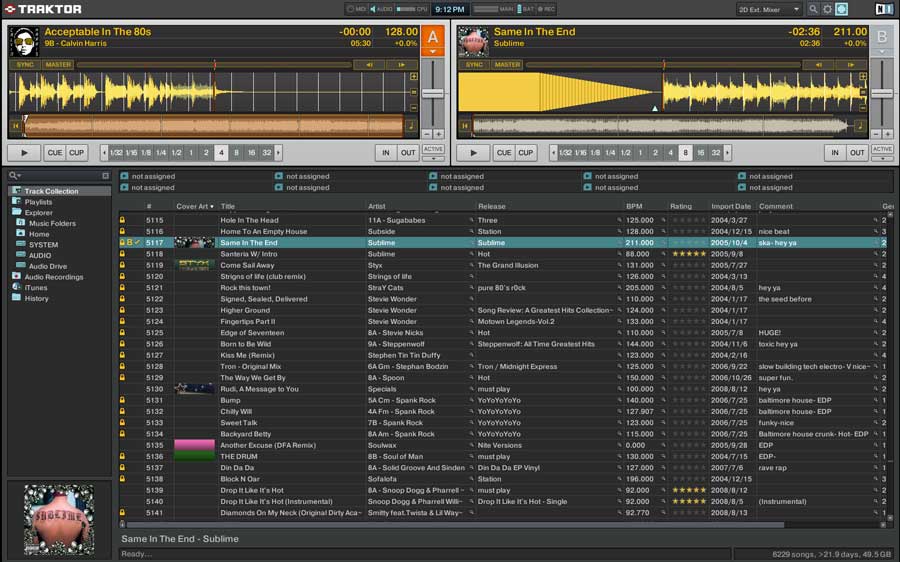
The integration of cover art into the browsing process and deck headers looks good and only makes me wish that Beatport actually provided art work! Overall, the look and feel of the new interface is very clean, strong and dare we say, Über Deutsch?
The Casualties

As with certain national budgets, when it comes time to strip down to the essentials, some extraneous features eventually find their way into extinction. While some may be disappointed at their loss, the net gain- more stability and greater time spent on other functions, is a reasonable compromise.
So what did you lose?
- master fx (but the same thing can be achieved with the fx slots)
- native mix recorder
- integrated beatport
- various midi mappable controls (some will be missed)
- Your old TKS mappings (Traktor 3 TKS files will not work with Traktor Pro)
The bottom line
____________________________________________________________________________
- The software will be free for those that own both Traktor 3 and Traktor Scratch.
- available starting November 1st
- Traktor Pro will be 199 Euro/ $229 Dollars, Traktor Scratch Pro will be 599E/ $669 (with audio 8)
- Registered users of Traktor 1,2,3 or Traktor LE can upgrade for 99 Euros/$119 Dollars
And the big question..

Should I upgrade? There are many software companies promising all kinds of new features but few delivering professional, reliable programs that will stand the test of time. While this new version may not unload a laundry list of new toys for you to play with it does continue its development into a mature tool that you can rely on. What your not seeing is the tremendous amount of time and effort put into completely re-writing everything behind the scenes. This version is essentially a brand new piece of software with major improvements to its core functionalities. What does that mean to you?
- Radically improved internal and external SYNC
- a much needed midi programming face lift (less confusing)
- streamlined and more user friendly user interface (no more panels)
- more cue points and hot cue access (CDJ style controls)
- midi pages are replaced by modifiers
- auto beat brid
- improved visibility in the club





DJTT always first with the best news. But has the video already been stripped off YouTube by the powers that be?
Traktor Pro looks pretty damn awesome, and seeing as I’m a sucker for new and fancy looking software, will probably be purchased in the near future.
Some collaborative efforts are needed I think from the community to create a functional .tks for Traktor Pro?
Oh my! I’m still trying to master Traktor 3.4!
decisions, decisions…
Ah video is working now.
I’m glad to at last see more effects and the ability to use three on a deck now.
The Cue point system is much better for Controllerists now with all those assignable slots.
Good riddance to the panels system I say. It was clunky and could never be properly organised.
The GUI looks great. I hope it doesn’t become a restricting program for DJs by losing some of the old features.
This is coming in less than a month and available to existing users of Traktor 3 AND Traktor Scratch? Or existing users of Traktor 3 OR Traktor Scratch?
Regardless, the need for “blank” VCI face plates should definitely be on my X-mas wish list in order for proper labelling of the controller…
Is there VST support for software sequencers?
I guess this goes without saying but hopefully you (Ean) will have a TKS that works with Pro. I’m willing to switch and experiment as soon as the upgrade link appears as long as there’s an SE tks file to go along with it! Not to mention a few Ean “how-to” videos to go along with it. It looks pretty user-friendly but I could use some more detail on how to work the various effects & new cue system.
I second the >>> ean make a new VCI-100 SE file for the new version.
I’m sorely pissed about the missing Native Mix Recorder for now.
I REALLY REALLY use native mix recorder all the time. Just seems it will come in a later update.
But overall, this update seems fresh, and for me, happy to see that it will be free.
I’m really happy with these changes. The UI stuff is huge.
I’m gonna guess and say that if you have an SE and u upgrade, u’ll have to get the upgrade chip and wait for an upgrade to the firmware (or use a midi translator); as well as wait for (or create) a new tks.
..and, just when i thought my SE was special. No, but i will be waiting this one out on the sidelines for a while.
Ean, so if I have Traktor 3 & Scratch the upgrade is free?
Anyone know if you can install Traktor 3.4 and Traktor Pro side by side or do we have to jump straight into the deep end?
Second, how has midi mapping improved? Please tell me you can click on buttons/knobs in the GUI and assign them to your controller.
I cant wait to try demo version… Loks realy cool, loops ar crazy, 20 effect’s, cue point… :D
Traktor Pro and Traktor 3.4 install on the same machine with no issues I was able to determine. They seem to run fine together.
Traktor Pro looks so bold and professional! GUI is crazy and 20 EFX, cue points, loop, etc.You can’t beat that!
Ean, will you be making an TSK of Traktor Pro to use with VCI-100?
Do you know if all the buttons in Traktor Pro will fit on the VCI-100?
Thanks!
humm looks good to me!!! cant wait till nov 1st!!!
PRE ORDERED !!
It looks like an interesting package with nice new features. However, at the Traktor Pro website I noticed the following about system requirements:
Windows® XP (SP2, 32 Bit)/Vista (SP1, 32 Bit, 64 Bit), Pentium IV or Athlon 1.4 GHz (SSE1), 1 GB RAM
Mac OS® X 10.4, Intel® Core™ Duo 1.66 GHz, 1 GB RAM
This looks like I can’t use Traktor Pro on my good old Mac G5 on which I am currently running T3 in my studio :-(
Also was hoping Traktor Pro would allow plug-ins, so for example you could strap a Vintage Warmer on the master output. Ean, do you know if this ever has been considered by NI?
Best regards,
Danny
wicked bring on november 1st!!!
hope you will have a vci-100 se file ready for us ean since you get to beta test it… any word on the new midi functionality??
What can I say, it was about time. It seems that those major developments made by Ableton and Torq had finally made NI scratch themselves.
I really hope that it won’t break user flow too much, specially for VCI-100 owners.
i want to see how well the auto beat grid works. i mean, i like setting them up myself, but it can get a bit boring after the first 100. also i would like to ask if NI has implemented ways to overwrite the bpm’s of songs that are already there.
i made the mistake of letting Mixed In Key tag in the tempo, and for some reason it leaves it as a whole number (when i try to delete the bpm from the tag it shows up as 0 bpm in traktor and won’t analyze), which does not do me well in Traktor, since the track is off by a few hundredths of a beat per minute
i still cannot configure Traktor 3 to overwrite the current BPM and analyze it according to its own algorithm. Any help with that?
I might just stick with Traktor 3 depending how well it goes with my EeePC 1000. Or maybe I’ll just get a new laptop altogether if Traktor Pro is that much better.
From the features i understood there will be some kind of auto-beat matching improvements, like VDJ…
yea vdj does a decent job of auto beatgrids, but not the best, i would think traktor developers would have spent a lot of time with perfecting their algorithm.
Hell Yes!!! FOR FREEE WWOOOOOO… traktor scratch and traktor 3 hahah..
Can’t wait.. for traktor pro
While switching from T2 to T3 I had a feeling like my hands were severed off. The changes in GUI were too big that I was practically ovverhauled by my (dj) friends. Hopefully this won’t be the issue with this version.
Benny, beeing mad about removing the NI Mix recorder is saying one thing about you…and that’s saad.
It is a good thing to see NI keeping up with development. If they have done this right there will be more users for them, less for serato.
I still miss fixed gui of T2. :-) It reminds me of DOS Fast-Tracker software.
typo: “auto beat brid”
I am really keen to see what Ean can do with this version seeing as he has no doubt been involved in feature requests and the direction of the application.
Ean do you know if Traktor Pro will come with out of the box tks files like v3.X does? this could be quite handy for us at least until you make a vci-100 se version :) also have the midi page issues been sorted.. will 4 deck setup on vci-100 se be a reality etc..
If you really want to upgrade Traktor to anything, try mixvibes producer.
YES ! For Free :)
Bye Bye ugly brown color…
I’m doing a lot of radio-style mixing and I was really hoping this would finally contain a software sampler, even if it’s a very simple and small one. I know I can make a track that has all the sounds in it and just assign cuepoints, but this is just a pain in the rear as they’re not really static until the end of time :/ Anyone tried djDecks here? How is it in general & in regards to the sampler?
Any idea if 14bit MIDI channels are now native supported so VCI-300 would work fully?
It would be nice to know if there is native support for 14 bit midi channel. Anybody?
One more thing…it amuses me that I heard about this from DJTT before I got the NI email newsletter about it.
No Native Mix Recorder?
Does this mean that we cannot record our mixes?
If so, I am sticking to the current version…thats a biggy for me!
DJ PEP, the native mix recorder is different from the audio recorder in Traktor. The audio recorder will still be included, from what I can tell, and I think that is what you are referring to.
The Native Mix Recorder actually records all the actions within Traktor, not just the audio signal you are feeding it.
Cool Traktor upgrade. I def. want it but I was just wondering how it will impact the VCI & VCI SE (hopefully not too much) in terms of being able to map everything with a comfortable contol layout. Please work your magic, Ean! ;)
Very well written. I loved the article itself.
I can see some serious reasons for the upgrade.
Loved the new UI.
PS: If you ever get tired of djing (yeah, right!), you could definately live off blogging.
Cheers!
NI have said they will be adding the Native Recorder in later updates so its not gone for good…
So Ean, from your experience of Traktor PRO, how well will it map to/work with our beloved VCI-100SE?
damn now i have to buy a new computer :( with all that gfx … i got only 1024*768 on my lappy bummer ….
whats the system req?& is it compatible with BCD2000?
It will work very well! Now that pro has duplicated our custom double filter function we will have to get creative with that knob but I have some ideas on how it will actually work out very nicely. We will release a TKS sometime soon that matches the SE labeling.
Nice one Ean.
I’ve been testing the TPro BETA now for some time and am not interested in upgrading until your VCI-100 SE is working as before (or better
The interface looks pretty good. I was rather hoping they would come up with a 3-deck view though. Is there any way to get 3 decks side by side? When you switch to the 4-deck view you lose far too much screen real estate. I think if there was a way to fit decks A, B and C in one line that would be ideal…
couple questions:
can you drag and drop the album artwork into traktor pro?
and also: can you remove the column so it doesn’t display the artwork?
I’m looking forward to giving this a run out. It seems to address a lot of the issues I have with Traktor. The revised cue and loops looks particularly interesting.
WHEN IS THE DEMO RELEASED??? The guy in the traktor pro videos said i could download it today after watching those short, teasing videos. HE LIED TO ME!!! i hope it comes out really soon, i wanna play with it NOW!!!! EXCRUTIATING!!! AHHHH!!
Everybody is asking for tks files for the vci 100SE…Can somebody tell me if traktor pro will work with the vci 100b ???
Are there tks files planed to be released for the vci 100b?
Hi Ean,
Im well excited bout this release but I am wondering if it will be compatible with the good old vci 100, not the se version, just standard? Im seein a lot of talk about se but not the origional version! Also, will there be a .tks for the origiona vci 100? If someone could let me know that would be great, as it will make or break the deal for me!
Double A
No Native Mix recorder?! COME ON! It’s one of the most used features! NI: Please, pleeeeeeeeeeeaaase, bring it back!
Can somebody answer his question? It would be very nice!
Yes absolutely, Traktor is going to be supporting most digital dj devices natively and then we will be creating our own special mappings for most of the major controllers.
Thank you Ean! You saved my life ! ;)
I just got new-shining faderfox micromodul dx2, hoping there will be midi mapings available for it soon, otherwise I gonna stay with Traktor 3
@Poltone: Can’t you think of your own MIDI settings.
Damn! Learn your instrument BOOOYYYY.
faderfox dx2 doesen’t have midi learning option…
so without midi maps for traktor pro i will have to stay wth traktor 3 I guess…
I rest my case. (BTW, the question is: does Traktor Pro have midi learning.)
traktor pro does have midi learn capacity and it will also support many dj controllers natively.
Awesome , i will update my tracktor 3 i guess.
Hello Ean, I was looking for the download section for Pro for users with Traktor 3 and scratch and I couldnt find it. Can you direct me to the link or place. I would appreciate it.
thanks,
Felix
@Felix: you have to shop online first i guess, choose an upgrade from Traktor + Scratch
Hey Ean,
Can you explain the radically improved internal and external SYNC and auto beat grid?
I’m an Ableton user who has dabbled in Traktor and could never get the SYNC and beat grids to line up. Many of my songs will never line up unless I’m constantly adjusting the pitch. I love the song browser in Traktor and I would totally switch if the SYNC was improved to match up tunes with the power of Ableton.
Thanks
Thanks ChachaKoala for the fast responce, I visited the shop before and they havent posted the traktor and scratch owner free upgrade. I did read a threat saying they will post that soon.
Hello to all on DJ Techtools!
I just downloaded my free upgrade to Traktor Scratch Pro and was pleasantly surprised.
As mentioned in the review, it has been simplified, and for me this solves a lot to the issues I was having with the earlier version. Don’t get me wrong I wont be trashing the original Traktor 3 /Scratch anytime soon. The new set up will make it a lot easer to use in a live setting, what do I mean by that? Well see I play in a band, and I’ve found Traktor a great tool for writing, remixing, and just plain experimenting. I have been hesitant to incorporate Traktor into my live rig. I currently down sizes to a Rane TTM56 Mixer, Korg KP2, my trusty Roland SP808 Sampler, and yes I do say the “best turntable” for playing on stage with a full band the Numark TTX.
OK..OK…Yes I still have 1200’s at home and love them, but they were never stable enough to withstand a jumping guitar player. Anyway as we head into the studio to record or next album, Traktor Pro will be a important part of my new rig. The new easy to access features will give me the quick access to effects, looping and cue points.
All of which will take over some of the duty’s of my sampler, and give me back turntable control of those sounds. The new effects section will be used to control my Pre- Kaoss Pad effects so I can leave the KP2 for strictly delay’s. The next big thing is to get a new midi controller, and yes I would love to have a VCI-100 but I am looking for other options, any suggestions? Over all I think that the new Traktor Pro is great and I’m glad I have both versions “old and new” there is plenty of room for both in my studio.
-DJ Lock Mess
http://www.myspace.com/lockmess
call me crazy or maybe my music doesnt have the correct beat grids but the sync feature is no where near what i thought it would be. everyone is talking it up and i am disappointed. maybe i just need a tutorial about it. any help???
maybe delete them from the collection, add them again and analyze again? have u tried that?
This is too expensive when have already paid for T3. Also features like the large effects selection should’ve been there some time ago.
Word! Brian
It seems that developing Traktor takes too much time/money/resources. Therefore they’ve been gathering all forum ideas and delayed this version until it was the right time (did the ITCH release triggered it, I can’t remember).
Many companies make additional (free) tools for handling files (ie: MixMeister BPM Analyzer) but NI does not have time to make one easy Traktor mp3 ID tag editor even after many accusations that their editor/tagger does not work well. Maybe I don’t want to start T3 every time just to edit one song, overkill is the word. While on the subject, anyone saw directory mp3 player “1by1″. That’s the amount of spartan interface (and speed) I’d like to experience while dditing vast amount of tags.
NI does a great job with every release but it seems like they’re undermanned for the task of keeping all of their sofware up-to date/wishes. I hope the’re having fat paychecks for my money this time is going to be spent on booze and cracked version here I come.
I am a software developer, and I dont like beeing held by the balls. Love.
Ean, what happen to the write and read commands in pro when you right click are they some where else. and is their a mapping, tsi, for the vci 100 silver.
much respect
yes their mapping is for the VCI-100 silver but we just published our own mapping that will work with all VCI-100’s.
http://www.djtechtools.com/2008/11/10/vci-100se-traktor-pro-sweetness/
thats a good question- and one I am still trying to find the answer to
hiya ean,
just wanted to confirm somthing here. with traktor scratch pro can you have a faderfox dx2 plugged in and through traktor asign any of the buttons to any part of the traktor interface. of course the labeling would be wrong when reasigned but nothing abit of paper pen and sticky tape wont fix.
plus a secondary question to you and evryone else i am using timecoded vinyl plus traktor scratch pro and want a small compat device that i can map looping functions and efx funtions to etc so i can control loop funtions from this device faderfox is the only one im noticing at theminute but have you guys got any other sugestions?
thnks kris