VCI-100 TKS fix + Jog Wheel 101

There is a nice thread going on in our forum right now about fixing the “waaaah” sound that some users have experienced when trying to scratch with a VCI-100. This was not the hardware problem that originally reared its head when the VCI first came out but a user having the same issue with a brand new vci-100. The always helpful forum members on djTT found a solution to the problem that I also came across several months back. I only now noticed that the actual public TKS files were never addressed. In order to fully grasp the problem, and the solution- let me explain how the jog wheel works so you will walk away with a better understanding of hardware in general.

Jog Wheel 101

Most touch sensitive Jog Wheels send out midi messages at 3 important times:

  1. The first time you touch the wheel it sends out a NOTE ON- this turns scratch mode on telling your software to stop playback.
  2. When the wheel is moved forward or back its sends out a single CC value that can range from 0-127 with 64 being neutral. So values from 65-127 tell the software your moving the wheel forward and 0-63 indicates your back spinning. When at 64 the software knows that nothing is happening and your are essentially “holding” the record.
  3. Finally when you stop touching the sensitive zone of a jog wheel it will send out a NOTE OFF message telling the computer to turn off scratch mode. This is the record release function, and when you release the jog wheel the song should spring back to full speed immediately.

The original VCI problem

Instead of sending the note off info when a hand left the wheel, the vci sent the message when the wheel stopped spinning. So instead of restarting the record on time, there was a ramp up that delayed the release depending on how fast you threw the jog wheel. This was fixed by Vestax when they released firmware version 1.2 late last year which sends out a note off message at the right time. If your not sure which version you have, read this post.

The current problem

The new firmware sends out 2 new sets of notes when the wheel is released and when it stops spinning. Because the public TKS file is incorrect the ramp up problem will not be fixed unless you modify the midi mapping settings.

The old TKS had assigned deck scratch ON to C3 on deck A and C#3 on deck B which turns off when the jog wheel is released (ramp up). Vestax added additional notes which turn off when your finger leaves the platter (no ramp up).
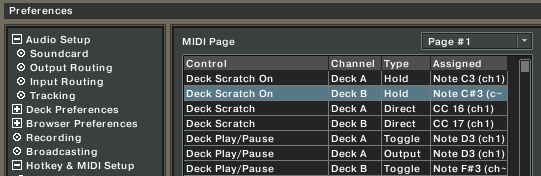
The TKS should be mapped to the A#2 and B2 notes as shown here:
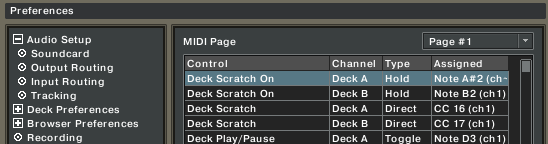
The Fix.

Download an updated generic VCI-100 TKS bellow or make the above changes to your own midi mapping settings.


Download the updated TKS

19 Responses to “VCI-100 TKS fix + Jog Wheel 101”


  1. 1 BentoSan

    Hazaa that makes a lot more sense than the forum post !

    Still waiting for my update device from midifidler, that is being shipped with my midifighter from midifidler lol - i am dieing over here, especially after reading this :p

  2. 2 Cre

    Hazaa that makes a lot more sense than the forum post !

    Still waiting for my update device from midifidler, that is being shipped with my midifighter from midifidler lol - i am dieing over here, especially after reading this :p

    Hi Ean, is it possible to release the VCI-100 SE TKS Version 1.4 (TT- Style) file with the above mention ed corrected

  3. 3 Niels

    I really dont no what the deal is but for some reason my traktor does not have the B2 note available

  4. 4 Chris combe

    I second what Cre said!!

    1.4 version please..

  5. 5 fatlimey

    This community rules. Well done people!

  6. 6 Ean Golden

    Hi Ean, is it possible to release the VCI-100 SE TKS Version 1.4 (TT- Style) file with the above mention ed corrected

    The SE TKS files always had the correct mapping and the current 1.4 version is correct. The only people that would have this problem are those that have downloaded the stock TKS files from vestax.com

  7. 7 JesC

    Thanks Ean, Ill check it out. I really dont scratch, but I do use the jog wheels to cue up my songs.

  8. 8 Niels

    really though, I don’t no what to do considering I dont have a B2 midi note, what should I do

  9. 9 Niels

    also when I load the tks file it just loads the changed scratch slot to random values

  10. 10 Ean Golden

    also when I load the tks file it just loads the changed scratch slot to random values

    are you using an old version of traktor?

  11. 11 Ean Golden

    also when I load the tks file it just loads the changed scratch slot to random values

    you can also try to midi learn the jog wheels on your own. Just midi learn whatever note happens when you first touch the jog wheel.

    note- if you dont have a vci-100 firmware version 1.2 or higher, this fix will not work.

  12. 12 DJLp

    So if this is all about CC note values, might an “accelerated” setting do the trick for those of us who want a more turntable-like performance? For instance, with scratch DJ’s…it’s all about the slip mats so as soon as you let go of the record, there’s instant action. Now I will say “scratching” on our VCI-SE’s is not a problem in my opinion. It’s cutting and backspins that are the issue. Cutting (or chopping) is pulling the record slightly back and then forth; equivalent to what the pause button does on the SE. However, that quick forward motion has a slight drag. Might accelerated CC notes solve that problem?

  13. 13 Niels

    alright well I my traktor version is of 2007. I wouldn’t think that would make a difference but who knows.
    I do have firmware v 1.2
    and when I midi learn the jogs wheels they just learn the same default values.

  14. 14 Ean Golden

    when I midi learn the jogs wheels they just learn the same default values.

    Then you dont have the new firmware. make sure you learn the value for when you first touch the platter, not when you release it. these are 2 different values.

  15. 15 Niels

    that is incredibly weird. sorry for the hassle. I do have the sticker that sayz v 1.2 and it passes the on/off jog wheel light test but I guess that proves irrelevant
    well I just remembered I have v 1.3 lying around, so time to upgrade.

  16. 16 Emil Brikha

    No credits to me ey? Damn you people! :P Also, it was not the help of DJTT people that I solved it. I was randomly browsing forums for something else when someone touched the subject and there it was, the holy answer to my dreaded problem.

    On the other hand, I am DJTT forum people so, okay, DJTT forum people did help to provide an answer. :)

    In any case, thanks for bringing this into the light because scratching has been the only sucky feature since I bought my divine VCI 100 and now it is finally omnipotent.

  17. 17 mycole (B33SON)

    Now if only I knew how to scratch I’d know if the ramp up issue was solved finally.

  18. 18 Ean Golden

    Thanks to Emil for bringing up the subject, and finding the solution on another forum and posting it on ours. :)

  19. 19 Kyoti

    Hello to everyone - I’m a fairly new VCI user, and am new to DJTT. Great site by the way, thanks Ean and the community for really stepping up and creating a valuable resource. I just wanted to say that I got around the ramp up problem with notes A#3 and H3 (at note on), which work great. I’ve never heard of using A#2 and B2, but if that works that means that v1.2 is sending out at least 3 different note on messages when the jog wheel is touched. Crazy. I was wondering why no one noticed that Vestax’s stock tks file was still using old values, wasn’t sure if I was missing something…

Leave a Reply

Quote selected text