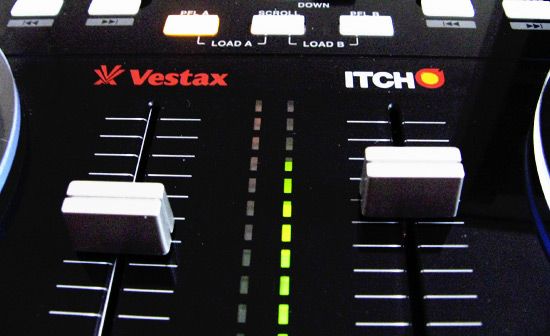
The Vestax VCI-100 made quite a splash in the digital DJ market, selling a significant number of units and raising the bar for DJ MIDI controllers. The most significant difference between the VCI-100 and its larger cousin, the VCI-300, is more conceptual than physical. The VCI-100 is a multipurpose MIDI controller designed to interface with a broad range of DJ software by offering a generic palette of controls that could suit many purposes. The VCI-300 adopts an entirely different approach. It has been designed specifically to control one piece of software, the Itch program from one of the leaders in the DVS world: Serato. The goal, as explained to me several months back, was to eliminate the disconnect between hardware and software design so that all the important controls in the software are found in a logical place on the physical mixer. The end result would be a cleaner marriage between the virtual and analog world and a much easier setup for the user. Anyone can plug in a VCI-300 and have it work right out of the box with the supplied Itch software — no MIDI mapping or tedious software setup required.
HD PERFORMANCE
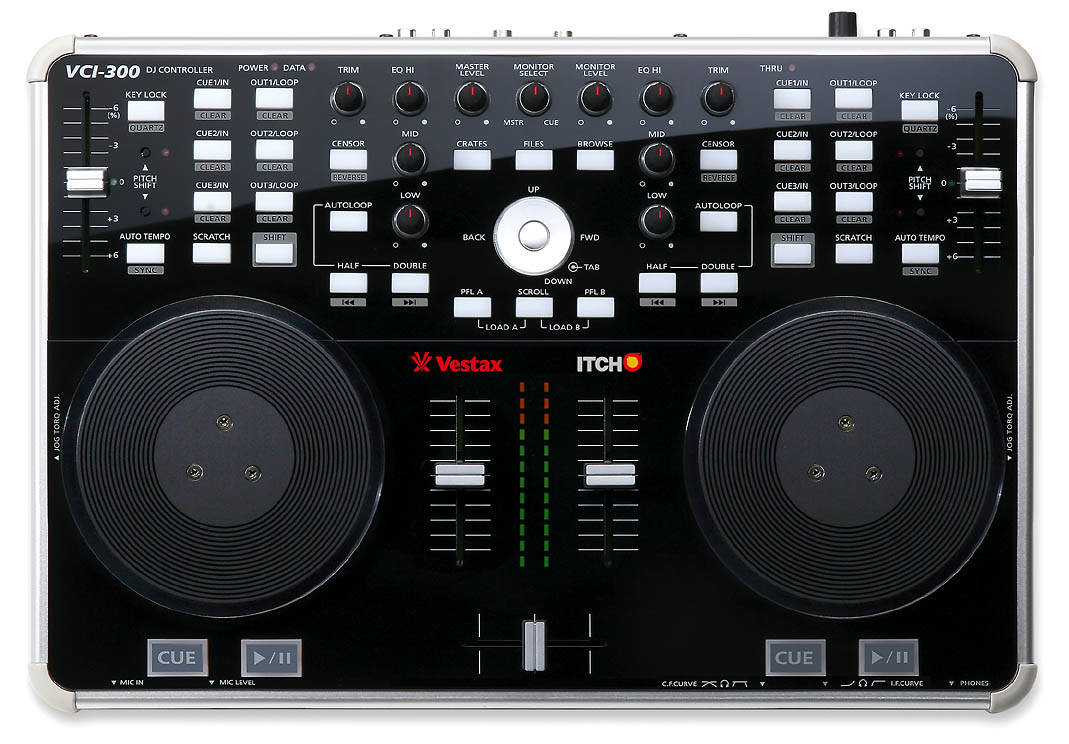
There are a few specific things that are unique to the VCI-300 that will make a difference in your performance. The jog wheels and pitch faders, for instance, are sending out 14- and 7-bit MIDI, which is much higher resolution than the standard 5-bit found on most MIDI devices. The length of the faders has also been bumped up to a more respectable 60 mm, which provides ±6 percent of smooth gliding tempo adjustment. Tension adjustment and a larger diameter lend a more professional feel to the jog wheels while maintaining the smooth action that made the VCI-100 popular.


If you hope to use the VCI-300 as a standard MIDI controller, you might need to get creative with your mapping, especially for effects-heavy programs like M-Audio Torq and Native Instruments Traktor. The VCI-100 includes 48 assignable buttons and 19 knobs, including layers, while the VCI-300 offers 40 buttons and 11 knobs. That’s completely sufficient for the requirements of Itch, which does not have any built-in effects or advanced transport controls. While fewer controls may not sound like an upgrade, the additional space does give the unit some much-needed breathing room.
The only disappointment in terms of physical controls are the main transport buttons, which, while getting a much-needed bump in size, feel a tad bit squishy. The knobs are the same rubberized type found on the rare VCI-100 black edition; they have a nice, smooth feel and clear markings. The remainder of the buttons are the stiffer variety found on all VCI-100s, which work well and are easily found in dark clubs thanks to bright LEDs. The cue-point triggers are the only buttons that might have benefited from a performance upgrade. They work well for re-triggering but are a bit stiff for frenzied rhythmic playback or controllerism.
ITCHY AND SCRATCHY
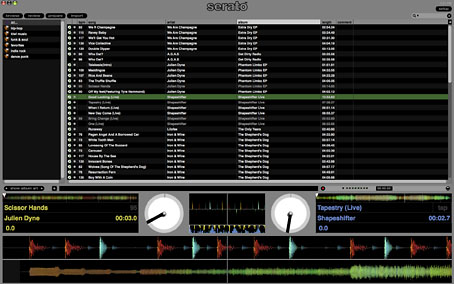
Thanks to the handy presence of a dedicated hardware controller, Serato had the luxury and intelligent forethought to completely strip down its new software to the bare essentials. A favorite quote from the Nobel Prize-winning economist Herbert Simon: “(Information) consumes the attention of its recipients, hence a wealth of information creates a poverty of attention.” Itch follows in that minimalist line by only providing information onscreen that is essential to the mix, including file browsing, waveform overviews and critical song information. Everything else, including loop and cue status, is clearly indicated by the brightly colored buttons dedicated to those functions on the VCI-300.
Itch also introduced a new concept in digital DJing, which after a few hours of use completely won me over. Serato placed two ultralong waveform overviews along the bottom of the screen where the eye naturally falls while playing. The trademark phase-comparison display from Serato Scratch is present, but Itch now also displays the full waveform overviews in an extra-large full-color format, making it supereasy to see exactly what is happening with your songs. My only fear is that this may continue to reinforce the trend of DJs mixing by sight rather than by ear. To be honest though, I even found myself cheating, using the extra long waveform display to keep mixes in time without headphones.
You may ask, “Can I buy just Itch and run it with another MIDI controller?” The VCI-300 is to Itch as the Scratch Amp was to Serato Scratch — required for full operation. You can run Itch without a VCI-300 connected, but you’re limited to song-collection management; all DJ functions are disabled. While other controllers will officially support Itch in the future, the VCI-300 is the first one on the market.
Now for the question I get most, “Can you really scratch with it?” Yes, the VCI-300 takes a big leap forward in this department. The combination of the high-resolution performance and a lot of fine tuning in the software mean that the VCI-300 and Itch provide better scratch performance than any out-of-the-box MIDI controller I have tested so far. I wouldn’t expect the VCI-300 to replace your turntables, but for a 10 lb. device, it’s pretty darn impressive. Slowly back-cueing tonal phrases while transforming sometimes creates a noticeable digital warble, but the accuracy and timing is spot on with zero sticker slip.
A word of warning, however, these nice high-resolution jog wheels are currently supported by very few programs out there. You won’t be able to use those specific controls with other digital DJ programs that can’t read high-resolution MIDI. Fortunately, work-arounds exist, such as a translator from DJ Tech Tools (www.djtechtools.com) called Mini-Translator that converts the VCI-300’s high-res data into high-res pitch-bend data that most DJ programs can read.
IN-HOUSE MANAGEMENT
If you’re familiar with Serato Scratch, then Itch’s browsing and song-management system will also be familiar and user friendly. Existing Scratch libraries are compatible with Itch, so you’ll have full access to all pre-existing cue points and loops. Those who don’t own Scratch and are using some of the other more feature-rich programs out there may feel limited by the lack of effects and flexibility in MIDI assignments. Then again, removing the fluff forces you to get down to business and focus on playing good music, which some people argue is the most important task of a DJ. All the basics are covered in Itch, including Auto Looping, cue-point storage, loop storage, key lock, optional automatic tempo matching and censor/reverse. The quality of how these are implemented varies between each feature, but all of them work as intended and are simple to use.
Auto Tempo Sync is a hotly debated feature that some use religiously and others avoid like the plague. The quality of the sync relies on Itch’s internal beat analysis or on the user manually entering the correct bpm of a song. Itch won’t keep your rhythms lined up, but it will match the tempos of two songs so you don’t have to adjust the pitch fader by hand. While the tempo analysis is good, it’s hardly spot on 100 percent of the time. For those who just need to get it in the ballpark, auto sync will be quite helpful, but for DJs who need every mix to be perfect, tempo sync may not be enough. As opposed to some other programs that offer flexible sync modes, in Itch you must completely disable it to make more precise pitch-fader adjustments.
Auto Loop’s success also relies on how accurate the determined bpm is for each track. Most of the time Itch drops correct loops automatically, but you are really playing Russian roulette with your set; there’s a chance Auto Loop will accidentally kill a blend. The more fail-proof method would be to prepare loops in advance and store them within the song when they are perfect, but most of us DJs rarely have time for that; we’re too busy looking for new songs.
Itch offers really stellar key locking. Serato also makes one of the industry’s best key-lock programs, Pitch ‘n Time. While they can’t just slap Pitch ‘n Time into Itch, there is certainly a quality trickle-down effect here. Even at pitch changes to a maximum of ±50 percent, the kick drum and bass stay tight and solid, keeping your tempos locked and the crowds moving. This especially shines while pitch bending, where you can make really dramatic adjustments to the jog wheels and the crowd will never even hear a thing. In Itch, it was possible to keep the entire intro of “Sweet Child O’ Mine” in time over a beat with flawless tempo adjustments. Pitch bending that all-too-well-known guitar solo normally sounds terrible, and it’s usually a major chore to keep their coked-up drummer in time with key lock engaged.
[audio:http://remixmag.com/remixed_media/audio/ItchPitchLockDemo.mp3]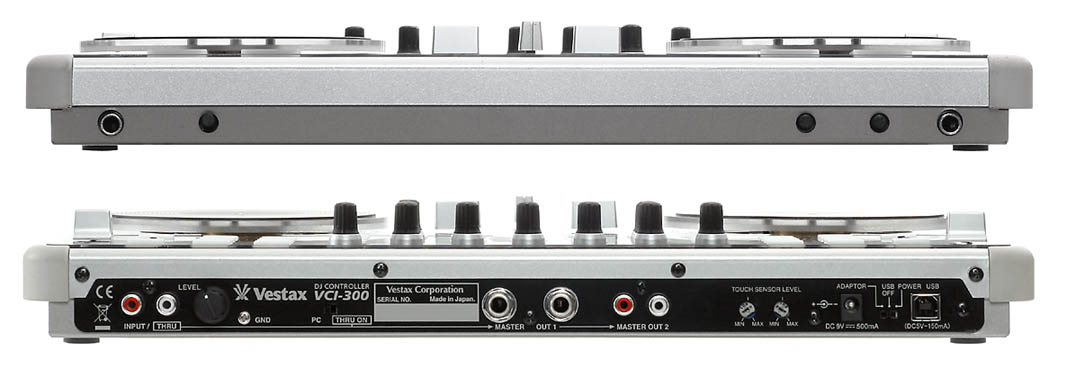
BUMP IT!
The VCI-300 comes with a built-in soundcard that serves most basic needs. It proudly sports a microphone input on the front and headphone output with independent volume controls. Two master outputs (RCA and ¼-inch) on the rear join an analog input that is a handy way to plug in a CD player or an iPod for emergency backup. If Itch crashes, the auxiliary input can be routed directly to the master outputs, so you can keep playing music even if a computer reboot is required. One catch is that you must choose to send either the auxiliary input or the PC output to the master output, so you won’t be able to mix in an external source along with two songs from Itch. The entire unit is powered by USB or via an optional power supply if you need to keep music flowing while the computer is turned off.
The USB soundcard seems to be reliable, with low latency and clean outputs. While I didn’t get the chance to try it in a club environment yet, the VCI-300 was bumping my apartment loud enough to bring adequate complaints from the neighbors.
TAKE IT HOME
Many hoped the VCI-300, would be a bigger leap forward in features, technology and design over the VCI-100. While the VCI-300’s improvements are subtle, many benefits come from the unique strength of combing the VCI-300 with the new Serato Itch software, rather than from just the controller itself. There are two types of DJs I imagine would be most happy with the VCI-300/Itch package: DJs who already use Serato Scratch and newcomers to the digital DJ department.
For the existing Scratch user who wants a low-cost, light way to play smaller gigs and mobile engagements, the VCI-300 will be very handy. If you’re an old-school vinyl guy or a new DJ looking to test the waters of the digital DJ scene, the plug-and-play simplicity of this package will mean more fun and less hassle. Those looking for a MIDI controller that can be used with other software might find the exclusive Itch support a turnoff. All in all, I’m hard pressed to find many complaints, as Vestax achieved what it set out to do: create a reliable, all-in-one digital DJ solution that is well-built and straightforward to use.
Pros: All-in-one design means easy setup and reliable performance. Excellent hardware and software interaction. High-resolution jog-wheels provide precise scratching and pitch bending.
Cons: No software effects or control re-mapping in Itch. Incomplete support of other software.
This article was written for Remix Magazine. Check a backlog of my reviews and articles here.
![ROLI’s Seaboard RISE 2: seamless integration into the expressive world of MPE [REVIEW]](https://s11234.pcdn.co/wp-content/uploads/2023/11/Screenshot-2023-11-16-at-5.02.41-pm.png)