Pitch Bend, Tempo Bend, Jog Bend, CD Touch Jog?

As Traktor and Midi controllers have evolved, the number of possible ways you can assign a jog wheel has increased dramatically. There are more than 10 ways for instance that you can slow down or speed up a song in Traktor 3.4. So which do you want to assign your jog wheel to? Lets take a look at the primary 3.

__________
Pitch Bend
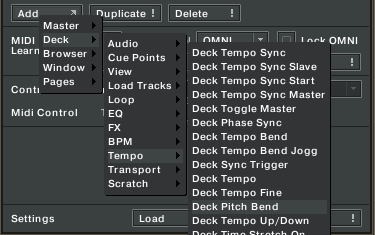
The old school standard, this bends the pitch temporarily slowing down the song with a very audible change in pitch.

pros

  • its going to sound a feel as you might be used to
  • its very adjustable with a wide range of strength from very hard to very subtle. I prefer fine for buttons

cons

  • its hard to keep track of and easy to make adjustments that will throw of your mix
  • even with key lock on you still get a very noticeable “pitch bend” sound
  • not exactly the most “precise” control of the bunch

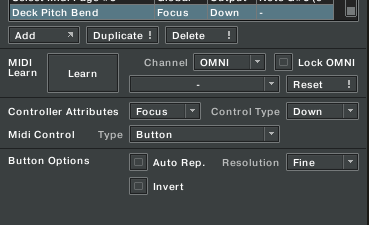
This control works best with 2 buttons or the outside of the vci-100 Jog wheel which sends two different button presses when you move it in each direction. I like to assign each to up and down with a fine setting.
____________
Tempo Bend
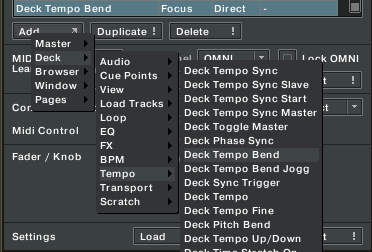
This is the more evolved version of Pitch Bend and is intended to duplicate the “ultimate” turntable form of pitch bending. In old school house days, you were not a good dj if you ever touch the platters to adjust the mix. This was considered much too un-reliable so the pros did it with the pitch sliders instead, temporarily making fast adjustments and returning the fader back to its original position. Tempo bend does the same thing, temporarily increasing the tempo without much of an audible sound.

pros

  • its more precise and has a better feel than the pitch bend
  • there is no audible change when key lock is on and just a slight one with it off

cons

  • there is just one usable setting and that is fine, if you need a more coarse adjustment your out of luck

assign the outside edges of your jog wheels to tempo bend with a pair of Jog Grips installed and thats the closest feeling to a turntable your ever going to get with a VCI-100. Take it up a notch and try assign the inside of the wheel to ” scratch/browse jog” .

___________________
DECK CD- DJ BEND
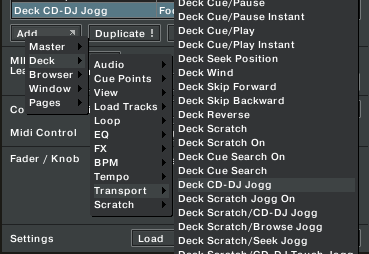
This one does not need too much explanation as it duplicates the behavior of a CDJ-1000 when in CD mode. The inside touch zone of your jog wheel scrolls through a track when not playing and pitch bends when it is. This frees up the outside edge of the wheel to do things like tempo adjustments (as I did in this TKS file).

pros

  • you get 2 good functions in one jog wheel surface
  • the pitch bending feel is more like a cd player

cons

  • if you want to reach and adjust things in nudges, like the edge of a turntable, this one is not for you
  • in order for it to work you must activate the touch sensitive zone of the jog wheel

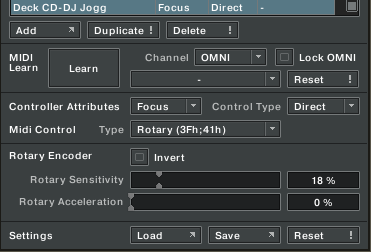
This is a good option and I have been using it for a while. Tempo bend however has given it a serious run for its money and now I really feel I may go back to using the outside edge of the wheel for a more natural feel. Make sure you match the settings bellow and adjust the sensitivity to suit:
Thoughts and Pondering in a digital world

Use midi pages to try several of these out at once. Then you can easily switch between them while mixing to get a true feeling comparison. You can also try them all out by loading the VCI-100SE TKS files here. Many of the settings may not work unless you have the 1.3 firmware but the jog wheels will work just fine for everyone.


12 Responses to “Pitch Bend, Tempo Bend, Jog Bend, CD Touch Jog?”

  1. Fatlimey

    August 15th, 2008 at 5:42 pm Quote

    Hey! You been looking over my shoulder while I edit my TKS file? That is spooky.

  2. BentoSan

    August 15th, 2008 at 6:33 pm Quote

    Nice write up :) this will hopefully help to clear some of the confusion about the use of these different jog functions

  3. DJ ToS

    August 15th, 2008 at 8:49 pm Quote

    Just what I was looking for thiese days.

  4. Urban Fabric

    August 15th, 2008 at 8:51 pm Quote

    Nice write up Ean. Thanks for the info.

  5. Chris combe

    August 16th, 2008 at 12:39 am Quote

    nice post indeed, very informative… cant wait to test it all out… got a gig on sunday so hopefully have it all sorted before then :)

  6. Ryan Catcher

    August 16th, 2008 at 1:42 am Quote

    huge article ean, thanks!

  7. Nick G

    August 16th, 2008 at 1:50 pm Quote

    great article again Ean. Its maybe worth mentioning that the jog wheel can effectively be used for other features such as making fine adjustments to a loop etc. if you have different pages of assignments!

  8. Ean Golden

    August 17th, 2008 at 1:15 am Quote

    Thanks for your suggestion, Nick G. We talked about that topic here in this article:

    http://www.djtechtools.com/2008/07/22/flip-the-script-and-your-jog-wheel/

    Chris combe, good luck on Sunday!

  9. Chris combe

    August 17th, 2008 at 5:59 am Quote

    thanks Ean, I was there last night for my birthday drinks and the place has an awesome sound system.. its called the bunker and rightly soo you can hear some techno bombs!!!

    I have tried both version of 1.3 and I prefer the TT version over the CDJ.. seems to make the most sense in my head…

    one thing i notice though if occasionally if I turn on some effects i.e. delay i get a slight pause before it initiates.. seems strange and only happens every so often.. will do some more testing and get back with feedback…

  10. DJ Kenton

    August 17th, 2008 at 3:09 pm Quote

    You forgot “jump beats fine”…

  11. Ean Golden

    August 18th, 2008 at 5:08 pm Quote

    Nice one Kenton. Your right. Beat Jump fine is the creator of Traktor’s favorite method but I dont like the feel of it personally. Do you use that method?

  12. DJ Kenton

    August 20th, 2008 at 12:10 pm Quote

    I did for a while however I found I could hear noticeable key changes even when key locked so I’ve since gone with tempo bend. You also get a real dirty grainy sound when jumping backwards if your mixing at say -50% or so.

    I do find tempo bend throws my scratching off a bit however not that I can scratch…
    I use the Xponent so it may also be a result of the jog wheels on the Xponent being less touch sensitive (as I’ve found playing with the vci and Xponent each side by side).

Leave a Reply

  1. Quote selected text

First Time?

This site is dedicated to digital djs. We develop performance tools and teach cutting edge techniques that enable creative expression. Visit tutorial videos on youtube, equipment reviews in the blog and a very helpful community in the forum. New articles every Mon, Wed, Fri.
In the Store
 

Categories:
Follow us:
You're going to need Flash 8+ and JavaScript to use this site. How'd you get this far without it?

Dig through the Crates

Readers are Saying

  • junejhunkie: vibration is like one of my biggest enemies. mpetersen3 used his hoodie, i used a windbreaker once and put my vci...
  • J450N N4ME: [quote post="5161"]Can you talk a little more about this or show a picture, please, thank you. Or give a...
  • onemikefitz: party startin problem solver! get em mei!
  • ToS: My Baggy (note that I’m a diggital DJ): - Windows XP setup CD - Buch of cables and connectors (1/8″TRS...
  • Wil: [quote comment="28259"][quote comment="28258"]I use lemons all the time. still thinking how to implement them into my...
Contributing-Writer-Ad