Auto Mix in Itunes

Yes, auto mixing is the ultimate anti-dj tool and goes against everything we stand for. But then there are weddings, or opening sets where a over-zealous club owner has requested that you start playing before the doors have even been opened. Its during these times that auto mix and an open wifi connection allow me to catch up on deep back logs of Dj TechTools mail. Traktor is equipped with a nifty “auto-play” feature but it only cross fades and requires building a good play list. Auto mixing that includes beat matching and cross fading directly in I tunes would be the ultimate lazy dj tool.

So here it is

“AccuBeatMix, the beat match & mix plugin for iTunes”

  • perfect beat-matching transitions
  • Completely automatic
  • switch tracks anytime without losing the beat
  • seamless iTunes integration
  • Free to try
  • License package includes BPMer.

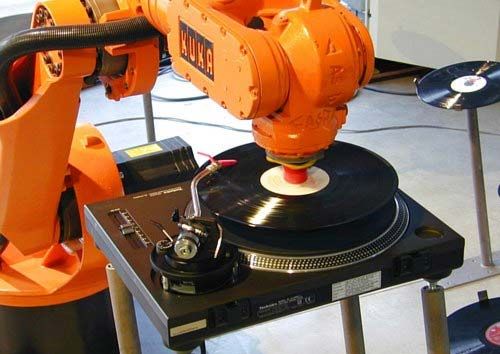
Perhaps you want your auto mix to be a bit more impressive and “bulky”? Then you could always invest in a pair of robots:

Speaking of deep email back logs, I might as well take this opportunity to apologize if we have taken a long time responding to your emails. Dj TechTools receives a very large number of emails every day asking for details and advise. Between those emails and all the work required to keep our new projects up and running, its safe to say I have been falling behind. So, yes, please continue to send us emails.  Send as many as you want but if we take a week to get back to you please don’t hold it against us? :)

11 Responses to “Auto Mix in Itunes”

  1. DJ ToS

    August 11th, 2008 at 8:49 pm Quote

    Cute DJ sentries.

  2. BentoSan

    August 12th, 2008 at 2:04 am Quote

    They remind me of the scutters on red dwarf :p

  3. tekki

    August 12th, 2008 at 12:19 pm Quote

    Oh my gosh…. I can totally see Rimmer in the back. ;)

  4. Granola Groove

    August 13th, 2008 at 11:50 am Quote

    Link is dead…

  5. Ean Golden

    August 14th, 2008 at 5:47 am Quote

    You might want to try again- the link is working for me.

  6. Darrel

    August 14th, 2008 at 5:00 pm Quote

    I noticed this effects the overall volume of the tracks when using this software .

  7. whiskers

    August 14th, 2008 at 7:24 pm Quote

    I’ll stick to digital, easier to carry around :P

  8. joy

    January 1st, 2009 at 10:51 pm Quote

    [...] – via [...]

  9. Anonymous

    March 17th, 2009 at 5:54 pm Quote

    [...] – via [...]

    hey is there a version compatable with windows?? :)

  10. josemontejo

    April 16th, 2009 at 12:09 am Quote

    [...] – via [...]

Leave a Reply

  1. Quote selected text

First Time?

This site is dedicated to digital djs. We develop performance tools and teach cutting edge techniques that enable creative expression. Visit tutorial videos on youtube, equipment reviews in the blog and a very helpful community in the forum. New articles every Mon, Wed, Fri.
In the Store
 

Categories:
Follow us:
You're going to need Flash 8+ and JavaScript to use this site. How'd you get this far without it?

Dig through the Crates

Readers are Saying

  • ManDingo: ManDingo wants to know when the MidiFighters with the joystick will be availabe. please let him know so that he may...
  • RCUS: @dj broken record: I am almost 100% sure DJTT wouldn’t limit it to a Traktor only contest so don’t let that...
  • dj broken record: a question – is traktor the required software? what about torq?
  • Vince: you should do more contests like this more often with different prizes
  • kilbot: nice video and the contest is great idea! however I have to agree with others, in that regardless of how subjective...