Reviewed by: Bill Griffin aka SOCIALPEST
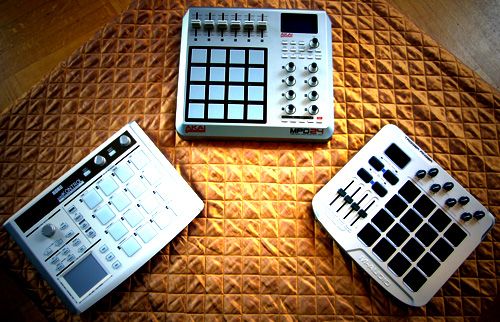
If you’re looking for a MIDI pad controller on a modest budget and can’t be troubled to build your own then no doubt you will have found these three; M-Audio Trigger Finger, Korg padKontrol and the Akai MPD24.
They are all around a similar budget and each has their own appeal but on paper its a tough call. Thanks to the help of online store thomann.de I got my hands on all three and set each up in Traktor, Serato and Live to see which would be reigning champ in the sub 200 EUR midi pad controller class.
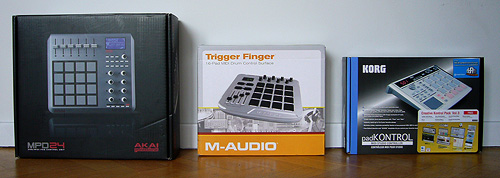
THE WEIGH IN OF CONTENDERS
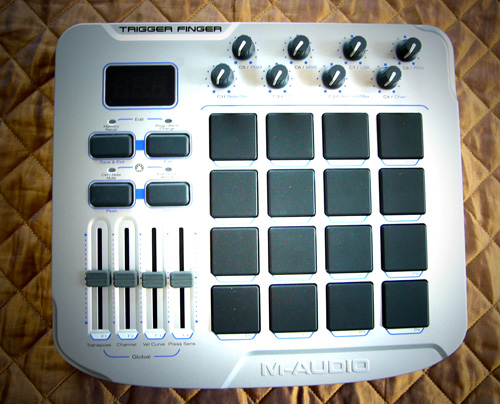
M-Audio Trigger Finger
In the blue corner we have the rather lightweight M-Audio Trigger Finger. This is the cheapest of the three, and to be frank, it looks and feels it. It offers nearly the same features as the Akai MPD 24 but is around 26 EUR (40 USD) cheaper.
Size
Width 27.9 cm
Depth 25.4 cm
Height 5.7 cm
Weight 1.21 k
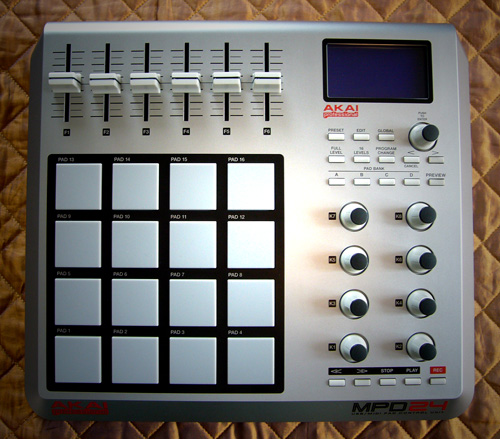
Akai MPD 24
In the red corner we have the heavyweight Akai MPD 24. This thing is built like a tank, has a solid metal base, the knobs and faders are well spaced and feel really pro.
Size
Width 31.8 cm
Depth 28.3 cm
Height 6.8 cm
Weight 2.18 kg
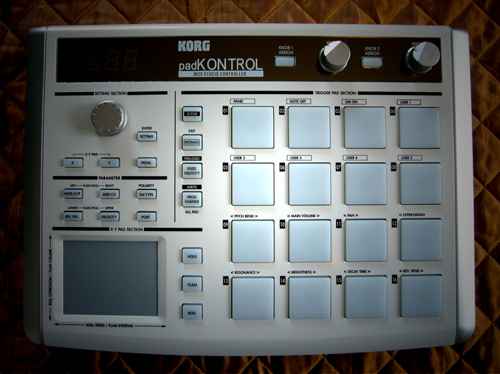
Korg PadKontrol
In the flashing lightship hovering above the ring we have the featherweight Korg padKontrol. Whilst all these contenders have 16 drum pads the Korg ditches the knobs and faders and gives you the famous Korg X-Y control! Plus It’s yours for the same price as the Akai.
Size
Width 31.4 cm
Depth 23.36 cm
Height 5.51 cm
Weight 0.96 kg

ROUND ONE: FEATURES
M-Audio Trigger Finger
Controls
16 pads
4 faders
8 knobs
Connections
MIDI out
USB
9V DC
Security
Kensington cable lock
Extras
Screw thread in base to attach to drum rack (or stick over a turntable).
Akai MPD 24
Controls
16 pads (4 bank memory)
6 faders
8 360 degree knobs
Transit controls
Connections
MIDI in & out
USB
6V DC
Security
Kensington cable lock
Extras
Durable metal base
Korg padKontrol
Controls
16 LED illuminated pads (16 bank memory)
X-Y pad
2 knobs
Flam and roll buttons
Connections
Pedal jack
MIDI in & out
USB
9V DC
Security
None
Extras
Flashing pads, make patterns when you hit them
Winner: Akai MPD24
This is a tough call between the Akai and the Korg. If you discount the Korgs flashing lights (does this add value?) then it’s a toss up between the X-Y pad or the extra faders and knobs you get on the Akai. I’m gonna give this to the Akai on the basis that the Korg does not have a security slot. I know Japan is a no crime zone but the rest of the world is not and I’d hate have my pad controller get lifted.
ROUND TWO: BUILD QUALITY
M-Audio Trigger Finger
The case is plastic but it seems solid and durable. The knobs and pads seems solid too. The nasty rubber faders let it down though, they are low profile and make it difficult to make very fine adjustments. On top of that they are fairly wobbly and come off a little too easilly. Given the cost saving of this over the other two, I’m pleasantly surprised how rugged this feels.
Akai MPD 24
Of the three this my choice when it comes to built quality. The case has a metal base which adds weight and strength to the whole unit. The knobs and faders give excellent control. However, compared to the other two the pads feel kind of squishy round the edges (I can’t think how this might impact a DJ performance so it is probably no cause for concern).
Korg padKontrol
The Korg is the lightest of the three. Which is great for your back but makes it feel less than solid. There is nothing that screams “I am of poor build quality” but it just does not feel as substantial.
Winner: Akai MPD24
This thing is completely solid there’s no question it is the best quality of the three. The Trigger Finger is pretty good though and offers a great weight/durability ratio as long as you don’t lose one of the rubber faders. As for the padKONTROL I would seriously advise wrapping this in bubble wrap whilst transporting.
ROUND THREE: ERGONOMICS
M-Audio Trigger Finger
I don’t feel like I have great control over the faders which could be a problem if you assign volume or pitch controls to these. The knobs are really tightly packed. I don’t have big hands but find it fiddly to adjust two knobs that are next to each other at the same time.
Akai MPD 24
Cannot fault it. The only thing that would be would be nice was if the controls were backlit. In a dark DJ booth this would be really handy.
Korg padKontrol
Did someone mention lighting? Some people might write off the flashing pads as a bit gimmicky but as mentioned above in a dark DJ booth things that glow can actually be quite useful. As for the controls, physically, I have no problems with what they offer (though I can’t help but feel I’m a few knobs short and despite the X-Y control a couple of sliders would have been nice).
Winner Akai MPD24
This is another tough call but I think it goes to the Akai again. Everything is well spaced and feels great and tactile. The illumination in the Korg is nice but the whole interface is busy and not as simple and clean as the Akai.
ROUND FOUR: WHATS IN THE BOX
All these come with a USB cable but apart from that some have bundled software which could be interesting. For example it’s a great way to get Live 6 LE which you can then upgrade to pro for cheaper.
M-Audio Trigger Finger
This comes with Live Lite, Pro-sessions samples demo (with a decent selection of samples) and the midi controller setup cd. These come with a Quick start guide on paper format with the main documentation supplied on the cd. I suppose this is a cost cutting move but personally prefer to have the docs printed in a book form.
Akai MPD 24
Nice big book of documentation, a preset editor CD and BFD lite (an Acoustic Drum Module). One thing worth noting, the USB cable included in this one seemed the highest quality of the three. Not a big deal but just another sign of the attention to quality Akai has.
Korg padKontrol
Great documentation – believe me you’ll need it! Preset editor CD and the Creative Kontrol Pack (including Lounge Lizard Session, Ultra Analog Session, Live Lite 6 Korg edition, Reason Adapted, M1 Le, UVI Korg Edition, Pianoteq lite Korg edition.
Winner: Korg padKontrol
I realize that given the context of this review (ie it’s for digital DJs) then most of us couldn’t give a toss about the bundled software. But if you do then you get the most with Korg. Live 7 LE costs 122 EUR. For some reason Live are very secretive about their upgrade costs. To find out how much it would cost to upgrade Live 6 LE I would need to register the demo version I have – which would mean I would make the copy un-sale-able. Which would piss off the shop that lent me the kit. If anyone has any info on these costs it’s be great if you could share this with everyone in the comments as it might be a good economical incentive for someone wanting Live 7.
ROUND FIVE: EASE OF MIDI CONFIG
Just a note, as all these boxes are just dumb MIDI machines most of the work in MIDI config is done in the software and rests on how well it is implemented here. That said they each had their own hardware interface to adjust the MIDI settings and also offered different features, so it’s good to asses as to how useful these actually are.
M-Audio Trigger Finger
This was the only one of the three that did not automatically appear in my MIDI setup when I plugged it in, which means you need to install the supplied drivers. Once this extra step was done the MIDI mapping was simple as far as the Trigger Finger is concerned.
Akai MPD 24
My MacBook found this as soon as I plugged it in and setting all the controls to various functions was a breeze. It was so intuitive I even managed to adjust the range of the 360 knobs without scratching my head let alone even reading the supplied documentation. That’s really good as I can be a bit of an ape man when it comes to problem solving (see below).
Korg padKontrol
Not quite as intuitive, in fact I had to read and re-read the docs before making progress. Of course we all read the docs anyway 😉 so this was no issue. I was really intrigued as to whether the X-Y pad would make up for the loss of so many knobs and faders. I really struggled to set this up and sadly in the end gave up defeated – could be my limited patience combined with lack of MIDI know-how but either way it demonstrated that it was not easy (which is what I was judging this round on). A great thing about the Korg is the 16 bank pad controls – offering a huge 256 assignable pads! A hell of a lot more than you could possible think of what to do with. Also, did I mention that the pads flash? You can actually change the settings so you can decide how the pattern acts when you hit the pads. Why? I dunno, but it kept me happy for a few minutes.
Winner: Akai MPD24
The Akai appeared in my software as soon as I plugged it in and setting up and configuring the MIDI was dead simple.
ROUND SIX: LOOKS
M-Audio Trigger Finger
Compact, clean and simple this a a decent looking piece of kit. Though it doesn’t have killer good looks it’s functional and does away with erroneous decorations.
Akai MPD 24
So how does old George Foreman stand in the looks department? Stong, clean and simple and dare I say pretty stylish. Though slightly on the large size.
Korg padKontrol
This thing is mad as a hatter. If someone slipped this onto the set of Star Trek (the original series) it would look right at home. The plastic silver knobs seem a bizarre choice to me but not as bizarre as the mirrored plastic strip along the top. In the end it all comes across like an 80s shiny suit. Nor appropriate or functional. For me it’s not the flashing lights that make this unit tacky it’s the white and silver color scheme.
Winner: Akai MPD24
Yet again the mighty Akai leaves the other two battered and bruised at the end of this round.
ROUND SEVEN: PRICE
The following prices were taken from thomann.de
M-Audio Trigger Finger
159 EUR
Akai MPD 24
185 EUR
Korg padKontrol
185 EUR
Winner: M-Audio Trigger Finger
Just as we thought the Akai would sweep the floor the Trigger Finger pulls quick jab and wins this round. It is cheaper than the other two but at 26 EUR (40 USD) it’s not a huge amount cheaper, and possibly will not be a deciding factor in your final choice.
ROUND EIGHT: MIXING CHALLENGE
Here is a rundown of each controller in action with Traktor. I’ll be attempting a mix using solely the pad controllers! Which is gonna be interesting.
M-Audio Trigger Finger
This has everything you need to set up a simple mix. Although the reversed layout of the Akai lends itself a little better to DJ use (see below). It’s possible 4 faders would not be enough; deck A vol, deck B vol, crossfader, deck A pitch and – ah crap I’ve run out. Still, who needs pitch control with Traktor on a regular basis?
Akai MPD 24
I set this up with the faders acting as deck volumes and a cross fader. I still had three spare – I guess I could have set the pitch control. For the eight knobs I set gain, hi, med and lo for each deck. Using the 16 pads I set play cue, pause, sync, loop, cue 1, cue 2, cue 3, CUE track for decks A & B. This combined with a few mappings on my MacBook keyboard, up and down to navigate and left and right keys to load each deck, was enough to comfortably make a mix. A bit rudimentary I must admit but combined with a VCI-100 or even an external mixer (to free up the knobs and faders) this would be a great set up. For me the layout is spot on on this machine, I prefer having the knobs at the side and the faders on top than the configuration of the Trigger Finger.
Korg padKontrol
OK, this is not gonna work. Unless I map a pad to the auto fade (left/right)function – but really, who uses that? Did I mention it flashes? Oh yeah I did already. This is only gonna be useful if you have hundreds of cue points you wanna access and have the desperate need to use two effects at once with one finger (and the patience to set this up).
Winner: Akai MPD 24
This is turning out to not be the even competition I had originally expected. Easy setup combined with great built quality and fantastic ergonomics made the Akai a sure winner when it comes to performance.
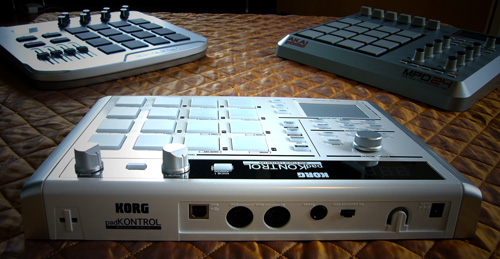
AND THE OVERALL WINNER IS…
In case you had not been paying attention the Akai MPD24 kicked ass in every round that mattered in this smack down (6 our of 8). OK, it’s a bit more pricey than the Trigger Finger and it doesn’t have as much software as either of the other two but it’s built like a tank and really has a pro feel to it. It’s slightly bigger too, but not enough to make a difference in a DJ booth (which come to think of it probably does not have enough room for any of these options 🙁 ). Mmmm when do those Korg micropad things come available? I’m sorry Korg all is forgiven.
POST FIGHT WRAP UP
M-Audio Trigger Finger
This is slightly cheaper than the other two yet still durable and a worthy contender.
Akai MPD24
Don’t mess with this big fella it’ll kick your ass, then it’ll go kick your momma’s ass and your papa’s ass cos’ it’s that hard.
Korg padKontrol
I don’t know what to make of this. I love the flashing lights (I’m easily amused) but on the whole the padKontrol just feels wrong. It’s no where near durable enough to take out of the studio or living room. This is a real shame as it would make a great performance addition. If the pads were in the body of the MPD24 it’d be awesome. Why Korg chose to make it pearl white with tacky silver knobs and panels I’ll never know. Compared to the fantastic KAOSS pad 3 you’d struggle to believe they came from the same company.
Editors Notes:
Some big thanks are in order to Bill Griffin for taking the time to create this thorough and well done comparison. You can visit him on the web here. We would also like to thank the helpful staff from http://www.thomann.de/ who provided the 3 midi controllers reviewed here.