

VCI-100 Firmware Update 1.3

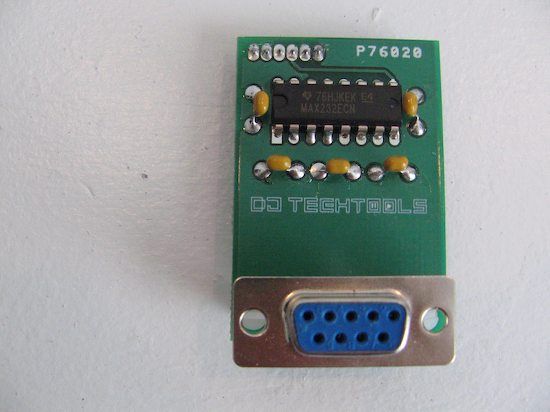
Much frustration has been expressed during the past year over the difficulty in getting your VCI-100 updated. We are happy to announce that it just got a lot easier. Next week you will be able to purchase a VCI-100 firmware update unit (pictured above) directly from Dj TechTools for $20 that allows you change your own firmware at home. That means that you can update any VCI-100 to the coveted firmware version 1.3 which:
- Includes all the features of the VCI-100SE
- Fixes the jog wheel ramp up issue from 1.1
- Increases the number of buttons that can receive midi and light up
Which firmware version do I have?!
For those of you that already have found a way to update your VCI-100, here is the 1.3 firmware file that you can download free of charge. Step by Step instructions demonstrating how easy it is to do the update yourself will be posted next week.
To upgrade your firmware please visit this post
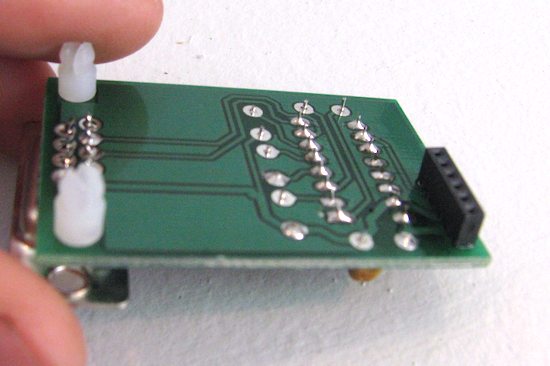
The kit is a simple and elegant design that was created by Dj TechTool’s own MidiFidler. He deserves much respect and credit from the community for stepping up and helping to make this happen. Send him a shout out in the Forum and say thanks! The black part of the piece connects directly to your vci-100’s mother board. Connect the serial port to your computer, install and run the firmware software (WIN only) and presto- your firmware is updated.







August 6th, 2008 at 7:40 pm Quote
Looks like I am going to have to pickup another VCI. Thanks for all the hardwork Ean.
Midifidler,
You most def live up to your name. Thank you for your hard work as well.
August 6th, 2008 at 8:24 pm Quote
Awesome work, thanks
so now the inevitable question: any word on the custom plates yet ? :D
August 6th, 2008 at 8:57 pm Quote
WIN only?
NO MAC??!?!?!
August 6th, 2008 at 9:04 pm Quote
Yes, the companies that make the firmware software only have a program for WIN. Once updated the vci-100 will work with any machine but you need to do the update with a PC.
Fortunately its a one time job so find a buddy with a WIN machine and your good to go.
August 6th, 2008 at 9:06 pm Quote
Cool! Once again, thank you.
August 6th, 2008 at 9:11 pm Quote
is there a short tutorial on how to do this? Or will it be with the package? I assume there’ll be needed some unscrewing etc right
August 6th, 2008 at 9:57 pm Quote
And then theres more. Now this community is really expanding.
August 6th, 2008 at 10:25 pm Quote
This is great! You better be able to post this thing to Australia
August 7th, 2008 at 3:46 am Quote
Excellent! Great work
August 7th, 2008 at 4:03 am Quote
This is awesome! I’m looking forward to purchasing one!
MidiFidler, you ROCK!
August 7th, 2008 at 7:02 am Quote
How very cool! I really hope you can send this to Holland :)
Midifidler, you are the bom.
Thinking about it, Vestax should be very ashamed of themselves, as i need it mostly for the jog wheel ramp up thingy, bloody bastards…
August 7th, 2008 at 7:07 am Quote
Great!
Very good work!
Thank you!
August 7th, 2008 at 7:56 am Quote
I haven`t even got a vci-1oo yet and am still super excited
Any chance of getting one to England?
Deepest respect to you guys, because of you I LOVE MUSIC AGAIN
August 7th, 2008 at 8:13 am Quote
Fantastic! Denmark salutes you guys! :)
August 7th, 2008 at 11:31 am Quote
Great, I was delaing to buy my VCI for months waiting for a SE and beeing lasy, now no excuses anymore, congratulations and from Brazil and keep the great work
August 7th, 2008 at 12:45 pm Quote
Why would It need to be updated? :S
August 7th, 2008 at 2:17 pm Quote
Huge respect to Midifidler! You rock our worlds dude !
August 7th, 2008 at 3:36 pm Quote
Directed at Thomas
Really? You need to watch the Video on Ean’s VCI SE edition. This update will change a normal VCI to Ean’s SE version.
August 7th, 2008 at 5:06 pm Quote
I need to change my jeans….
August 7th, 2008 at 5:48 pm Quote
I cannot tell you how excited I am to get this!!!!! Thanks DJ Tech Tools!
August 7th, 2008 at 8:13 pm Quote
does the vci-100SE already have the 1.3 firmware?
August 7th, 2008 at 8:34 pm Quote
Yes
the Normal Vci-100 depending when you bought will either have 1.1 or 1.2(which fixes a problem with the job wheel)
August 7th, 2008 at 8:36 pm Quote
Well done Midifidler!
August 7th, 2008 at 8:55 pm Quote
Yes, the VCI-100 SE does have the 1.3 firmware. That is what it was designed for.
August 7th, 2008 at 10:10 pm Quote
i love everyone on this site lol are there gonna be preorders???? i want one now and not to be in the bussiness but does Midifidler get a nice cut cuz will personnally donate to him for the cause because this is a good price for this. i try makeing one but fail almost breaking my unit in the process but tht another story….
August 7th, 2008 at 11:39 pm Quote
Nice, I’m ready where do I send my cash?
August 8th, 2008 at 3:54 am Quote
Cant wait! :)
Once you install the firmware 1.3 update, will you be able to switch back to firmware 1.2?
August 8th, 2008 at 9:22 am Quote
It would be very helpful if you could put together a list or diagram denoting which note(s) is sent from each control.
August 8th, 2008 at 4:01 pm Quote
Dj A-Tron you should share that story with us on the forums ! :D
August 8th, 2008 at 4:50 pm Quote
Perhaps, what ‘djs’ is suggesting is for the forums, but I’d have to agree. I have a hell of a time trying to custom map anything between the VCI-100 and Traktor because the midi notes shown in Vestex’s cryptic chart from the manual don’t appear to be the same when Traktor ‘Learns’ them. They must be using different notations or something. That means I end up creating an unused assignment in traktor, turning the knob to find out what it’s value is… then I can look for what it’s currently assigned to, delete those entries (or reassign), then assign the function(s) I originally wanted to my knob. It’s so frustrating and slow! I was about to make my own chart, but then I realized that when I update my firmware to 1.3 everything will change anyhow.
August 8th, 2008 at 6:42 pm Quote
yes good idea i will i will even post some pictures of the wiring
August 8th, 2008 at 6:47 pm Quote
sorry for the double post but tht would be useful mycole and dj i kno Ean kno a think or two about the control and how to do custom control because how else would his be fully customize…..
August 8th, 2008 at 9:50 pm Quote
Will order on cause I need to get to 1.3….many thanks Ean and MidiFidler!!!!!
August 9th, 2008 at 7:52 am Quote
Were do i buy one need it now ?!?!?!?! God Work btw.
August 11th, 2008 at 1:28 pm Quote
sick! I can finally put down some cash on the VCI. much love from singapore!
August 12th, 2008 at 6:11 am Quote
I am so pleased to see this happen – I’m the guy who got hold of the Vestax kit and scanned the manuals and took photos of the chips and posted them to the NI forums. I didn’t have the know-how to build the interface, but a guy in England I met online worked out all the pin-outs and how to replicate the update kit. I’m assuming this interface is built on that discovery, and I’m really happy that this is now available to everyone.
August 12th, 2008 at 1:03 pm Quote
So when is this available?
I want one now!
Nice work Ian & MIDIFidler
August 12th, 2008 at 9:04 pm Quote
where exactly is the tks file for traktor 3?
August 12th, 2008 at 10:39 pm Quote
There’s a hyperlink on step one that takes you to this page: http://www.djtechtools.com/forum/showthread.php?t=339
August 13th, 2008 at 6:26 am Quote
*speechless*
this is awesome!! hope to see order information soon and yes – hope that you can send to australia :)
after this, all i’ll need is the new plate/skin and i’ll be laughing!!
August 13th, 2008 at 5:28 pm Quote
thx mycole.
August 14th, 2008 at 11:11 am Quote
Is it an equivalent to this converter cable? http://www.ftdichip.com/Products/EvaluationKits/TTL-232R.htm
August 15th, 2008 at 12:20 am Quote
Hi Aki,
The converter cable you have shown would work but is only half the solution, you would still need to create the appropriate header for the VCI.
August 16th, 2008 at 3:54 pm Quote
Great News! Will wait impatiently :)
August 16th, 2008 at 4:08 pm Quote
Well… The new layout will certainly take some getting used to. It might be worth it to load the firmware update and then get the plates later. I don’t know about you but I don’t really read the control label before I use it. If you’re fast you just know what the knob/button’s functions are.
August 18th, 2008 at 9:41 am Quote
i brought one those converter cable from another site thinking i will be able to mod it to fit the vci after reading the posted routing but it seem usb don’t work well with the system. And like i sed earlier i think i had it almost right the second time using serial but i think one or two cable wasn’t tie back up.
August 18th, 2008 at 5:12 pm Quote
Without labeling I would go crazy- its not a good idea to figure things out on the fly in the middle of a set. Thats me though.
August 18th, 2008 at 5:23 pm Quote
No, no! That’s not what I meant at all. At least for me, I practice everything so much at home that when I go play out I know exactly what every knob and button is without having to look at a label. I don’t suggest ever tweeking knobs during a live set unless you know exactly what that knob will do. That goes for both the label and effect that knob will have on the sound.
August 18th, 2008 at 5:47 pm Quote
We are on the same page for sure, having intuitive control over your music is the best but labeling is helpful in getting to that point and filling in the gaps if there are a lot of controls and/or layers.
August 28th, 2008 at 1:34 pm Quote
Hi,
i dont use traktor but mixVibes and a vestax vci-100 firmware 1.1.
The vestax didnt have the jogwheel issue in mixVibes as in traktor, what it has is an issue in assigning the monitor knob. That issue is solved with 1.2 of the firmware, I am not sure what 1.3 does to the midi commands issued by the controller so I am interesting in upgrading the 1.2 firmware instead. Is the 1.3 firmware issued by vestax and since i am interested in buying the upgrade kit anyways can I upgrade to 1.2 instead ?
I am quite happy with the mapping I currently have with mixVibes i just miss a few things that the firmware 1.1 doesnt allow. Anyway please let me know and thanks for the great work.
P.S You should definitely try mixvibes, the producer edition with the sampler, miilearning and all the fx integration makes it a great tool, i found it way better than traktor (less customizable in my opinion).
August 28th, 2008 at 2:18 pm Quote
FIRMWARE SUCCESS!!!
okay, so to all of you who are a little bit hesitant towards modding your vci-100, have no fear.
First off, ean’s tutorial on youtube is “golden”. Very easy to follow while doing the necessary steps.
Ean has a step where you temporarily disconnect a cord to allow room for the djtechtools connector kit. I had much trouble on disconnecting this, and in the end, I just pushed the wires to the side to allow the kit to click in.
Everything works accordingly. Jog wheels are completely fixed, and the new filtration and loop features are wonderful.
One thing I should point out is that the serial to usb cable was an odd connection (a little archaic) but instead of buying a 40$ connection cable, I found that sparkfun has cheap serial adapters: http://www.sparkfun.com/commerce/product_info.php?products_id=8580
Ean, thank you once again. Great work. If you need me to give anymore insight/detail on the process I’d be happy to supply.
August 28th, 2008 at 5:56 pm Quote
Thanks a lot for sharing beep, and great find on that spark fun cable!
August 29th, 2008 at 5:01 pm Quote
Good job!
However, you wouldn’t have a speciel dealer here in Europe? It’s kinda nasty, not mentioning expensive, getting things out from the US to say Denmark :-)
August 29th, 2008 at 5:59 pm Quote
Its not expensive or nasty at all Oskar,
We charge $7 for international shipping (5-7 days) and its free if you buy a pair of jog grips. There are many people from all over the world that have received their upgrade kits without any problems at all.
February 2nd, 2009 at 8:13 pm Quote
Hi guys! Great site!
Here’s the deal: I just purchased brand new silver VCI-100 (in Poland) and read about the firmware issues. Do you know perhaps how I can check the firmware version of my unit? (no little green sticker on the back) Or is there any chance that my vestax has the latest firmware already installed? Otherwise im so looking for upgrade kit… Are there any in the circulation?
February 2nd, 2009 at 9:18 pm Quote
to check which firmware you have please visit this page:
http://www.djtechtools.com/forum/showthread.php?t=1457
February 2nd, 2009 at 10:35 pm Quote
Thank you for super-fast reply. It looks like I have firmware 1.0. Now I’m trying to estimate what I am missing having this firmware version -apart from 4 decks support…
September 3rd, 2009 at 1:09 pm Quote
can i buy the firmware kit ? i live in the uk
i just bought the vestax vci 100 second hand and its the 1.1 firmware version :(
September 5th, 2009 at 5:03 pm Quote
please check out this post to upgrade your firmware:
http://www.djtechtools.com/2008/08/18/how-to-upgrade-your-vci-100-firmware/