

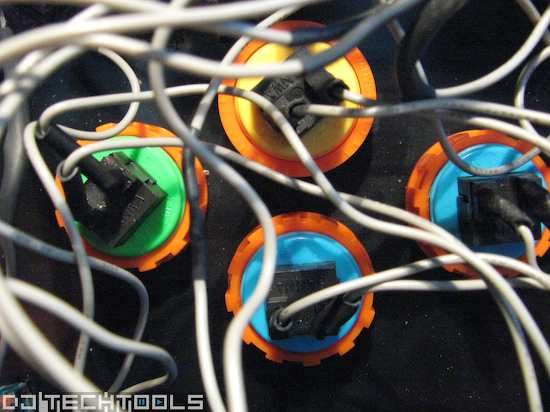
Dj-101 DIY Guide

Our new dj tech tools mantra for this week is:
“we go through the annoying stuff so you dont have to”
That certainly applies to my current attempt to offer a simple, inexpensive midi controller that most people could find useful. In the end I succeeded, but it required some serious investigation and re-thinking the fundamental concepts. This design is not meant to be sold or duplicated but rather to show the basic steps required in building your own midi accessory or moding an existing controller.
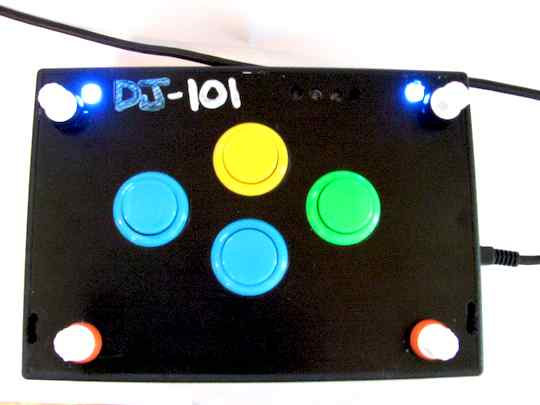
While there are many, many different ways to boil this particular egg- i was shooting for the most straight forward method that could be tried out by anyone with access to just a few house hold tools. This meant it had to fit the following:
- 8 controls or less
- be useful as a single deck control
- cost under $100 in parts
- not take more than a few hours to assemble
- plug and play USB connectivity with cross platform support
- not require any coding
It was a frustrating experience because there really are no fantastic plug and play midi systems out there for a low price. In the end the best solution was to abandon MIDI all together and instead go with an HID interface. These interfaces boast lower costs, easy setup, high resolution and universal plug and play compatibility.
Step 1: Read this post
Step 2: Check out the video for more on HID and a step by step guide to building your own dj-101





July 28th, 2008 at 7:39 am Quote
cheers this is great…
As you say you had to ditch the MIDI and go with HID.
What are some of the disadvantages with using HID > MIDI? More overhead on the system?
July 28th, 2008 at 1:35 pm Quote
Maybe you know how to wire stereo pots with six pins instead of three?
July 28th, 2008 at 2:34 pm Quote
Hi Ean, great project. Will there be a followup on how to set everything up in the software?
July 28th, 2008 at 5:09 pm Quote
The only Midi package that fit my criteria was the USB micro dig by IcubeX.
Unfortunately, after 2 weeks- I just could not get it to work. Their third party drivers, faulty editors, poor directions and lack of documentation was a very frustrating experience. In the end I could not possibly recommend going that route and instead fell back on plan B- HID. Using a DIY MIDI interface like Doepfer has would be just as good but its more expensive and not usb powered.
July 28th, 2008 at 5:11 pm Quote
The software setup request is a good one but it would be hard as their are so many different options. This tutorial was more of a hardware one.
July 28th, 2008 at 5:22 pm Quote
Hi Ean! The project sounds interesting, even if it costes waaay too much.
I made a MIDI 1.0 controller for less than €200, with support for 32 knobs (12-bits ADC truncated to 7-bits for MIDI translation) and up to 128 normally-open buttons. The bad thing is that it was purely MIDI, so you had to buy a MIDI->USB translator (I found ESI Midi Mate for €35) to make it work as “Plug & Play”.
The project documentation (unfortunately for you is in Italian) can be downloaded from:
http://www.geocities.com/gnegno88/gpmc.zip
I’ve developed it more than one year ago, so there are some things which could be made better.
I’m trying to move to HID, but I haven’t much time because of University. I just need a HID->MIDI translator…
Give also a look to MIDIBox, it’s the most professional “open-source” modular MIDI project I’ve ever seen.
July 28th, 2008 at 7:40 pm Quote
Okay, presuming we’re up and running with midi-cc messages being generated somehow by our Dj-101, how would you use the functions you outlined in this video – beat juggling, loop activation, loop length etc? I guess what I’m after is a beat juggling 101 :)
July 28th, 2008 at 8:03 pm Quote
having trouble deciding which HID board to use….
July 28th, 2008 at 8:04 pm Quote
to joel, you may want to try and look at this post for beat juggling basics
http://www.djtechtools.com/2008/01/03/controllerism-basics-cue-point-juggling/
July 28th, 2008 at 8:05 pm Quote
Ean, what is the link to the HID that you used, i think i would like to get that one since you used it already…. Thanks!
July 28th, 2008 at 8:17 pm Quote
Thanks for the link Ean, that’s perfect! Only found the site recently, didn’t look back far enough through the archives, sorry!
July 28th, 2008 at 9:56 pm Quote
If you want to look how HID works, just take a game pad. Here is a vid http://www.youtube.com/watch?v=H9f-rM7mXC0
July 29th, 2008 at 12:10 am Quote
@Justas
When using stereo pots just wire one of the groups of three pins as if it was a ‘mono’ pot. Generally speaking that is VCC to one of the outside pins, GND to the other outside pin, and the ADC to the middle pin.
July 29th, 2008 at 12:24 am Quote
100 USD to build something like this (that anybody can put together ina couple of hours) is very cheap.
When building a homebrew controller the real cost is in you own spare time.
200 Euro however to recreate the mighty BCR 2000 (which costs a little over 100 euro) ….
July 29th, 2008 at 12:34 am Quote
Midifidler is right, I need to re-calculate the totals but with old school knobs and a inexpensive HID device like U-HID then it could be as little as 60-$80. Thats a steal!
July 29th, 2008 at 12:37 am Quote
OR….for the 101controller number of controls, you really can scavange a joystick that has enough analogue inputs and buttons.
It is easier, only difference I cant support it with a nice steb-by-step video. Good job Ean.
July 29th, 2008 at 12:55 am Quote
Thats a good point Tos
Must be plenty of those lying aroung waiting to be recycled
July 29th, 2008 at 1:10 am Quote
wow, never thought of that… will any USB joystick work? I have an old USB joystick here that i can take apart. I only want to put 6 knobs on this thing anyhow….
July 29th, 2008 at 1:16 am Quote
I think you probably can only put 2 analogue knobs on a standard joystick, most would just use a pot on each axis (x/y)
July 29th, 2008 at 1:18 am Quote
great Idea TOS-
that should work well depending on which device you scavange.
July 29th, 2008 at 4:08 am Quote
so u don’t think I can use an old USB joystick to incorporate knobs cause the connections won’t be there? Well not enough for 6 your tellin me.
So I am still stuck not knowing what HID piece to get. I took apart my old vestax mixed and the knobs etc will come off the board very easily. I am gonna try that tomorrow. I would like to get an HID soon. Any help of guidance would be great. Thanks.
July 29th, 2008 at 7:52 am Quote
I like the idea of recycling parts from dead electronics, it gives home midi making a green edge.
Peace K
July 29th, 2008 at 1:33 pm Quote
Well I have been thinking about HID controller since I found that video I posted before. Now I am doing a little experiment. I Dissamsembled my saitek p580 game pad and an old gemeni mixer for knobs and faders. The only thing you should know is that the gamepad must have an analog inputs to connect a fader or pot. Here is a little tutorial http://www.cycling74.com/story/2007/3/12/113645/135 PS2 type gamepads have only 4 analog inputs, while windows supports 8 as maximum. I think it is not very much, so Im planning to mod a game pad into a cdj style controller only with 4 buttons, 2 pitch faders and two jog wheels, and for other controls I am thinking to buy Evoliution uc33. Of course it depends on how I will manage to wire stereo faders. Midifidler, thanks for a help. I will post my results here :)
July 29th, 2008 at 6:48 pm Quote
@ TacoPimp
Yes- you can use an old usb joystick. They are just saying that there will need to be a lot more controls on the joystick so you can have multiple input. Just a single joystick with no extra sliders or buttons will only offer 2 inputs (x and Y) but some may have rotation as well.
July 29th, 2008 at 6:54 pm Quote
http://www.cycling74.com/story/2007/3/12/113645/135
Thats a great guide. If you decide to use the guts from an old play station type controller then you have 4 analogue controls (knobs and sliders) and 14 buttons.
July 30th, 2008 at 1:03 am Quote
ok… So what part of the pc playstation style controller let’s me add knobs to the guts? I went to target today and found one controller for $9 but it did not have the dual thumb knobs things, hope that makes sense. Thanx for being patient with all my questions guys. I bought a soldring iron today and I am going to take the knobs off of my old mixer. I couldn’t find a soldering pump though… So hopefully I will be able to remove the knobs. I found some tutorials on how to remove stuff off of a board.
July 30th, 2008 at 2:11 am Quote
@tacopimp
You need the type with the analogue thumbsticks. Once you pull it apart you will see each stick has two rows of three pins each. Each of these rows are the three connections of the pots used for x and y. So once you have pulled the joy sticks out you can just wire your pots to these pads.
If you get really stuck start a thread on the forum….
July 30th, 2008 at 3:00 am Quote
I ended up going with the Doepfer PE cause I just wanted straight forward midi. The whole thing is going to cost upwards of around $200 (shipping kills me) but the point is that I making it my self. I have no problem paying a bit more for diy it the end result is awesome.
August 5th, 2008 at 2:46 am Quote
http://www.flightsim.com/cgi/kds?$=main/howto/mind.htm
I too want buttons and knobs and for little or no money down. The above device allows 6 analogue inputs (knobs/sliders/etc etc) and 24 (i think) buttons, and is recognised on win/mac/linux as an HID joystick.
I’m still making mine (adding more buttons/knobs/enclosure), but have built the guts and seen it working on all platforms.
The other exciting possibility is hooking up old ball-mouse rotary encoders to some of button inputs, so as to have rotary (endless) knobs as well, great for pitch nudging and softsynth tweaking.
Anyway the ATMega16 microcontroller can be persuaded to do USB-HID and is very cheap compared to the prebuilt solutions.
(note this was my first electronics project)
August 5th, 2008 at 5:20 am Quote
Thanks for sharing that info haszari
August 7th, 2008 at 10:56 am Quote
“In the end I could not possibly recommend going that route and instead fell back on plan B- HID.”
do the midi controls function? ,or do i have to control traktor or whatever with the Hid-commands?
greetings
August 13th, 2008 at 6:38 am Quote
is it possible to use a on/off switch as a midi control with the BU0836X?
September 18th, 2008 at 4:36 pm Quote
this can be done with a arduino usb board, and you can add easily six faders and use like twelve buttons too
oh, and direct usb cable output
October 25th, 2008 at 1:57 pm Quote
…
Hi community,
this is my first post.
If you check at leobodnar forum you will found my works to do more useful before versions (which are more cheap).
Also could check Controllerism.com, sparkfun and Machinecollective forums to enjoy a Biggest comunmunity involving little communities.
Please search my post around internet… you will found a lot of info about this an other DIY projects.
For the video tuto a big THANKS men, my electronic skills are truly bad…
;)
…
February 25th, 2009 at 11:38 pm Quote
Hi Ean and readers!
I’m planning making myself a costum midi controller since I’m soon going to swich to ableton live.
I’ve already got some analogue and digital dj gear, but I think that having something custom would be nice.
You’re mentioning that you use some extern software wich convert your HID signal to MIDI. Well I can¨t help wondering: Does that mean that I can simply purchase a standard pc keybord, rip it apart add some new knob and LEDs, a then change the HID signal to MIDI?
And then I got myself a custom MIDI controller?
Best regards
Frederik Olufsen
March 3rd, 2009 at 6:13 pm Quote
Thanks Ean, this has been really helpful. i have made the midi controller and use it a lot. i DJ and i have used this midi controller at my last 7 events.
March 3rd, 2009 at 6:31 pm Quote
post some pictures- I would love to see other “dj-101’s” out there :)
March 6th, 2009 at 2:07 pm Quote
hai Ean ,i just joined in ur site,itz pretty interesting for me,,i am using abelton and traktor,i have a Axiom 61 but i need more information on how to plug things with Axiom and traktor,i also use Sound flower for Ableton and Traktor..so if u have more info on how to set up traktor with Axiom and Ableton pls let me know..
April 13th, 2009 at 2:31 am Quote
here’s a board w/8 analog ins, etc. $27.50
check it:
Seeeduino is an Arduino compatible board. It’s design is based on the Diecimila scheme, 100% compatible to its existing program, shield and IDEs. On the hardware part, remarkable changes have been made to improve the flexibility and user experience. From Seeed_Studios.
http://www.makershed.com/ProductDetails.asp?ProductCode=MKSEEED2
April 16th, 2009 at 8:47 am Quote
is there a hid board anywhere with 40 analogue inputs plus space for about the same number of buttons?
im making a full boar mouseless project for live 8, its 4 channel with hi and lo pass, 3 band eq, fader, clip launch and stop and fx routing all per channel.
April 16th, 2009 at 11:40 am Quote
…
You could check U-hid but HID protocol has some limitations:
8 axis
32 buttons
1 hat switch.
This make it show as “native” without driver more than this by HID device must need a translator like glovepie.
…
May 10th, 2009 at 3:15 pm Quote
did anyone else notice that his mustache grew?
May 29th, 2009 at 1:50 am Quote
Im gonna sound like a total noob but i kinda am when it comes to building things that is, but here goes. What is that board with the Phoenix connector bars on it? (Those green things with all the holes in them) and also theres an easier way to mount the leds for almost nothing and its very simple just check out the link
http://vcclite.com/SMB200
Thank you you for the help. -Josey
September 10th, 2009 at 10:25 pm Quote
Hi! I was surfing and found your blog post… nice! I love your blog. :) Cheers! Sandra. R.
September 25th, 2009 at 10:14 pm Quote
Hey guys..!
How’s it going !?
I really loved this post but i still have two questions… :P
Do the Slide Potentiometers use the same logic as Rotary Potentiometers !?
Well, do they both have “+5 / GND / Input Value” ?
I think i understood preety quick how to do this but.. yet i still have this question…
The other question is… can i use 2 rotary encoders to simulate a turntable? ( to scrath and stuff like that… )(or to navigate through the playlist of let’s say traktor or something like that?)
Cheers!
Rick
September 29th, 2009 at 5:44 pm Quote
Hey Ean, why do you recommend the U-HID over the board you used in the video?
November 24th, 2009 at 9:51 am Quote
hey there!!
i was wondering about making my own MIDI mixer, but i really can’t understand wich HID interface to buy.
i’d love to build it with 16 channels each none with:
- 1 fader
- 7 knobs
- 3 buttons
to be used with Ableton Live and some other experiments.
any chance you can drive me trough this process?
peace,
k.
November 24th, 2009 at 10:17 am Quote
also, the piano keys on a MIDI keyboard could be used as potentiometer inputs?
if so it would be way amazing for me, just because i’ll have a fucking amount of chances!
basically, this should be done since MIDI keyboards allows Velocity control in a range between 1-127 (isn’t it?), so i think they have some kind of potentiometer working on the pression instead of a knob/fader.
btw i’ll wait for an your answer before destroying a keyboard!! :)
peace
January 4th, 2010 at 11:14 pm Quote
does it matter what the value is of the potentiometers used for this project are?
January 5th, 2010 at 8:46 pm Quote
hi ean, you didnt mentioned which hid device is that and where did you get it.
i dont know where to look for it and what to look for. hid circuit? hid device? no idea
thanks
January 7th, 2010 at 9:16 am Quote
Hi! grettings! just a questions: what kind of hid board u used? where i can find that? I actually used a 4axis joystick with “Rejoice” software (joystick signal to midi converter) that gave me 4 knobs and 16 buttons but i would like to have more knobs as i see in the video… Well, I’ll wait for an 8 axis joystick… or your answer haha! Thanks for the idea!