
Flip the script- and your Jog Wheel

As a follow up to this jog wheel post last week, here are two more ways you can you can creatively re-use your jog wheels for tighter performance. Are you really going to scratch on a vci-100 or similar small jog wheel? Lets be honest with ourselves- most likely not. So what do you do the most during a song?

  1. Adjust the tempo in small increments
  2. Pitch bend a track

Then why not have your Jog wheel dedicated to those 2 functions?

The vci-100, for instance, has 2 zones. The outside area is for pitch bends:

the touch sensitive metal zone is used for scratching:

There are several problems with this concept including:

  • the pitch bend area is too small, so its quite easy to accidentally trigger the touch sensitive zone (stopping the song because you have just “scratched”)
  • Scratching is really only used in the begining of the song when you are cuing up to find the first beat.

Fortunately, Traktor has a great assignment which allows you to re-assign the touch sensitive zone to a CDJ-1000 style controller. That means that when a song is not playing you can use the top to search through a track and once you hit play that same zone now becomes a dedicated pitch bend area. That frees up the outside edge to be assigned a new function. To rock a CDJ style jog wheel just re-assign yours in the following way:
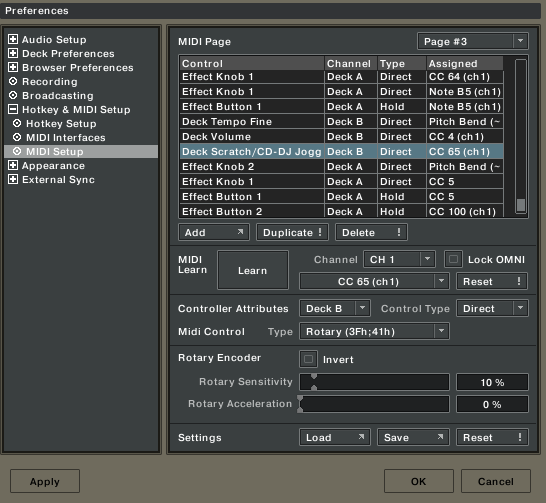
(note- the CC number of your jog wheel is going to be different)

TEMPO NUDGE

With bpm sync and fined tuned tempos your really only going to make small adjustments to the BPM of a playing track. Unfortunately, many controllers don’t have buttons dedicated to this function. So why not use the outside of the jog wheel to make fine up and down adjustments to the tempo. I can tell you it works quite well and after a little practice feels very natural. Here is what that assignment should look like:
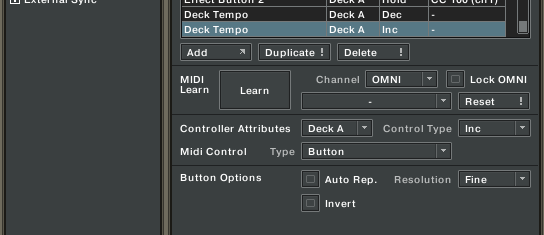
DOWNLOAD THE GOODS

Owners of the VCI-100SE can download a new TKS file with the jog wheels remapped using the method above. Owners of a standard vci-100 can also try the technique using this TKS but the other controls may act funny. Don’t worry though, the upgrade package will soon be available.


Download on this page

15 Responses to “Flip the script- and your Jog Wheel”


  1. 1 Dj JesC

    Thanks for the info Ean

    -Jesse

  2. 2 Sheph

    Is there a list of untold CC/note values for the VCI-100? it appears there are many that are not listed in the manual.

    Sheph

  3. 3 BentoSan

    Is there a list of untold CC/note values for the VCI-100? it appears there are many that are not listed in the manual.

    Sheph

    Just use the midi learn function, and if you really need to learn the midi messages that the vci is sending out i personally use a midi monitor like midi-ox for that.

  4. 4 tekki

    Nice… tempo bending… :D Got that mapped on my BCR too. :P

    But looks nice! :D

  5. 5 DJLp

    Ya know…I was thinking along these lines but was probably about 40 miles off of where you just took it. Thank you.

    Side note: WHAT VCI IN THE PICTURE IS THAT WITH THE NICE MULTI-COLORED LIGHTS?!!

  6. 6 BentoSan

    Ya know…I was thinking along these lines but was probably about 40 miles off of where you just took it. Thank you.

    Side note: WHAT VCI IN THE PICTURE IS THAT WITH THE NICE MULTI-COLORED LIGHTS?!!

    Thats the standard VCI in all its glory :p

  7. 7 Ean Golden

    Is there a list of untold CC/note values for the VCI-100? it appears there are many that are not listed in the manual.

    Sheph

    There is a list on the back page of the manual but a midi monitor will work much better.

  8. 8 Phorte

    brilliant! these new mappings sound amazing.

    would be great if someone could make up a TKS file for non-SE owners that will work perfectly!! can’t wait for SE but these little adjustments sound the trick.

    it has happened to me a few times, especially after a few drinks, when im making fine adjustments then accidentally touch the centre of the wheel and it suddenly ’scratches’. bah!!

  9. 9 Phorte

    gah! i cant work this out for a standard vci-100. can someone save a new TKS for this from the standard TKS with the new CDJ-style jog wheel and tempo nudge?

  10. 10 Ean Golden

    You can always try and do it yourself, just follow the instructions above. :)

  11. 11 kidfromkibbly

    Only got around to adding this mod in now! It’s fuckin’ wicked, really loving it!

  12. 12 Radziecki

    Argh… can someone publish a TKS file for that? can’t get around that :/

  13. 13 Anonymous

    awesome. got the cd j style jog wheel to work flawlessly, but can’t get the tempo nudge working at all. it adjusts only in one direction - down.

    is there a way to adjust the pitch bend so it’s more harsh and wammy bar-esque?

  14. 14 Ean Golden

    You need to make sure you assign the notes being sent by the plastic, our outside of your jog wheel. It will only work if they are sending one note in each direction (as the vci-100 does)

  15. 15 Ryan Catcher

    thanks ean.

Leave a Reply