DJ TechTools
  • Blog
    • DJ Gear
      • DIY Projects
      • Gear Reviews
      • New Products
      • Controllerism
    • Techniques + Tips
      • Beginner DJ
      • Advanced DJ
      • Producer
      • Finger Drummer
    • News + Culture
      • Editorials + Opinions
      • Artist Interviews
      • Performances + Routines
      • How I Play
    • DJ Software Tutorials
      • Serato Tips
        • Traktor Tips
      • CDJ Tips
      • Ableton Live Tips
  • Store
    • Run by real DJs, not a corporation
    • DJ Controllers
      • Midi Fighter Twister
      • Midi Fighter Spectra
      • Midi Fighter 64
      • View All
    • Accessories
      • Chroma USB Drive for DJs
      • Chroma Caps
      • Chroma Cables Audio
      • Chroma Cables USB-A
      • Chroma Cables: USB-C
      • DJTT Gift Card
      • Midi Fighter T-Shirt
      • Keyboard Covers
      • Earplugs by V-Moda
    • Production Gear
    • Soundcards & Mixers
  • Community
    • Popular Forums
      • General Discussion
      • Buy & Sell
      • Reviews
      • Mixes
      • Music Production
      • Show Your Setup
      • Off Topic
    • Handy Links
      • New Posts
      • Private Messages
      • Register
      • Search
    • Midi Maps
      • Traktor
      • Ableton
      • Serato DJ
      • Midi Fighter 3D
      • Midi Fighter Twister
      • Midi Fighter Spectra
  • Midi Fighter
  • Chroma
No Result
View All Result
DJ TechTools
  • Blog
    • DJ Gear
      • DIY Projects
      • Gear Reviews
      • New Products
      • Controllerism
    • Techniques + Tips
      • Beginner DJ
      • Advanced DJ
      • Producer
      • Finger Drummer
    • News + Culture
      • Editorials + Opinions
      • Artist Interviews
      • Performances + Routines
      • How I Play
    • DJ Software Tutorials
      • Serato Tips
        • Traktor Tips
      • CDJ Tips
      • Ableton Live Tips
  • Store
    • Run by real DJs, not a corporation
    • DJ Controllers
      • Midi Fighter Twister
      • Midi Fighter Spectra
      • Midi Fighter 64
      • View All
    • Accessories
      • Chroma USB Drive for DJs
      • Chroma Caps
      • Chroma Cables Audio
      • Chroma Cables USB-A
      • Chroma Cables: USB-C
      • DJTT Gift Card
      • Midi Fighter T-Shirt
      • Keyboard Covers
      • Earplugs by V-Moda
    • Production Gear
    • Soundcards & Mixers
  • Community
    • Popular Forums
      • General Discussion
      • Buy & Sell
      • Reviews
      • Mixes
      • Music Production
      • Show Your Setup
      • Off Topic
    • Handy Links
      • New Posts
      • Private Messages
      • Register
      • Search
    • Midi Maps
      • Traktor
      • Ableton
      • Serato DJ
      • Midi Fighter 3D
      • Midi Fighter Twister
      • Midi Fighter Spectra
  • Midi Fighter
  • Chroma
No Result
View All Result
DJ TechTools

Phasing – Old school beatmatching for all

nico by nico
June 13, 2008
in Basic DJ Tips
Reading Time: 4 mins read
0
Phasing – Old school beatmatching for all
319
VIEWS
Post on FacebookTweet thisUpvote on Reddit

There is currently a heated debate about the use of the Sync button. Some say it’s cheating, some say: as long as it sounds good for the audience, it’s ok… I think that everyone is missing the point. Learning to beatmatch by hand is a skill that any DJ should learn. The only reason he should learn it is to have at his disposal a broader way to express himself artistically.

There is absolutely nothing wrong with using the sync button. It saves time and allows you to do something else, it can also be a lifesaver when you have lost it while in a mix. I’m really glad to have that function at hand, and I use it often, even if I’m able to beatmatch two records by ear in a short amount of time. So, what’s the big deal with learning to do it by hand? Well, I think that the perfect mix in term of phase and speed doesn’t really exist. It is all a matter of what you want to express artistically. Hand beatmatching techniques can be used to breath life and spontaneity into your mixes, and have been used this way by all the best DJs since the beginning. And it sounds really different from automated matching. No judgment of value, there, both can be useful.

I now need to show you a trick to prove my point. It’s a very old and cool trick, which has a lot of practical applications, among them being able to teach you how to beatmatch by hand, or get better if you already know how.

You will need to have 4 buttons assigned to pitch bend, either on your controller or on the keyboard. Two for pitchbending up and down Deck A, and two for Deck B. Set the sensitivity of these to ‘min’ for now.
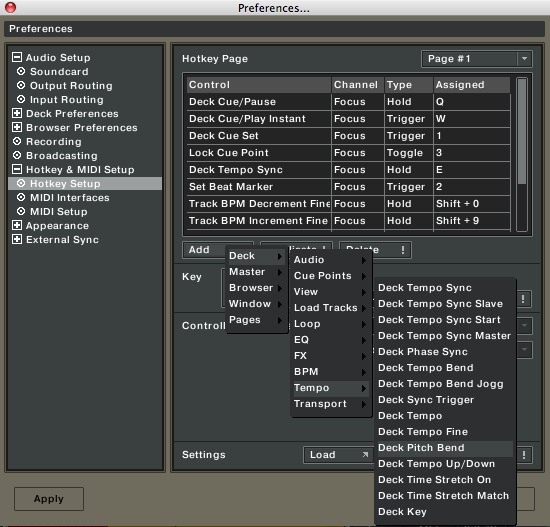
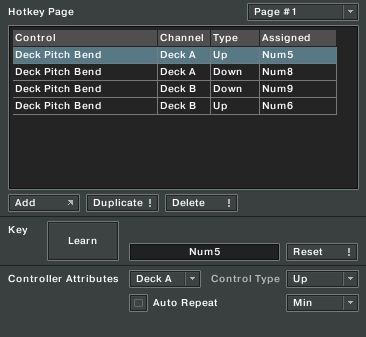
You need also to be able to control the tempo of both decks in the same way, either with a rotary controller, or with two keyboard equivalent for each deck, as above. Set those to ‘min’ sensibility too. Reset all the EQ and levels and tempo for the two decks. Turn off the Key lock too, it will make things more obvious.

Next, load the SAME track in decks A&B. A complex, harmonically rich track with some good bass is what work best, you should try different tracks to see what the effect is on each.

Start the two decks together. Just push the two play buttons for decks A&B at the same time. Chances are that, however you did it, your two records aren’t exactly in phase. Well, press that sync button, it is there for a reason 🙂 The two copies of the same song should now be perfectly matched. Notice anything? Normally you just have the impression that the volume is doubled, which is only to be expected after all.

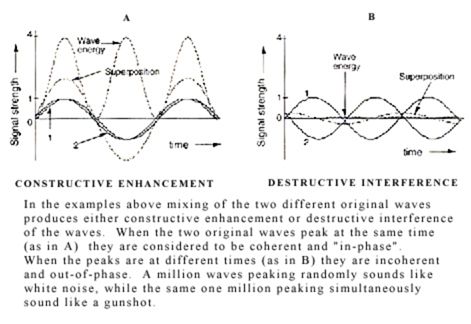
Now, use the pitch bend. Pitch deck A up a little. Notice how the sound has changed. Keep pitch bending up until you hear two different sounds, like an echo, instead of the flanging sound. Now pitch bend deck A down, in short bursts, all the way to the other side. Play around with the pitch bend and see how the sound evolve. And then, press sync. As you can see, there is quite a wide range of possible superpositions, that all have their distinct sound. This is a perceptual illusion: the brain merge sounds that are close together when the difference in time between them is under 1/10th of a second or so. When the phase difference is larger than that, you hear two sounds.

Ok, now I want you to speed up the tempo of deck A, put it at around +0.04%. The song in deck A will be a bit speedier, and it will audibly ‘glide’ up until it is out of phase. Pitch bend up the deck B to catch it up! Fun isn’t it? Let A glide up again. Try to use the tempo control of B to catch up with A. You will need to overshoot a bit, say put the B tempo at +0.07% or such to start, then play with it so you manage to get the two songs back in sync. You can also use pitch bend at any time to change the position of the current phase.

That’s it, you are beat-matching the old school way! Try with larger speed difference, like putting A tempo at +1.5% and try to get B back in sync using only tempo control and a bit of pitch bend.

As you can see, this is fun, and learning to do this allows the introduction of tension in your mixing. If two songs are not bang on synched from the start for example, one is a little behind, and people can feel that you are struggling to get them back together. You may then require more than sync to keep the night on track.

Editors Note: While in SYNC mode you can adjust the phase of a song inside Traktor. So, theoretically you can use the sync button and then adjust the exact phase you prefer by hand. This requires a little bit of extra work but may be another alternative to blind auto pilot.


Tags: Dj BasicsTips
Share2Tweet2Share
Previous Post

TechTools goes Global

Next Post

Little controllers

Related Posts

Meet the Koala sampler app: a mobile production powerhouse, now with stems
DJ Gear

Meet the Koala sampler app: a mobile production powerhouse, now with stems

February 7, 2023
Tips for DJing in Extreme Cold: DJTT readers share their advice
DJ Techniques / Tips

Tips for DJing in Extreme Cold: DJTT readers share their advice

January 30, 2023
One Thing Ableton Production Tips
Production Tips

One Thing: Super Quick Ableton Tips From Professional Producers

March 10, 2017
Load More
Next Post
Little controllers

Little controllers

Want to reach DJTT's audience here?

Shoot an email to advertising@djtechtools.com

DJTT ads
DJTT newsletter
Midi Fighter
Chat with us
  • ABOUT DJTT
  • CONTACT
  • PRIVACY
  • MIDI FIGHTER HELP
  • ABOUT DJTT
  • JOBS
  • CONTACT US
  • ADVERTISE
  • PRIVACY POLICY
  • ACCESSIBILITY STATEMENT

© 2024 DJ Techtools all rights reserved by DJ TechTools on all content unless otherwise noted.

No Result
View All Result
  • Blog
    • DJ Gear
      • DIY Projects
      • Gear Reviews
      • New Products
      • Controllerism
    • Techniques + Tips
      • Beginner DJ
      • Advanced DJ
      • Producer
      • Finger Drummer
    • News + Culture
      • Editorials + Opinions
      • Artist Interviews
      • Performances + Routines
      • How I Play
    • DJ Software Tutorials
      • Serato Tips
      • CDJ Tips
      • Ableton Live Tips
  • Store
    • Run by real DJs, not a corporation
    • DJ Controllers
      • Midi Fighter Twister
      • Midi Fighter Spectra
      • Midi Fighter 64
      • View All
    • Accessories
      • Chroma USB Drive for DJs
      • Chroma Caps
      • Chroma Cables Audio
      • Chroma Cables USB-A
      • Chroma Cables: USB-C
      • DJTT Gift Card
      • Midi Fighter T-Shirt
      • Keyboard Covers
      • Earplugs by V-Moda
    • Production Gear
    • Soundcards & Mixers
  • Community
    • Popular Forums
      • General Discussion
      • Buy & Sell
      • Reviews
      • Mixes
      • Music Production
      • Show Your Setup
      • Off Topic
    • Handy Links
      • New Posts
      • Private Messages
      • Register
      • Search
    • Midi Maps
      • Traktor
      • Ableton
      • Serato DJ
      • Midi Fighter 3D
      • Midi Fighter Twister
      • Midi Fighter Spectra
  • Midi Fighter
  • Chroma

© 2024 DJ Techtools all rights reserved by DJ TechTools on all content unless otherwise noted.

This website uses cookies. By continuing to use this website you are giving consent to cookies being used. Visit our Privacy and Cookie Policy.