How to Dj with Guitar Hero

The basic principles of this technique will not require a rocket science degree. I know we usually just turn over the TKS file but in this case I would like to walk you through the basics so you can learn the principles yourself. I was asked the other day “why guitar hero”? The answer is simple, its a medium that the audience can relate to. Tapping on arcade buttons or keyboards may look cool and in many cases work much better but unless the audience can understand and relate to what your doing, they just wont get it. At this point just about everyone has either seen or played guitar hero so when you bust it out in the club the learning curve just got a lot shorter.

Pick your AXE

As you may have noticed there are a lot of guitars out there to choose from and several platforms as well. I recommend you get a wireless USB guitar made for the play station 3 console. Why? I can guarantee they will work perfectly without any fuss. Now that we have narrowed it down that still leaves several choices. They can basically be broken down into 2 camps.

The Guitar Hero Guitars
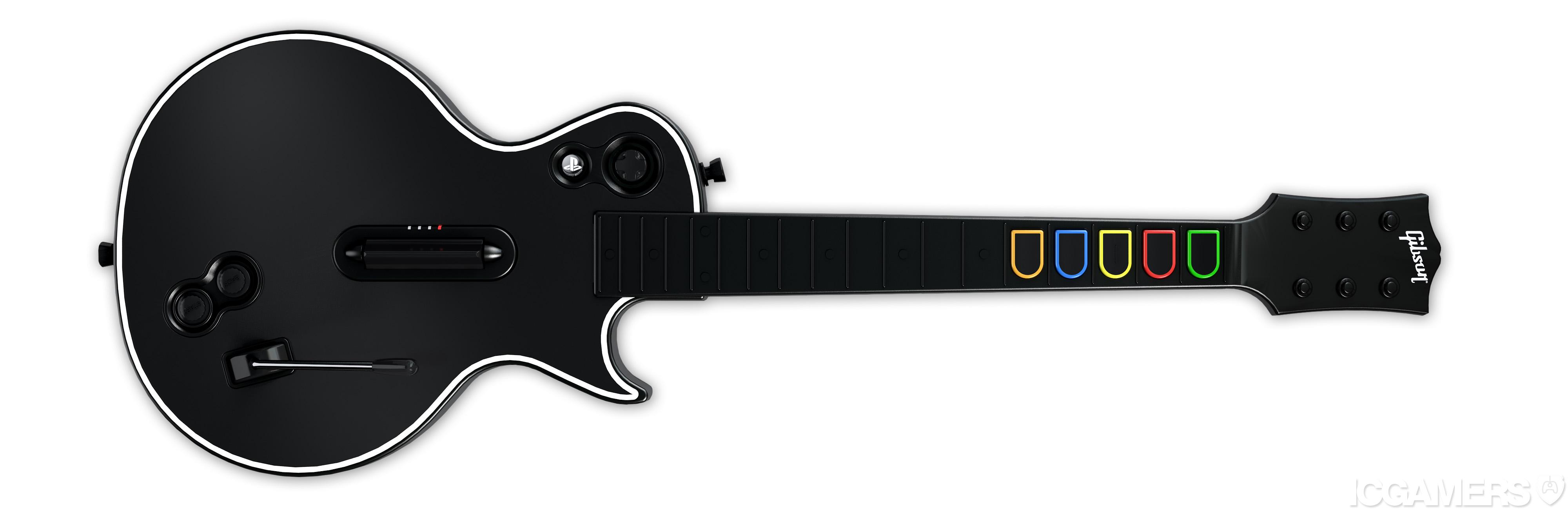
Pros:

  • Looks more toyish and fun, impossible to mistake for a real guitar.
  • comes with really bad decals that you can put everywhere including skulls on the neck buttons.
  • The action on the strum bar is faster and cleaner
  • its black!
  • the neck comes apart from the body making it super easy to travel with
  • the buttons are colored and visible from the front making it easier to see what you are doing
  • the front plate is removable for easy painting and custom work

Cons

  • the action on the fret buttons is squishy and not so enjoyable
  • the wammy bar position sucks
  • you cant do bass style thumb strokes
  • it feels small and a tiny bit dinky

The Rock Band Guitar
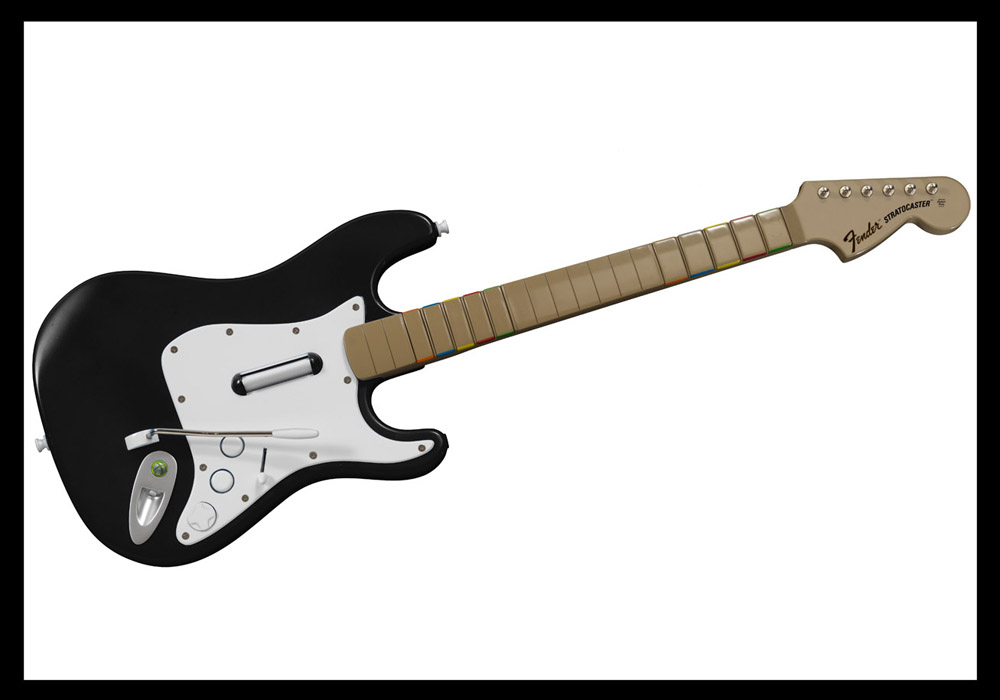
Pros:

  • The wammy bar has a much better feel and more comfortable position
  • the neck buttons are much more crisp and clean
  • there are 10 neck buttons BUT the 5 uppers duplicate the same messages so you really only have 5 buttons
  • the strap is better
  • its got a better size and feel
  • it has a 5 position effects switch thats great for A/B focus
  • the strum bar is much better for bass style plucks and thumb action.

Cons

  • it looks too much like a real guitar.
  • no detachable neck!
  • taller strum bar makes 32 note strums harder to perform.
  • the neck has no color on it so your 5 “notes” are not as obvious

Plug it in

All of the play station guitars transmit standard HID messages over wireless blue tooth to the included USB receivers. The device is instantly recognized by the computer and no drivers are required. HID (human interface device) messages are fast and accurate but there is no dj program that will listen to them so your going to have to convert it into MIDI or Key strokes. There are several tools that do the latter, many of which have been covered in this post. They are all a bit complicated and some are terribly expensive so if you are after a simple solution then convert your HID into key strokes. The program I used is obscenely basic, wonderfully free (for the trial period) and does the job just fine. Its called GamePad companion. (mac) This tutorial is explained using GamePad but you can follow along with a Windows equivalent such as xpadder.

After installing GamePad companion you will never find the app because its been embedded into your system preferences at the bottom. Click there and you will find the settings.
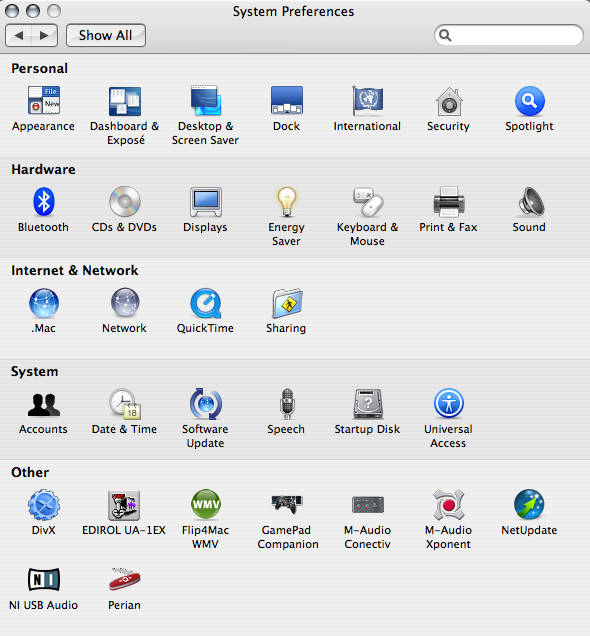
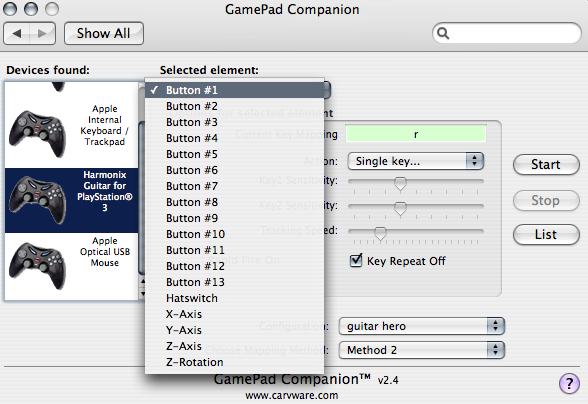
If your guitar is connected then you should see it show up in the left hand list. Simply select the Harmonix guitar icon and start assigning hot keys! First you need to select a element from the drop down list.
Then select the action you want to associate with that element. Once the action is selected you will see a dialogue that allows any key to be assigned to that element.
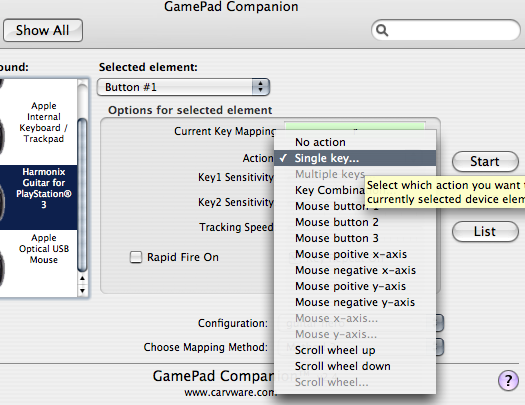
To keep us all on the same page please follow the assignments I have made bellow:

  • button 1 = Single Key R
  • button 2= Q
  • button 3= W
  • button 4= E
  • button 5= T
  • button 6 =5
  • button 9= ,
  • button 10=.
  • hat switch= multible keys (y+u+i+o)
  • Z axis= multible keys ( ; + ‘)
  • Z rotation multible keys (a + s)

Connect the dots

Now you just need to hit start and gamepad companion will start spitting out keystrokes. The next step is setting up some Traktor hot keys. I will point you in the right direction so you can experiment with some of your own ideas out over the next few weeks. Then we will come back in part 2 and explain how to really take it to the next level!

You might consider:

  • making each button jump to cue point 1,2,3,4,5 but not play
  • making the down stroke play
  • making the up stroke pause play
  • finding creative ways to use the other buttons and wammy bar to engage layers or switch focus to different decks
  • play around with using the strum bar to pitch bend a focused deck.
  • experiment with the wammy bar as a super knob

33 Responses to “How to Dj with Guitar Hero”

  1. DJ NUNAS

    May 9th, 2008 at 4:11 am Quote

    This is sweet…

  2. BentoSan

    May 9th, 2008 at 6:01 am Quote

    I agree that the crowd can really relate a lot better to what you are doing on one of these guitars than tapping buttons on a mixer any day. I might have to get me one of these some day, looks fun !

  3. Jinx

    May 9th, 2008 at 4:12 pm Quote

    Thanks :)

  4. Az

    May 9th, 2008 at 5:45 pm Quote

    For windows users u can check out http://www.xpadder.com to map the keys

  5. AJ Orbit

    May 9th, 2008 at 9:49 pm Quote

    I love it !!! I want to use the Rockband drums !!! OH YEAHHHHH !!!!

  6. tobamai

    May 10th, 2008 at 4:27 am Quote

    I think this is a horrible idea and ridiculous, but to each his own.

    Windows users might look to use GlovePIE instead, it’s free and it offers a very powerful script interface that can map joystick punches directly to MIDI (among other things).

  7. Ean Golden

    May 10th, 2008 at 2:07 pm Quote

    I think this is a horrible idea and ridiculous, but to each his own.

    You think the guitar idea or the drum idea is horrible? and why exactly?

  8. tobamai

    May 10th, 2008 at 4:30 pm Quote

    Using a toy guitar on stage. Sure it’s a fun novelty, but it’s a pretty geeky thing to do… Maybe it’s just me, I never thought guitar hero was cool.

    There’s actually a band that does this, but with synth guitar sounds: The Guitar Zeros. They use Max/MSP to interface their guitars, just ideas for anyone who wants to try this out.

  9. Jarred "JKon" Harris

    May 12th, 2008 at 6:50 am Quote

    hm…. well maybe i’m just retarded (not a far stretch) but does Torq allow you to assign hot keys in the same way Traktor does? My group has a show coming up and i would love to play the guitar hero guitar

  10. Ean Golden

    May 12th, 2008 at 11:40 am Quote

    hm…. well maybe i’m just retarded (not a far stretch) but does Torq allow you to assign hot keys in the same way Traktor does? My group has a show coming up and i would love to play the guitar hero guitar

    even if they dont you could use the HID to MIDI conversion tools found on this site to convert it into MIDI. Hotkeys are just more simple.

  11. Matthew Hubble

    May 12th, 2008 at 11:12 pm Quote

    I did this after seeing Ean’s video mine is here if you want to check it out:
    http://www.youtube.com/watch?v=hk5ZUsXi894
    I’m using the PS2 wireless kramer with USB converter, junXion 3 for Mac OSX to convert to MIDI to trigger clips in Ableton.

  12. mycole

    August 17th, 2008 at 12:48 am Quote

    Horrible idea? No way. The crowed loves it when I just use a keyboard. I do some scratching on the keyboard too. People know I’m not really scratching but they’re still entertained.

  13. Art

    November 16th, 2008 at 8:23 pm Quote

    okay so i got the ps3 wireless controller to try this out, but when i plug it in, it is saying there isnt enough power to run it?

    how do i fix this, or what am i doing wrong?!

  14. Art

    November 16th, 2008 at 8:24 pm Quote

    [...] Ean Golden has been dj’ing for more then a few minutes. Dude writes a blog about dj toys too. I love the ‘guitar-as-a-dj-tool‘. [...]

  15. Ean Golden

    November 17th, 2008 at 9:04 pm Quote

    okay so i got the ps3 wireless controller to try this out, but when i plug it in, it is saying there isnt enough power to run it?

    how do i fix this, or what am i doing wrong?!

    did you buy the new guitar hero world tour? that one is apparently not working for us either- too much power.

  16. Art

    November 19th, 2008 at 8:19 pm Quote

    did you buy the new guitar hero world tour? that one is apparently not working for us either- too much power.

    i bought it used, so im not sure what version it is. should i maybe check out the guitars made for mac/pc?

  17. evan

    January 8th, 2009 at 10:23 am Quote

    ok i’m not a real tech head so you’ll have to forgive me, i’m trying to use this with my traktor scratch pro setup but i’m kind of stuck. i followed your instructions to the point of “Now you just need to hit start and gamepad companion will start spitting out keystrokes. The next step is setting up some Traktor hot keys.” This bit lost me, once i hit start and started pressing buttons nothing happened.. i went into my traktor settings but wasn’t sure what the hell i was doing.. i think i need some kind of serious idiots guide! please can you sort explain this in a bit more detail? sorry!

  18. evan

    January 9th, 2009 at 9:40 am Quote

    ok, ive looked at it a bit more, it seems as though m computer is recognising the guitar is plugged in but for some reason its not recognising the the buttons being pressed. could it be my guitar (don’t worry i did make sure it was turned on) its a generic ps3 guitar i got off ebay, i haven’t tried it on an actual ps3 i bought it to try djing with it.

  19. dj gray

    January 17th, 2009 at 8:50 pm Quote

    I just noticed that Amazon has a Frontman Wireless Guitar for real cheap, $9. would those work?
    http://www.amazon.com/PlayStation-3-FrontMan-Wireless-Guitar-White/dp/B0016P7LY6/ref=sr_1_2?ie=UTF8&s=videogames&qid=1232225378&sr=1-2

  20. Ean Golden

    January 19th, 2009 at 7:02 pm Quote

    [...] Ean Golden has been dj’ing for more then a few minutes. Dude writes a blog about dj toys too. I love the ‘guitar-as-a-dj-tool‘. [...]

    yes- that will work. It looks like its a standard HID device.

  21. Alari

    April 14th, 2009 at 11:41 pm Quote

    [...] DJ Techtools article [...]

    I read at the top that the guitar used was a PS guitar, does it matter if the guitar is from xbox?

  22. BentoSan

    April 16th, 2009 at 5:53 pm Quote

    [...] DJ Techtools article [...]

    I read at the top that the guitar used was a PS guitar, does it matter if the guitar is from xbox?

    Yes this guitar also sends HID messages – you will just need to convert these messages into usable midi messages which is explained in the article.

  23. Alari

    April 20th, 2009 at 3:25 pm Quote

    I understand the HID through blu tooth, but the xbox controller comes in through usb and I am just looking for a way to conect the control into Isadora through an HID reader.. Any suggestions?

  24. DJ Redsign

    August 20th, 2009 at 6:11 pm Quote

    [...] DJ Techtools article [...]

    Hi, im trying to hook up a wireless GH3 Xbox guitar controller to traktor pro via GlovePie and a belkin bluetooth usb dongle on XP, im fairly confident on the key mapping and glove pie bit as ive already tried it out with a usb xbox gamepad but im having difficulties discovering my guitar via bluetooth… the bluetooth dongle picks up other devices but i cannot find either of my guitars can anybody help or have tried a similar way as this setup and let me know if it works. cheers

  25. DJ Redsign

    August 21st, 2009 at 10:04 am Quote

    Just found out that in order to use any wireless Xbox controller with a pc you will need to buy ‘Microsoft Xbox 360 Wireless Gaming Receiver for Windows’ as the controllers do not use standard bluetooth. gutted another 20 quid in microsofts pocket then i supose.

  26. DJ Redsign

    August 21st, 2009 at 10:14 am Quote

    Ah Screw microsoft im going into town to buy a secondhand ps2/3 guitar.

  27. DJ Redsign

    August 21st, 2009 at 10:29 am Quote

    just a not too… GlovePIE as well as being free allows you to program combinations of key presses which i think allows you to have upto 120 assignable function for your dj software using the standard neck button alone. might get overly complicated but if you are looking for a bit more scope with this in theory at least in can be done.

  28. DJ Redsign

    August 21st, 2009 at 10:29 am Quote

    *note

  29. DJ Redsign

    August 21st, 2009 at 1:11 pm Quote

    Done it… got me a PS3 Metallica guitar tested the combination of pressing multiple keys too and works fine will post my full key config soon

  30. freecoholic

    August 26th, 2009 at 7:31 pm Quote

    Done it… got me a PS3 Metallica guitar tested the combination of pressing multiple keys too and works fine will post my full key config soon

    Can you please share more information about your progress? Thx :)

  31. Devastation

    December 17th, 2009 at 3:49 pm Quote

    shout out to the Djtechtools family
    you guys sheared so much knowledge to me about Controllerism and how to mack my own unique style of dj ing
    i enven took it to another level and started useing my usb logitech dual action game pad in my performance
    BIG UP ALL THE WAY FROM TRINIDAD & TOBAGO ( Caribbean w.I.)

Leave a Reply

  1. Quote selected text

First Time?

This site is dedicated to digital djs. We develop performance tools and teach cutting edge techniques that enable creative expression. Visit tutorial videos on youtube, equipment reviews in the blog and a very helpful community in the forum. New articles every Mon, Wed, Fri.
In the Store
 

Categories:
Follow us:
You're going to need Flash 8+ and JavaScript to use this site. How'd you get this far without it?

Dig through the Crates

Readers are Saying

  • ManDingo: ManDingo wants to know when the MidiFighters with the joystick will be availabe. please let him know so that he may...
  • RCUS: @dj broken record: I am almost 100% sure DJTT wouldn’t limit it to a Traktor only contest so don’t let that...
  • dj broken record: a question – is traktor the required software? what about torq?
  • Vince: you should do more contests like this more often with different prizes
  • kilbot: nice video and the contest is great idea! however I have to agree with others, in that regardless of how subjective...