

Native Instruments Audio 8 Review
Native Instruments has a impressive record in the software department but their hardware products have less of a history. So when the audio 8 was released many months ago, I was speculative, and held off giving it a try due to the fact that I had already identified several good sound card options. One thing that remains elusive though, is a reasonably priced, high quality sound card that supports direct phonograph inputs. With more and more people using Ms. Pinky, Deck a Dance and tools for Ableton Live time code control, Phono inputs are a good thing to have around.
The scoop
The card, as did most others in our $200 round up, works well with a good computer at lower latencies. It proved also to be reliable in live use without causing any problems or breaking up. The going rate is around $399 with some retailers including an upgrade to Traktor 3.0 for free. Overall the latency, size, and build quality is comparable to the Presonus Firebox which is priced around $299 these days. So what exactly does that extra $100 buy you?
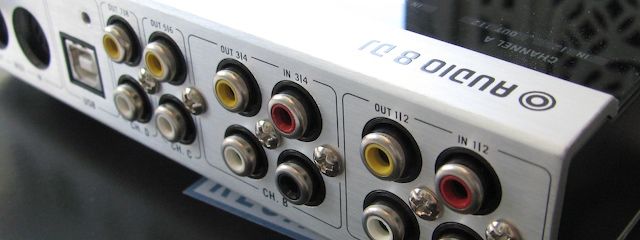
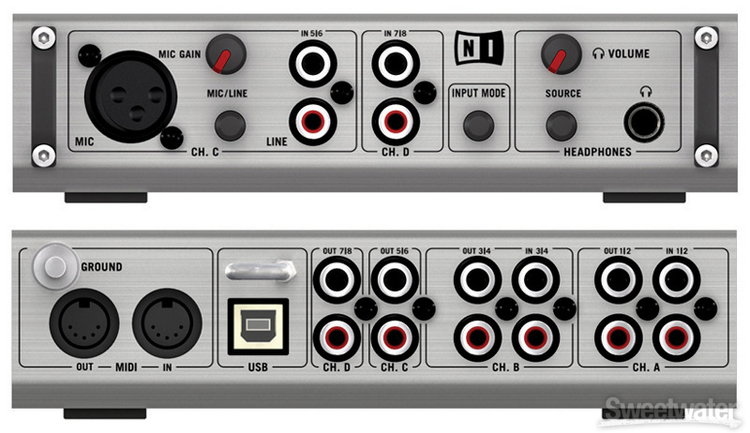
} Multiple phono inputs on the back so you don’t have to buy phono-line level converters which can run about $50 each. Keep in mind though you could always get time code control from CD players and run those signals into just about any sound card out there.
} Very Hand Female RCA jacks. As I have mentioned in the past its way easier to hi-jack the RCA’s from a clubs CD players than to run your own lines into a mixer. Just hope and pray your system does not crash if CD’s are your only back up. That could end up being an awkward silence filled by the sound of cable scrambling and boos.
] Signal Indicators on the top of the Audio 8 can quickly tell you if audio is coming out of the box to help problem solve if you don’t hear anything through the speakers.
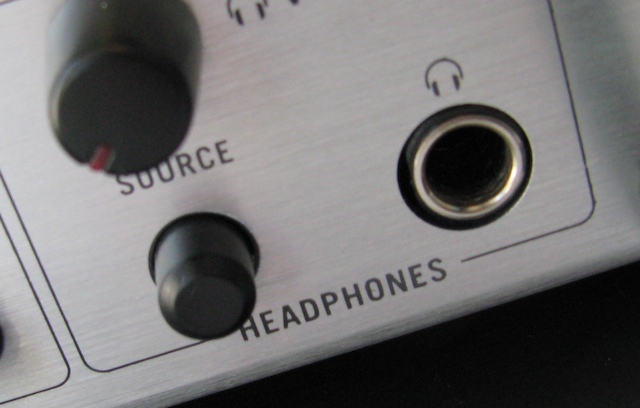
} Headphone Jack that includes a level pot and source button that can quickly switch between one of the inputs and a pre-set output.
} one of a kind multi-core cables that make re-connecting your set up a breeze. Be warned that this is a bulky set of cables, and not something I would pack in my gig bag. They are however great for plugging in your home setup so that when you take your sound card out you can easily plug it back in with a minimum of effort. Instead of finding the right place for 6 sets of phono/line cables, you just plug in 2 sets of clearly marked and color coded cables into the sound card.
} 4 inputs and 4 outputs so you can connect 2 turntables and 2 cd players to 4 decks in Traktor and route all 4 outputs to a hardware mixer.
You should know
} None of the inputs route directly to the outputs so if you want to run a drum machine or back up CD player into a PA through the sound card that would not be possible. You can however route any of the inputs through Traktor for processing and then out but that would introduce some degree of latency.
}its a bit heavy for the size but then again your not packing for a 60 mile hike so a few extra pounds should not make or break anything.
}it works well with Deck A Dance and I had no problems controlling both decks with a variety of time code vinyls.
Conclusion
All in all I cant really say anything bad about the Audio 8, its well built and easy to use. There are very few sound cards that have been built specifically for a dj out there and this one certainly fits our needs well.It also allows you to incorporate vinyl control into Traktor 3 after they discontinued support of the final scratch interface. I have been trying to slowly work in some record control into my sets after all these years and its been nice to have that option with the audio 8. 2 giant platters of pitch control is great but centralizing all your transport controls in one compact place still works a lot better for everything else.





April 29th, 2008 at 12:50 am Quote
I really like my Audio 8 DJ, but i do have an issue with the drivers.
I wish NI would implement a better control panel app that would allow the gain to be adjusted on each input/output channel. allowing dynamic routing through the card would rock as well.
the hardware is great, i use it for vinyl control in T3.3, and for production with Live and MLR.
as soon as the drivers are buffed up a bit, it will be a much better card…
April 29th, 2008 at 12:52 am Quote
Good review, I have this soundcard and I love it. It would of been nice if it was a firewire interface rather than a USB.
April 29th, 2008 at 3:48 am Quote
I got an audio kontrol 1, and its been great so far, somewhat wish I’d saved up and bought one of these as it has 2x as many outputs and 4x as many inputs O_o
April 29th, 2008 at 3:55 am Quote
Good review Ean!
I own this card as well. Not many people have reviews for the Audio 8 alone, most credible info came from in-depth reviews for Traktor Scratch. I ended up going for the Audio 8 as an investment for when I may want to add time-coded vinyl to increase my pitch control and scratching possibilities, once my skills start to ask for more than the VCI-100 platers will give me.
I was a little worried about it being only bus-powered, for my laptop is short on USB ports. I must say though, that it’s connected through a USB hub, and it’s performance is great!
April 29th, 2008 at 4:05 am Quote
Thanks for the feedback guys, anyone else that has input on the card including any bad experiences please post them here. So far so good for me.
April 29th, 2008 at 6:42 am Quote
This review comes really handy, I was thinking about buying the audio8. Now I definitely will.
Keep up the good work Ean
April 29th, 2008 at 6:45 am Quote
is deck a dance a new benchmark? ;-) or why is it important to mention that soft?
April 29th, 2008 at 8:52 am Quote
I assume this is because Dckadance supports sooo many different types of vinyl timecode and is best for testing time code compatibility on multiple timecode types.
April 29th, 2008 at 1:02 pm Quote
For home use I’m still absolutely satisfied with my Maya 44 USB for only 99 EUR. Of course, you only get 4 inputs and 4 outputs, but that should be enough for most hobbyists.
April 29th, 2008 at 3:24 pm Quote
Thanks for the review dude.. you always seem to be testing the exact soft/hardware I’ve been giving thoughts on. Good Stuff..
April 29th, 2008 at 5:16 pm Quote
I have ableton running on my MBP as well as an xponent, I want to add a turntable to my system and be able to mix between all 3 sources would this be able to handle that?
April 29th, 2008 at 5:19 pm Quote
yes, sounds like it would. :-)
April 29th, 2008 at 5:21 pm Quote
I assume I would have to run the xponent as one channel in and wouldnt be able to cue between both channels in the xponent?
April 29th, 2008 at 5:23 pm Quote
I own this card too. In my opinion is a great sound card. Stable, vary good sound quality and high gain outputs. I have no drivers issues and I haven’t change the default conf. traktor works flawlessly.
April 30th, 2008 at 1:24 am Quote
i’m interested in knowing how this compares to the fast track pro from m-audio…… i am interested because i am really looking into buying timecoded vinyl and i own the fast track pro… i’m just up in the air as to whether or not i should keep it or sell it and get this ni card.
May 1st, 2008 at 6:47 pm Quote
If you plan doing live gigs, anything is better than FastTrackPro…
May 2nd, 2008 at 4:16 am Quote
Well, I am 99% sure the fast track pro does not have phono inputs. So that should make it an easy call.
May 15th, 2008 at 3:33 am Quote
thanks for the input…i’ve ordered my audio 8.. now as for traktor… because there are four digital decks within the traktor software… how would i set up the audio 8 for 2 turntable/cdj timecoded controlled decks (1/2) and the other two decks (3/4) by my vci… would i need to also buy a 4 channel mixer and have decks 3/4 routed to the two additional lines in the 4 channel mixer?
May 15th, 2008 at 2:33 pm Quote
that depends on if you want to mix internally or externally. Internally you wont need a mixer but if you really want tactile control over all 4 decks an externall 4 channel mixer might not be a bad idea!
May 21st, 2008 at 1:35 pm Quote
i would have picked up this card if a friend of mine didn’t sell me his Presonus Firebox for 200.
November 20th, 2008 at 5:44 am Quote
Hi all, new to the site but had to jump in as soon as I saw Ean mentione the multi-core cables.
My DJing partner for one of my regular nights uses Serato while I use Traktor. I bought him a set of the multi-core cables, as this makes it a *snap* for us to switch between Traktor and Serato mid-show.
We use his “mixer-side” cables permanently attached to the mixer and each of us has our own “scratch-amp” cables attached to our respective audio boxes. When it’s time to swap, all it takes is a quick snap of 2 XLR connectors and we’re “in”. It’s possible to just swap one at a time, but another benefit of the multi-cores over the Serato standard cable solution is that the phono turntable signal is passed through the cable, not the audio interface. This let’s us bring in traditional vinyl while making the transitions, even if the cable XLR’s are disconnected.
True, the interface-side cables do not cleanly connect to the Serato amp since the inputs & outputs are on opposite sides of the amp, but it’s still workable. Maybe some enterprising soul can start a business supplying multi-core compatible interface-side cables for Serato specifically!
I think these cables are a GREAT solution for club installations (I’ve even convinced the sound engineer of a club in Seattle to implement them). It allows the club to have a quick 2-XLR click to introduce a new DJ using Serato, Traktor or other DVS system without having to rewire any of the main cables. If we could get this standardized throughout the club world (and for only $70 total for a complete cable set, what a cheap standard to adopt), we’d improve the world of DVS-based DJing throughout the industry.
-Kundabuffer
November 20th, 2008 at 7:20 pm Quote
I think these cables are a SIMPLE thing to make. Soldering connectors is not a rocket science. Thus every club engineer should be able to make one set that perfectly fits the need of the club (maybe even use an in-case connectors so it can fit on some sort of a patch bay.). That goes for serato too, create a set of cables for yourself man.
All you need is a set of 7pin XLRs and RCA connectors.
October 10th, 2009 at 8:00 am Quote
Hello everyone.
I own a Audio 8 dj for a year . using together about one month but last weeks I is broken on channel 1/2 no sound . I think is shit sound card . if anyone to buy please read more on .Audio 8 dj forum
I had my maya for 8 year for a 100$ still working good than 670$ does what i paid for my audio 8 dj in asia
December 7th, 2009 at 6:15 pm Quote
imo those cables suck… they most definitely introduce hum if you switch to vinyl… either those or the unit itself. when mixing vinyl i end up bypassing the audio8 altogether and going straight into the xone… wish monster would make a set of these… no i dont feel like making them ;)