HID Joysticks for Djs

20070417180035space-navigator

by: Ean Golden

That new midi controller might be almost perfect, but you may find you need just a few more controls. A common HID (human interface device) is an inexpensive and simple way to add a few extra buttons to your setup without breaking out the drill and soldering iron. HID devices like the Griffin Powermate connect via usb and are usually bus powered so they will easily integrate into your setup.

HID to midi converter software will transform the non-dj friendly HID messages into midi land and then you can assign them easilly in your dj program.

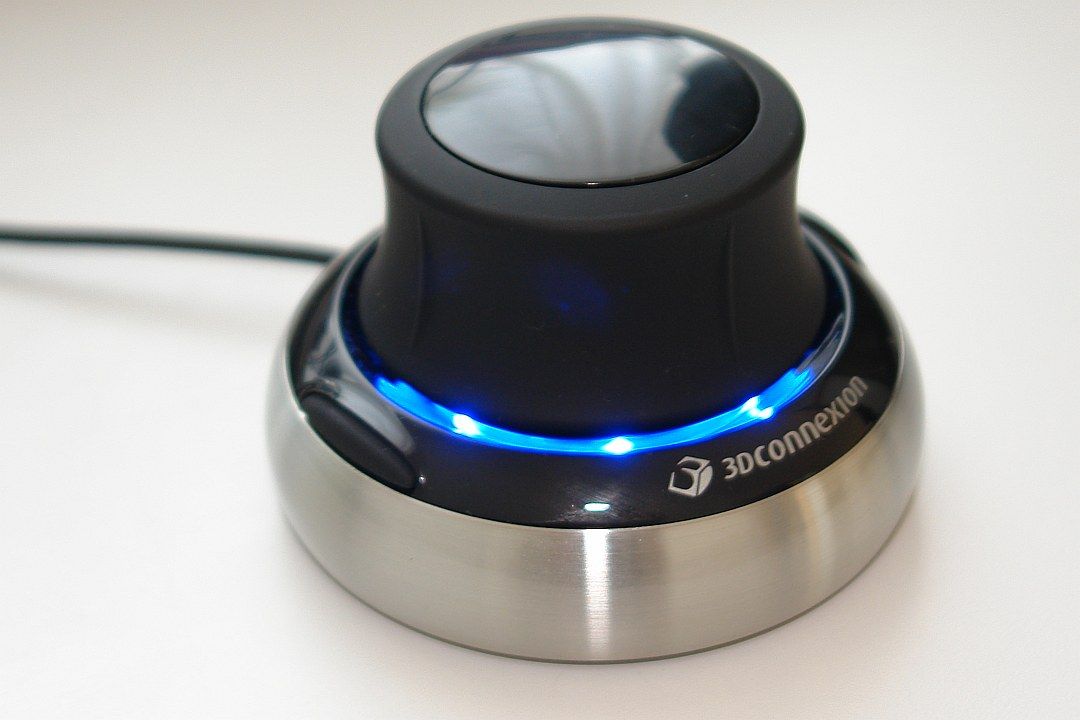
Bento san brought the Space Navigator to our attention which is basically the PowerMate on steroids. The power mate offers essentially two controls, a jog wheel and a push button but the Navigator packs in at least 6 axis of control which could be great for effects manipulation. There are even 2 native programs that directly support conversion of the Space Navigators messages into MIdi:

Midi Navigator for the Mac

3D connection Windows Drivers

While we are on the subject of next generation human interface devices, I stumbled upon the Novint Falcon which brings together mouse and joystick control with haptic feedback on top.
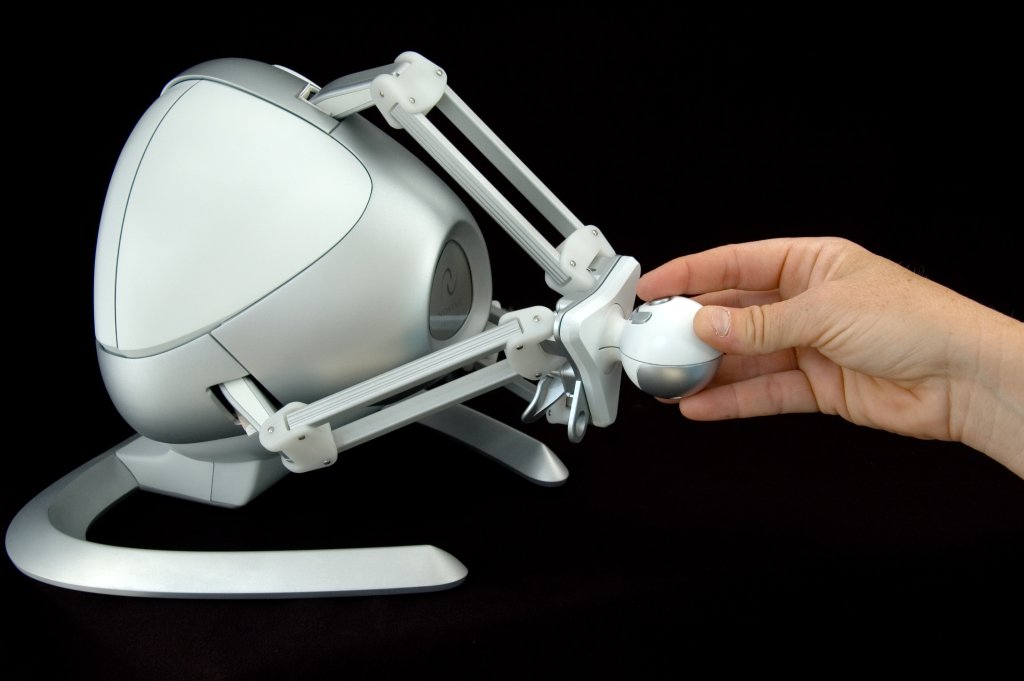
There are no dj programs out there that spit out haptic feedback but I cant wonder what it would be like to literally feel the beat through your controller. Some thing tells me there is no way you would ever be taken seriosuly if you tried to show up and dj with that thing. Non the less, Dj Tech tools is going to try and secure samples of both devices so we can give the inside scoop on how well they actually work.


  • obsidiance

    haha haptic feedback would be crazy!

    FIGHT THE RHYTHM!

  • http://www.myspace.com/bentosan BentoSan

    Lol that haptic feedback device is freaky looking, nice find !

    As for the space navigator that thing is mental and it looks sexy too ! I can think of so many crazy effects id love to try on that thing, even for producing i think this thing would be useful. Different effects really translate best to different kind of HID devices, x-y pads are better for somethings, knobs for others and so on all with their own varying feels.

    Hell i have even used a plastic bag with my laptops mic, ran it though a peek controller(to turn the plastic bag level of loudness into a midi CC signal), that i could then use to control an effects parameter on a bass line i was making(monitoring on my headphones). The amazing thing is how well this actually worked ! :| (true story)

    The point is don't judge a device by its shell, while it might not "look the part" theres a good chance you can probably do some amazing things with it.

  • http://www.myspace.com/bentosan BentoSan

    <blockquote cite="#comment-3262">haha haptic feedback would be crazy!

    FIGHT THE RHYTHM!

    Ean Golden VS 4 on the floor ! i wanna see a video lol !

  • http://www.ome-les.com tekki

    Still if you would like to have a little bit more buttons, you might also look for the Contour solutions:

    Contour Shuttle Xpress

    [img ]http://www.feedback.nl/images/cache/productafbeeldingen/contour-shuttlepro_v2_350_ffffff_75.jpg[/img]

  • DJ Pep

    <blockquote cite="#comment-3262">haha haptic feedback would be crazy!

    FIGHT THE RHYTHM!

    Ean Golden VS 4 on the floor ! i wanna see a video lol !

    I have a small problem. I would love to use this with Traktor/Ableton but I have no more USB ports left? What can I do?

  • http://www.eangolden.com Ean Golden

    powered USB hub would be your only way to go.

  • http://www.nem0nic.com/ nem0nic

    Hey BentoSan, are you using MIDI Translator convert the SN data to MIDI, or binding keystrokes to the controller through the driver?

  • whiskers

    wow, only $60 for the Space Navigator! Sweet!

  • midian

    I'm totally getting 1 or 2 those space navigators! Awesome.

    I did my honors in haptic interactivity (in relation to music and visualization) theres some crazy stuff out there. I actually see no reason why you couldnt use haptic interaction in a club. Would involve making some unique custom devices around this.. I think I might look into this (should start a thread).

  • http://www.myspace.com/bentosan BentoSan

    <blockquote cite="#comment-3288">Hey BentoSan, are you using MIDI Translator convert the SN data to MIDI, or binding keystrokes to the controller through the driver?

    I actually do not have one of these for myself personally(yet).

    However i was thinking would use the two buttons on there to change which deck the device has control over. Which is best done with Bomes Midi Pro.

    The drivers listed in the artical are converting the movements on the spacenavigator to midi, so you don't even need Bomes to get this thing going(though theres more you could do with it using Bomes midi translator

    ).

  • http://tosmts.spaces.live.com DJ ToS

    Since yesterday I am using an additional (PS1 format) gamepad for Traktor control. The idea is to do some b2b mixing as concurent as possible whout interrupting the "main DJ" that has master control.

    I won't reveal assignments but I can say that I am using two programs for this setup, Mjoy and rejoice.

  • Ean G.

    Since yesterday I am using an additional (PS1 format) gamepad for Traktor control. The idea is to do some b2b mixing as concurent as possible whout interrupting the "main DJ" that has master control.

    I won't reveal assignments but I can say that I am using two programs for this setup, Mjoy and rejoice.

    Why not reveal your set up? This web site is all about sharing knowledge- not hiding it.

  • http://tosmts.spaces.live.com DJ ToS

    Far from the idea of hiding, I just don't think that it is usefull to post a semi-finished(yep, I still haven't agreed with myself about all button assignments) setup which other people would most probably do other way based on the usage of their (dj) software.

    X/Y axis is drawn from the MJoy because it has the ability to bind one axis to two separate CC ids(one for left, one for right).

    Buttons are routed trough Rejoice because it has the shift-option(you can make multiple layers with key conbinations(i.e. BTN L2 + BTN 1, where L2 is shift-state )).

    Let's just count the triggers bound to mine(I hope you know how the SonyPS gamepad looks like):

    x axis lft/rght : pitch bend

    y axis up/dn: undefined (used to be FX knob 1 inc/dec)

    L 1/2: shift button 1/2

    R 1: cue-play instant

    R 2: undefined

    SELECT (the stop shaped button): undefined (used to be shift btn)

    START (the play shaped button): play/pause

    buttons 1-4 (X 0 triangle and square): changing by the hour :-)

  • Ean G.

    Thanks for sharing! Let us know if any of those assignments prove to be particularly useful to you.

  • compert

    Thats funny. We are using the Space Navigator for CAD programs at Uni. They are really well build and fun to play with.

  • http://tosmts.spaces.live.com DJ ToS

    Further testing pooved that Rejoice application in fact does not have shift-state system. I've been in search for a few days now and hopefully found two apps that are free and can do the trick.

    First one is a a bit hardcore, the Hubi's MIDI TRansformator. Because of it's hardcoreness I still havent tested it.

    Second app is a more user-oriented: Bome's Midi Translator Classic which does just about the thing I need.

    If none of thiese proove good enough I'll probably write one myself.

  • http://irondj.net iron dj

    cool devices when can I guy one?!

  • http://www.linkedin.com/in/howtogetasixpackfast How to Get Six Pack

    The style of writing is quite familiar to me. Did you write guest posts for other bloggers?

  • Ean Golden

    [quote comment=""]The style of writing is quite familiar to me. Did you write guest posts for other bloggers?[/quote]

    I wrote for remix magazine for a while ( 3 years) but not any other blogs.

  • http://www.djtechtools.com/2008/09/19/serato-joins-up-with-pioneer/ DJ TechTools  |  Serato joins up with Pioneer

    [...] This combination however, chose not to use MIDI, instead relying on the HID format we explained in this article. Scratch LIVE 1.8.2 recognizes the Pioneer CDJ-400 controls using the robustness of the HID [...]

First Time?

This site is dedicated to digital djs. We develop performance tools and teach cutting edge techniques that enable creative expression. Visit tutorial videos on youtube, equipment reviews in the blog and a very helpful community in the forum. New articles every Mon, Wed, Fri.
Subscribe with one million others

Featured Article

DJ TechTools Traktor Kontrol S4 Mapping

The long awaited Traktor S4 Mapping is here and totally FREE. Continue reading for a full video and the download link.

Categories:

RSS DJ TechTools Forums

  • Using S2 with Ext. Mixer
    Currently Im using a ddm4000, (yeah i know. not the best, but hey its affordable) And im very seriously considering buying a S2. I would love to use... […]
  • RIP Whitney Houston
    http://abcnews.go.com/Entertainment/wireStory/whitney-houston-superstar-records-films-dies-15565063 http://www.youtube.com/watch?v=q_bP1SiZltg […]
  • Konvection 16: Dark Progressive Techno and Electronica
    A 100 minute progressive journey through techno heaven and hell. I love putting this kind of mix together; taking the time to choose the right tracks... […]
  • Audio/Recording in Ableton
    Hey guys Just got a copy of Ableton, have it installed, now trying to hook it up to my studio monitors with my Audio 8 sound card. In... […]
  • How to do a remix
    Hey guys just wondering how a remix is done? Do u have to get all the individual parts separate like the kick etc? thanks […]