
Super Knobs

superman-logo-5000767.jpgWith a limited number of physical knobs to control an ever increasing number of software goodies you need to find a way to get more out of your control surface. Using a single knob to control more than one parameter is one of the best ways to do that. A good example of this is the effects section of my VCI-100SE. Each effect in Traktor has 4 knobs and 4 buttons but my vci-100 only offers 2 knobs per effect. How can this be effective? Super knobs!

First check out this video in which Moldover explains his use of super knobs among other things. Here you can see how each part of the knob kicks in a different effect or sound. This is the most complicated way of accomplishing the goal and requires advanced midi translators, Reaktor or max msp to accomplish. Don’t fret there are some easier ways to try it out at home.

YouTube Preview Image

In Ableton you can easily assign several knobs to different functions and have them react in stages, kicking in different effects as you slowly increase the knob. A simple goal for example might be spicing up the basic low cut filter. Cutting out the bass and sweeping up a filter until there is no more sound is a tried and true digital dj trick but you can seriously improve it by adding several other effects to the top of the sweep!
superknob_filter.png

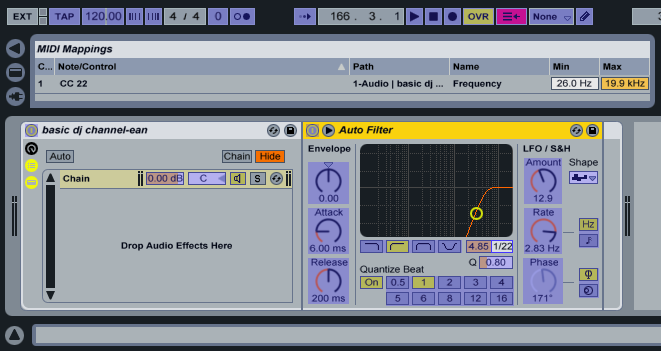
First you need to assign your knob to the frequency function of a hi pass filter in Ableton. All the settings are stock to begin with. You can use the “Cut O move H” preset of the auto filter for this example but lower the resonance.
superknob_filter_echjo.png

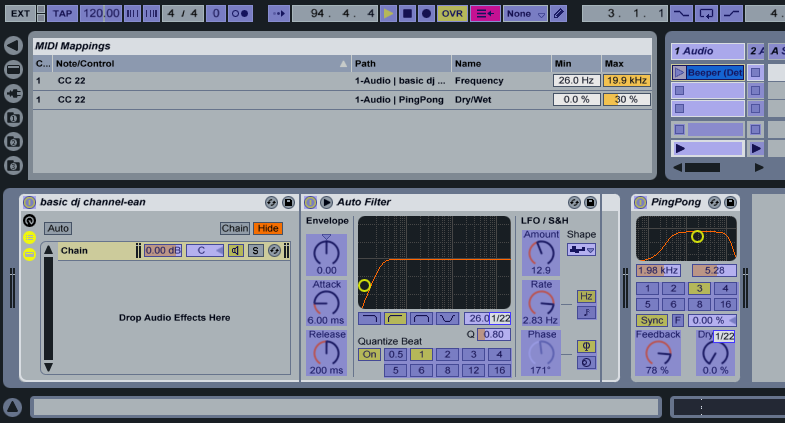
Next lets add a basic ping pong delay to our effect chain. Here I am going to assign the same knob to the dry/wet mix. Just leaving that assignment as-is will double up the effects, so I have a filter and echo working at the same time all the way through the sweep. Thats not what I want. The delay should only kick in at the top of the sweep when all those bright high frequencies are twinkling so the low end does not get messy. To do this, all you have to do is lower the max setting. For this example 30% is a good place to start. Bingo, now you have a delay that kicks in at the top but you may notice the volume drops a lot and the track looses a little energy. No, problem- just add one more effect!
super-knob_filter_echo_comp.png

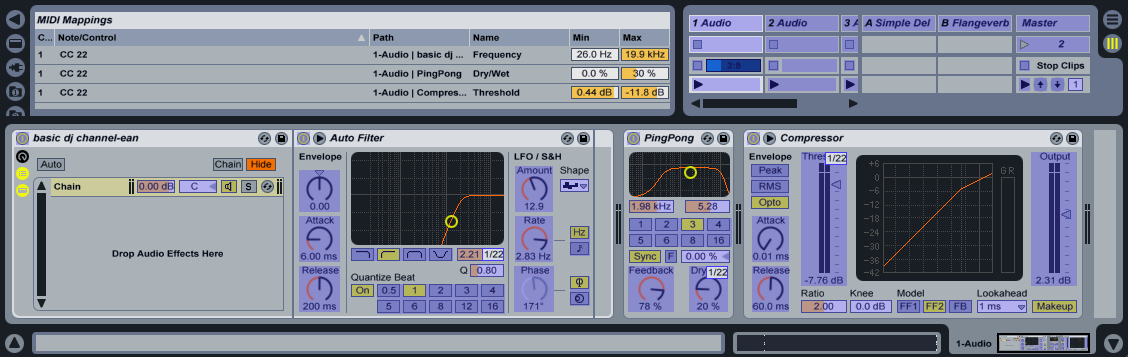
Now I will add a basic compressor to raise the volume when the bass is lost. Assign the same knob to the threshold and see how it works. Right off the bat, its all wrong. The compressor starts all the way on and then is compressing less as the effect increases. We need to reverse that action. Again using the min/max functions I am going to flip the values so the min is higher than the maximum. Match the values in the photo to the left to get a good starting place and then adjust them to your liking.

There you go, now you have a very expressive low cut filter that wont get old after a few uses. If you don’t use Albeton for djing check out this post which will show you how to use the effects in Ableton while djing through another program. Next I will explore some uses of super knobs in other dj software like Traktor and Deck A Dance.


9 Responses to “Super Knobs”

  1. 714ssdj

    April 2nd, 2008 at 4:41 am Quote

    coo post

  2. Anonymous

    April 2nd, 2008 at 11:58 am Quote

    What about creating a rack with multiple chains in it? Mapping each effect to a range of zones which in turn are all x-faded (again in the zone mapping area) in to one another (check out ‘zones’ in the ableton manual, took me a while to figure out what these were)?

  3. Chris combe

    April 2nd, 2008 at 1:32 pm Quote

    awesome, now how do we do it in Traktor… since this is what everyone is using..

  4. aiden

    April 2nd, 2008 at 2:13 pm Quote

    awesome, now how do we do it in Traktor… since this is what everyone is using..

    http://www.djtechtools.com/?p=289

  5. Ean Golden

    April 2nd, 2008 at 5:20 pm Quote

    Exactly, this was an introduction. Next I can show you in Traktor- That is part B of the tutorial.

  6. audiodestruction

    April 2nd, 2008 at 6:17 pm Quote

    thats awesome, i think it would be cool if we started seeing more of this and stepping outside of the VCI-TRAKTOR setup, maybe throw in some torq, deckadance and more ableton. Hell if someone has some good logic beatmatching tips i am all for it. I love what everyone here is doing but it would be a waste of a great community if we squandered it on a setup that “NOT everyone is using” Hopefully we will see some dedicated rooms in the forum. I am registering now!! Thanks keep up the good work

  7. Jonny Pez

    April 2nd, 2008 at 10:56 pm Quote

    Ean, thanks for doing an example in Ableton. I was beginning to feel left out.

  8. Chris combe

    April 3rd, 2008 at 1:19 am Quote

    Awesome, thanks Ean you certainly look after us aspiring Digital DJ’s really well :) I got myself the Stanton Uberstand yesterday for my laptop and its the coolest thing since sliced bread… its very portable and strong.. with an extra height adjustable shelf for my sound card

  9. dj Thomas

    September 4th, 2008 at 10:48 am Quote

    Interested in finding solution on “How to turn an oxygen 8 or any other keyboard into controllerist musical instrument” ? Visit http://www.djtechtools.com/2008/08/22/how-to-hack-a-keyboard/ from DJ Techtools to find helpful articles related to your topic and get going. Interesting, isn’t it?

Leave a Reply

  1. Quote selected text

First Time?

This site is dedicated to digital djs. We develop performance tools and teach cutting edge techniques that enable creative expression. Visit tutorial videos on youtube, equipment reviews in the blog and a very helpful community in the forum. New articles every Mon, Wed, Fri.
In the Store
 

Categories:
Follow us:
You're going to need Flash 8+ and JavaScript to use this site. How'd you get this far without it?

Dig through the Crates

Readers are Saying

  • Double DutchDj: Right, here’s why the zero 4 is simply the best for what I want, firstly I can control Traktors Clock...
  • PlanetDJ.com: [quote comment="30788"]What happened to the Stanton 680? They were the industry or club standard… now...
  • azunderg: Do I download the firmware upgrade software directly from renesas or do you have link to it?
  • Anonymous: [quote comment="34512"]Too bad soo many entries do have other songs then listed. I thought it would be a great...
  • Dude: I’ve owned most of these products, and the AKAI LPD8 is by far my favourite. I use 2 LPD8s, though an LPD8 coupled...

RSS Hot Topics in the Forum

  • Hercules RMX Traktor DUO Mapping PLZ (MacBook Pro)
    I cant find a mapping for my hercules and plus i dont if the buttons are suppose to light up? HELP? :confused: […]
  • mac mini with dual monitors..
    hello everybody! i plan to sell my tower pc and to buy a mac mini. i really want two monitors because of vsts beeing inside my arrangement view... […]
  • Beatgridding help on a track.
    Dear all, Can someone give me some tips on beatgridding whith traktor this track : Image:... […]
  • Drugs
    I once joked that cause I was pill'n on ADHD meds all threwout my childhood I was simply graduating to the extra strength stuff with adulthood (with... […]
  • Track Selection Question
    This is a question i've had for a while and with Ean's posting recently about the "time line of the dance floor" it seems like a good time to ask. If... […]