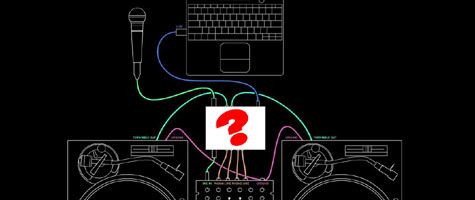
For those that avoid acronyms like Perez Hilton’s blog, DVS stands for Digital Vinyl System. Aka Final Scratch, Serato Scratch, Traktor Scratch, Butt Scratch, Back Scratch and anything else that ends in Scratch that may interface with a computer. Mr. Kirn of CDM has unearthed this very interesting story about our friends at NI who apparently settled a law suit in favor of the reported owners of one type of digital scratch technology. Wait a moment, I thought Riz invented that? Well apparently not according to this article in Create Digital Music:
Native Instruments acknowledges the validity of patents held by N2IT, and has now fully licensed their usage worldwide for its TRAKTOR SCRATCH digital DJ system and related products.
The patents held by N2IT relate to general principles of digital music playback using time-code records, which are being utilized in TRAKTOR SCRATCH as well as in other manufacturers’ digital DJ systems with time-code control
Continue reading ‘Who actually did invent DVS?’

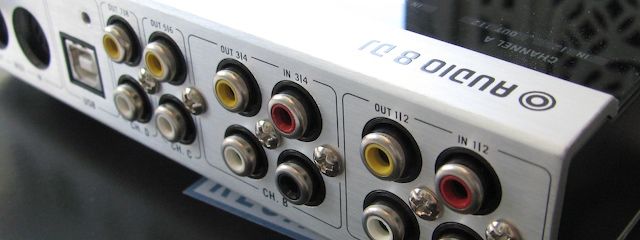
Native Instruments has a impressive record in the software department but their hardware products have less of a history. So when the audio 8 was released many months ago, I was speculative, and held off giving it a try due to the fact that I had already identified several good sound card options. One thing that remains elusive though, is a reasonably priced, high quality sound card that supports direct phonograph inputs. With more and more people using Ms. Pinky, Deck a Dance and tools for Ableton Live time code control, Phono inputs are a good thing to have around.
Continue reading ‘Native Instruments Audio 8 Review’
In response to the handy feedback icon you see on your left hand side of this site I will be starting a “FX Fundamentals” series and go through many different uses of FX that you can use inside Traktor or any other software. First on the list is filters, the work horse of a dj’s effects arsenal. Along with a basic overview of the different filter options, I will go into multi mapping a single knob to many parts of a filter and layering 2 filters for even more effective results. Check out the video bellow for the scoop.
Continue reading ‘FX Fundamentals- Filters’

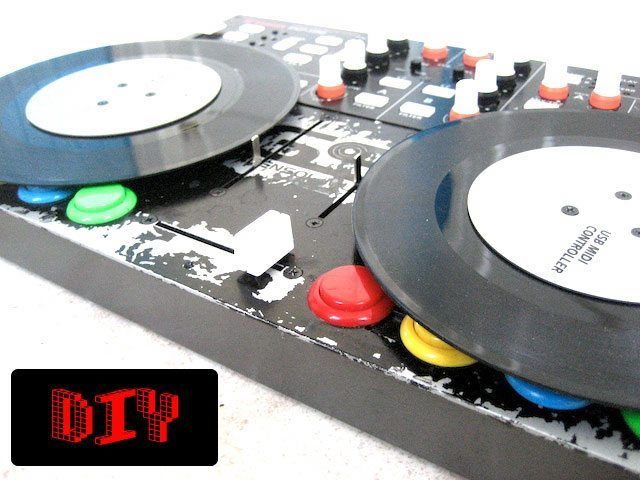
This DIY mod wins several awards including: most useless mod, easiest to perform mod, and most instant gratification bang for your buck mod. Adding a pair of 7″ records to your vci-100 does not make too much sense as you loose functionality of the fine pitch faders, nearly 16 buttons and you must remove the input fader knobs. Then again, its fun to do and looks great. You can also fantasize what it might be like to actually have 7″ record midi platters which would be sick! Vestax briefly brought out a mock up of a single 7″ record midi controller with motorized platter and basic controls. It was a mechanical mock up that didn’t exactly wow the crowds at NAMM 2008 but I cant think of anyone that does not like 7″ records. So here are the basic steps required to add a few to your VCI-100.
Continue reading ‘Add Records to your VCI-100 Jog Wheels’

The moment frequently pops up when you must come up with the next song in a hurry. The clock is ticking backwards and you find your self with only 1 minute left in a track and then you think of the perfect song, but wait- what was it called again? This is one area where 12″ records offered a serious advantage, instead of requiring the memorization of 4000 song names- you became emotionally attached the the visual image of the cover.
Many djs could NEVER remember the name of their go-to record but instantly pull up the most minuscule details about a cover. “Yeah- its the purple one with the little orange dot on the corner and Erika’s phone number scrawled on the back”. Hey we are artists people, and artists are a visual group of folks.
So, how to work this problem out in the digital age? Well, there are a few tricks up my sleeve that I can share with you. Next week we will expand this concept into a full blown I tunes management class but first I want to share one simple little trick that will go a long way.
Continue reading ‘Find the next Tune’

The Final Round!
In round 2 everyone really stepped up the game and came back with better and more polished ideas. Several people were working together, pooling ideas and integrating each others concepts to create a better logo. Its really hard to say, they are all very good, but which one do you think best represents Dj Tech Tools?
These finalists are the re-vamped versions of the top 3 logos from the first round and 1 late comer which due to his efforts should be included. Midian and I joined forces to merge my original concept with his great turntable/hard drive idea.
Continue reading ‘Logo Contest’


Those of you that missed out on the VCI-100SE should not feel left out, just make your own! psychoguru, a member of our brand new forum posted these stunning photos of a black VCI-100 that he basically created himself. Well technically he converted a silver VCI-100 into the black version by getting creative and leveraging his local suppliers. The process was a simple one that can be broken into 3 stages depending on how deep you want to get.
Continue reading ‘Create Your Own Black VCI-100′

Well, the weekend is here and I hope your weekends, gigs, get-togethers, BBq’s and so on go bananas. Two points of business we must manage before I take the weekend off myself to play a gig in San Diego.
First, There is a cool event in SF this weekend that is all about hi-tek futuristic music concepts, a subject we are all certainly very fond of. Plus its held in some sort of a NASA research center, so that alone makes it fairly cool. Its called Yuri’s Night and our friend Peter Kirn from CDM will be there judging the Futuristic Music Controller event.
Next, the Logo contest: check bellow for the final submissions and vote in the forum on your favorite.
Big props to all of you that took some time out of your weeks to put something together. I really enjoyed seeing every-ones take on what dj tech tools represents for them. It was very cool and we hope to find more ways to continue and involve you in the future.
Continue reading ‘Logo Contest Round 1′

Here is my method to easily beat grid your tracks by setting up a set of simple hot-keys. The best way to figure out the precise BPM of a song and ensure that any loop you drop is perfectly in time is by using beat-grids. When Traktor first analyzes a new song in your collection it determines the peaks of the wave form. 9 times out of ten these peaks are also the down beats, which means the BPM accuracy and auto loop features should work fairly well most of the time. When you get to a breakdown or start dealing with rhythmically complex material though, only beat grids will insure consistently accurate mixes. Setting beat grids and cue points can be a cumbersome process though so I will show you how I blow through 10 tracks in less time than it takes to brew a cup of coffee.
Continue reading ‘Quickly set up Perfect Beat Grids’
Readers are Saying