


This is where you can find a central collection point for TKS files (Traktor midi settings) from around the web and Dj Tech Tools. This post WILL get updated and the following list is just a starting point. If you also want to contribute to this list send me an email to ean @ eangolden.com or post something here in the comments. I will then update the post with the files and a link to your site.
Custom Layouts:
VCI-100
VCI-100_EG_VERSION.zip (firmware V. 1) Traktor 3.2 and up
Designed by: Ean Golden for 3 deck use of Traktor while mixing externally. All mixing controls are used for effects. The original post is here
Vestax VCI-100 (2 Decks) + Ean’s Oxygen 8 (Firmware V 1.2) Traktor 3.2 and up
This layout combines the Vestax official VCI-100 layout with the layout bellow by changing the Oxygen 8 to Channel 2. Carlos Domingo sent it in to us.
Oxygen 8
Oxygen%20%2a%20Djing.zip (OXY 8 V2, or any 2 octave keyboard) Traktor 3
Designed by: Ean Golden for control over 2 decks, 3 FX per deck and 5 cue points per deck. used for external mixing mode or with another midi controller as teh mixer. The original post is here
BCD-2000/30000
Xponent
xponent pad tks Designed by: Digital Deejay for Traktor 3.2 Video demo (in spanish)
Novation
Novation Remote SL.zip For Traktor 3 and up
Designed by: Keng for controlling 2 decks and the master effects
Numark Total Control
Here are 3 options of different TKS files made by various Traktor 3 users
traktor-33-numark-total-controltks
And the Official Numark TKS for Traktor 3:
numark_totalcontrol_t3midi_tks1
X-Session Pro
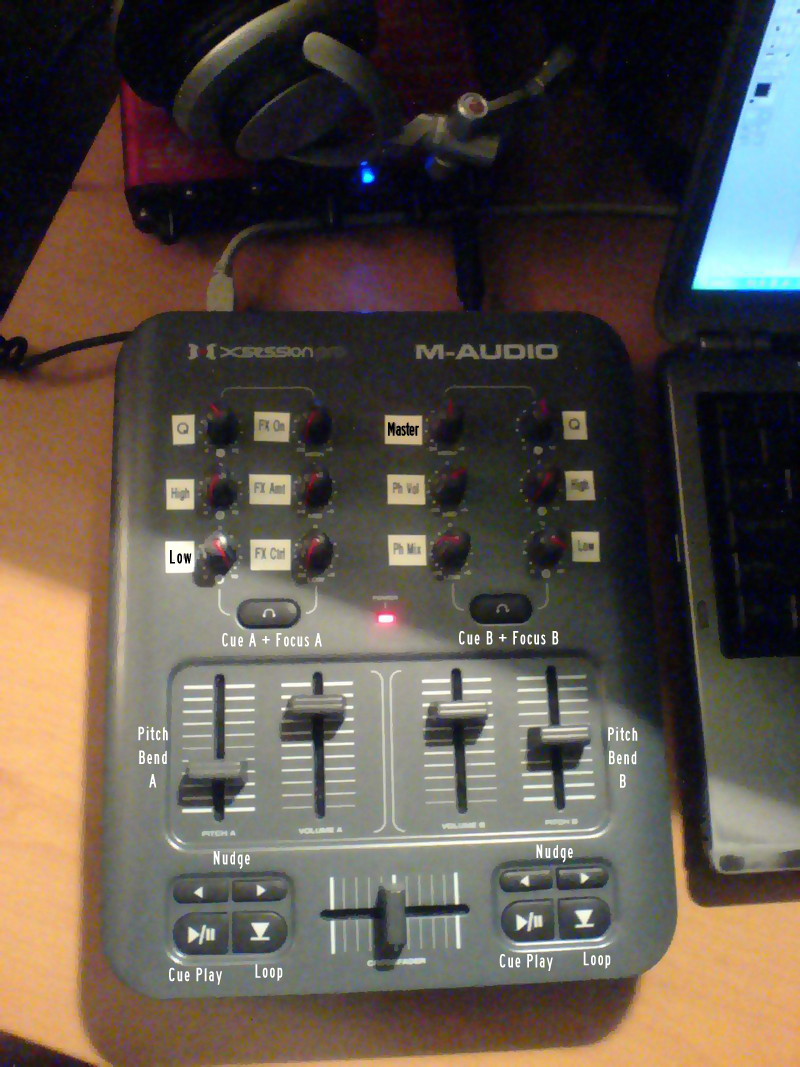
xsession-pro-tks Designed by: Fatlimey for Traktor 3.2+
Manufactures Layouts
VCI-100
traktor32vestaxvci100.zip vci-100 (firmware v. 2) TKS for Traktor 3.2
Designed by: Native Instruments for control over 2 decks
traktor33vestaxvci100.zip vci-100 (firmware v.2) TKS for Traktor 3.3
Designed by: Native Instruments for 2 decks
vci100_4decktks.zip Download: vci-100 (firmware v.2) TKS for Traktor 3+
Designed by: Native Instruments for use with 2 vci-100 to control 4 decks, not 4 decks with 1 vci-100.
Using These Files
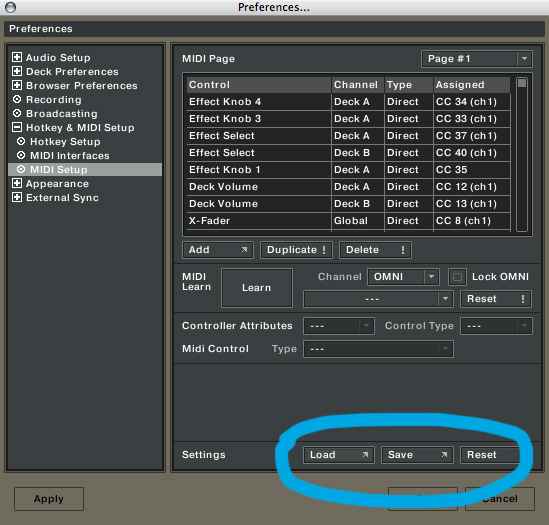
1) Save your Existing Layout and load the downloaded TKS file as shown here
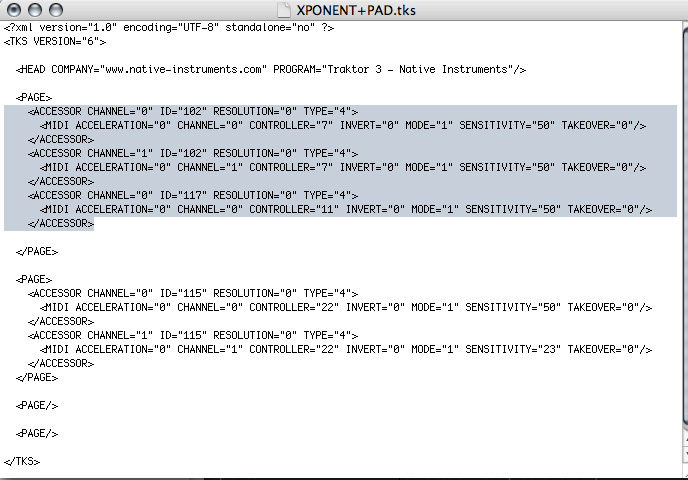
2) If you want to merge a new TKS into your existing one then you can copy and paste the contents from one TKS to another inside a text editor. Only copy the contents between the page marks (<page> =start of a page </page>= end of a page) as shown bellow:
To take a what is connected to what in each TKS file without try this TKS file viewer
If you want to contribute to this list please include
1) text file explaining what your file does and what is different. Please only submit complete layouts, not one button tweaks to existing layouts.
2) What version of Traktor you built it with and which version of a controller you used (1.1 or 1.2 VCI-100 firmware for example)






Sweet looking files, i usually use Deckadance/Ableton but i think its worth reinstalling traktor to have a play around with these. hopefully i will be able to replicate some of the ideas into my own setup. Thanks heaps !
Thumbs up to anyone who puts the time in to add to this list, ill be sure to check out everything people put up of interest.
Thanks a lot! this is exactly what I was looking for.
there is a link on this page to a xone 3d tks file… i dont have enough to buy one but someone else might
http://www.native-instruments.com/forum/showthread.php?t=56070&highlight=xone+3d+tks+file
novation coming soon???? i look forward to it, pelase notify us of the remote sl tks file when you do have the chance. thanks so muchQ!!!
novation SL template uploaded and more to come this week.
For those of us waiting for the “official” VCI-100 EG Edition, will we still need those settings?
No, that is a completely different layout that can only be achieved with new firmware for the vci-100. So those special editions will ship with the new firmware and the right TKS file.
do you think there is one available for the trigger finger
hi, firstly love the site. i am thinking of buying a pair of XP10s off ebay and i was wondering whether there were any TKS files for them. I had a quick look and couldnt find anything.
ps. it would be awesome if you could review them.
Hey Ean
Thanks for the update. I was curious what you thought of the Stanton SC system (Enter the System). Will you be doing a review anytime soon?
I sent you an E-Mail with .tks files for the Numark Total Control…
Is anybody else using it?
I like it much more than the BCD ones and it’s got a little community for its awesomeness :>
Hi Ean,
I wanted to inquire about your .SYX template for your SL-25. You had a really neat setup for Traktor in this video:
“Setting up Digital DJ Gear in a Club”
http://www.youtube.com/watch?v=FeevazoXGMg
Don’t suppose you’d be so kind as to share the wealth? :)
Hi Ean!
I’ve sent you an email with vci-100+oxy8V2 combo traktor files.
cheers
do u have a tks for the dac-2 with gizmo labs midi emulator
I tried the XP5’s a few weeks back which are nearly identical and the build quality was awful case flexed when you pressed the cue buttons then some buttons were so stiff they didn’t even click. The jogs had no adjustments and one wobbled a bit while the other was slightly stiffer. Overall it felt like a cheaply made toy. I’d stay away from it and save for a vci-100 you’ll probably kick yourself if you don’t.
Ean speaking of custom layouts files have you tried out Virtual DJ with the VCI-100? I like the feel of it more than deckadance and traktor in my brief experimenting between the three plus it’s got the added VJ feature which is pretty dope stuff I gotta say I can’t wait to try it out more, but I might have to send my VCI-100 back for a replacement one of my jog wheel adjustment screws broke the first time I went to adjust it why they couldn’t have used the same knob as the curve control on the cross fader is beyond me.
Thanks Chris, Its a little late though!! haha.
Having used the XP10s a little bit since they arrived, i have to say that im not really unimpressed, they certainly didnt seem to be QUITE as bad as what you said about the XP5s. Remember the XP5s are the “budget” version of an already cheap piece of hardware. I must agree that the buttons are rather stiff, but i dont mind the feel of the jogs, both of them have nice resistance. Luckily i got them dirt cheap ($150 AU) so i cant really complain. Nice that they have their own sound cards too, now i just gotta hook up a nice 2 chan dj mixer with 3 x eq.
I dunno I was really unimpressed by the build quality of the XP5 units I ordered, but the jogs actually felt pretty good and seemed to perform more or less on par with the vci jogs. I’m still glad I returned them for a vci-100 just the same though. It looks better and feels better and seems way more rugged plus it’s a fairly compact all in one unit.
I’m in the process of custom mapping virtual DJ for my VCI-100 the jogs seem more responsive with VDJ compared to traktor or deckadance. Also you can VJ with VDJ which is nice can’t wait to experiment with it further briefly tried the VJ thing and seems dope. I plan to map my MPD16 with it as well for like samples and or additional cue set/cue trigger stuff.
Oh what a great work!
I hope you make some .tks files for numark total control :P
Does anyone have the VCI-100 mapped for Virtual DJ? I would really appreciate it if someone could upload it or email it to me. I you respond on this board, I’ll post my email. Thanks.
Any maps for Traktor 2.6??
Hy Ean!
Do you have any video from you acting with the Oxygen 8 V2, because i have one but the latest version of it..Does your TKS works with mine thks in advance..
And also i would like to know if the Remote Sl 25 that you use to act live is better than a Oxygen 8..
Good website thanks.
The xponen Tks has updated,Thanks Ean.
Here the Control map.
http://img399.imageshack.us/img399/4930/xponentpadym0.jpg
Has anyone noticed that the Oxygen 8 zip file doesn’t have anything in it? There isn’t a TKS file in there. Is that on purpose?
it apparently is zipped in a mac format and PC users are having trouble downloading it. Some one posted the TKS in PC format here but I cant seem to find it just now.
A new hack for Xponent has discovered,now the leds sync/work whit traktor since v3.3.1,only need open before VirtualDJ select Xponent and close,after load a .tks in traktor whit output signals configured.
Tks here :
http://digitaldeejay.blogspot.com/2008/05/xponent-leds-en-traktor-configuracion-y.html
Hi people… and tks files for CDJ 400 Midi Controler????? Share your files please….!!!!
Hi All. Any .tks files for Denon’s new DN-S1200 with traktor 3.3??? PLEASE!!
Thanks