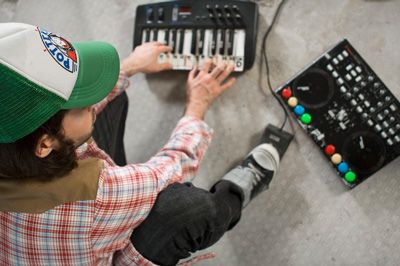
Oxygen 8 Controllerism Layout

Oxygen 8 controllerism juggle routines

The manufacturers don’t want you to know this, but the truth is you don’t have to plop down $1,500 for the latest Allen & Heath mixer or $3,000 on a JazzMutant Lemur to do creative things with MIDI and DJ software. Sure, having a brand new DJ controller with all kinds of bells and whistles will get you excited about trying new ideas, but you might get more mileage out of something at a fraction of those prices. There are many inexpensive two-octave keyboards that offer mappable controls in a small footprint. Perhaps you still have an M-Audio Oxygen 8 ($149.95 for the Oxygen 8 V2; www.m-audio.com) lying around from your first foray into music production. Take it out and imagine how you might DJ with it. Think of how each knob and slider might best control two or more songs on the fly. It’s actually a lot more realistic than you might imagine, so let’s turn the zillion-selling Oxygen 8 into a controllerist’s dream rig.

GET IT STARTED

When I first switched to digital DJing from vinyl 5 years ago, the Oxygen 8 was one of the only portable MIDI controllers that would not break the bank, so I made it work. Surprisingly, it beat out every new option until recently when I upgraded to a customized Vestax VCI-100. The Oxygen 8’s keys handle all pitch bending, tempo adjustments and transport controls for two decks, and the knobs act as dedicated effects controls. An optional footswitch can engage a hidden “controllerist layer” that I’ll detail later. If you have an Oxygen 8 or similar two-octave keyboard, I recommend you get an additional footswitch like the M-Audio SP-1 ($19.95), which will help you wrangle a lot of control out of a small surface area.

I created TKS (Traktor MIDI assignments) and Oxygen 8 settings files that will get everything running appropriately. You can find both at the bottom of this post, but keep in mind that although the files will work with the older Oxygen 8 and most two-octave keyboards — such as the Alesis Photon X25, Behringer UMX25 or the Edirol PCR-M1 — the layout is optimized for use with the Oxygen 8 V2. All of the keys in my layout are split into two sections — left and right — which control the left- and right-hand deck, respectively. Each key is grouped into areas based on logical sequences of actions. For example, the three black keys work together to play a song and grab it like you would a record. The first black key drops a cue; the second goes back to that cue and samples it (Cue-play); and the third plays the song from that temporary cue point. This simple but effective grouping is the first basic controllerist technique you can learn: dropping a cue on the fly and then going back to it with the Play and Pause buttons to “scratch out” the section, extending a break or sampling an appropriate word into the next song. That’s the bread-and-butter technique of many mash-up DJs and turntablists in clubs. Instead of blending long mixes, they just grab the last part of the record and sample it over the intro of a new song.

STAYING IN TIME

Programs such as Native Instruments Traktor very accurately match the tempos of songs for you, so nine times out of 10 only small adjustments are needed to keep songs perfectly in sync. A group of four tactile and responsive white Oxygen 8 keys effectively handle tempo down, tempo up, pitch down and pitch up, in that order. Because the keys are next to each other, you can easily bend the pitch and tempo at the same time — like a turntable’s pitch fader, but with more accuracy. The technique does take some getting used to if you learned on turntables, but for house, hip-hop or any fixed-tempo genre, the keys work surprisingly well.

JUGGLE IT

The easiest way to jump into controllerism is to experiment with cue-point juggling. Cue juggling differs from the turntablist’s standard, beat juggling, because you are jumping between different points within a song. That can be done with two different songs or two copies of the same song, depending on the routine.

The key is to consistently place your cue points so that they make sense to your brain and are easy to work with on the fly. I often place five cue points on every song in a consistent manner so each cue is placed on a different hit or sound that I would like to sample in a logical progression through the track. The first cue point always goes on the first down beat — usually a kick. And if the software supports it, I always make this cue a “load marker,” so the song always starts at the right spot. Then the next cue is always placed on the second hit — usually a snare or similar sound — so my kick and snare are always right next to each other for freestyle drumming. The third cue is always placed on a cymbal, hi-hat or sound with a long tail, and the fourth always goes on a fill. Finally, the fifth cue goes on the downbeat of the first major part of the song. Not only does this fifth cue provide me with a visual reference of when I need to be finished mixing, but it’s also usually a good spot for beat juggling with two copies of the same song. I set up my VCI-100 so the jog wheels always trigger that last cue. Then with two copies of the same song loaded, I can juggle between them using the crossfader and the jog wheels as triggers. It looks and feels just like juggling two records but with more control — a classic example of effective controllerism. Those five cues are played in the Oxygen 8 layout by engaging the footswitch, which turns the five black keys into direct cue-point triggers for each deck.

Controllerism can be a lot of fun if you set up your gear correctly, so use a controller that is simple to understand and fun to use. There are many options out there, but I encourage you to think for yourself and use these ideas as a jumping-off point to develop your own signature way of working with music.

DOWNLOAD THE FILES

Take note to look at the Read me file. Remember that your keyboard needs to be at the neutral or the middle octave point otherwise the keys wont work. I will post a video next week on how everything works but in the mean time try every control out and find out how they are mapped. I recommend putting stickers on there for clarity! This will work with all Oxygen 8 and 2 octave keyboards but the effects selection and direct mapping of the knobs and buttons will only work on the oxy8 V2.


Link

33 Responses to “Oxygen 8 Controllerism Layout”


  1. 1 Matt Holden

    ive got an old oxygen 8 hanging round which i was about to put on ebay, i think ill give this a try and see what i can come up with. Do you think it will be possible to integrate it with a Behringer BCD-3000 isntead of a VCI-100 >?

  2. 2 Manager

    BCD3000 is crap. Scrap it and get VCI.

  3. 3 Ean Golden

    stay focused on the oxygen 8 guys. Plus for the money, you can do a lot of things with the BCD. Like run 2 turntables into it to control deck a dance for instance. The build quality may not be so good but lets avoid completely trashing things here.

  4. 4 phil

    Wahoo - at work now but will try this as soon as I get home - thanks Ean!

  5. 5 DJ Elvis

    Sory Ean, my english is not so bad, but I could no undertud exactly where it is:
    “Finally, the fifth cue goes on the downbeat of the first major part of the song.”
    This becouse you has said :
    “The first cue point always goes on the first down beat — usually a kick”

    Could you be a bit more clear, about where exactly it is ?

    By the way, get it on and put the tutorial to the guitar hero controlerism, becouse if you not do it I will, just waiting to my PS2 =>USB conversor be here and will make a video too

  6. 6 treedeez

    awwwwesome!

  7. 7 Phil

    No idea if anyone can help me here but someone may have had the same troubles.

    Firstly my set up: I am running a Dell Laptop with Vista, Traktor 3, an external Soundblaster Live card (24 bit), a Oxygen 8 midi controller. I also have Asio4all drivers installed.

    Basically I had to install the asio4all drivers so I could set up headphone cue’ing through my soundcard (for some reason before I installed these drivers I only had 2 visible outputs in traktor for my xternal soundcard). After installing the drivers I was able to select the front speaker output for the master output and the rear speaker output for headphone cue’ing!

    Now that is all working well but the problem comes when I introduce the Oxygen 8 - Traktor never recognises it whilst I have the above set up. IF I disconnect the external soundcard and use onboard sound OR disable the asio4all drivers (i.e. using front/rear output on xternal sc) then the midi controller works…

    It has me stumped, I think it must be conflicting somewhere along the line - is my soundcard worthless? do i need to install some other drivers?

    Anyone help would be much appreciated!

  8. 8 whiskers

    I had troubles with an external Soundblaster Live (older version, one of these) where it was conflicting with a Numark Total Control - “USB device not recognized” and all that jazz. Seems like a problem with midi and Soundblaster/ASIO4All drivers. Never got it working.

  9. 9 whiskers

    err.. Phil, you might want to post on the Native Instruments forums.

    As for using keyboards to control Traktor… I started out with a full-size midi keyboard and… it was awkward. The keys were really nice and soft but the knobs I did not like at all and the pitch bend control was weak. I am curious to try adding some live synths sometime though.

  10. 10 Xsquizet

    Hmm I wonder how I could use this in ableton.

    and I need to get the traktor demo I really want to try this program out.

  11. 11 Phil

    Whiskers that is indeed the same card as I have - guess I should have invested a bit more money and got a decent soundcard with good drivers already on it.

    I guess I’ll go with headphone cue’ing for the time being and move onto controllerism when I can buy a better soundcard. Recommendations? I’ve already read Ean’s article but the one I was going to go for is PCI (Echo Indigo) and NOT PCI-Express.

  12. 12 Chris Wright

    I liked the footswitch/sustain pedal idea. A MPD32, MDP24, or M-Audio Axiom 25 would all be nice too especially since pads just feel better than keys to me at least for beat/cue-point juggling keys are better for melodies, but that’s a different subject with that in mind tho the Axiom might be the best all around suited and cheapest depending on your need, but lacks the faders that the MPD 24 and MPD32 have on them as well as less pads on the Axiom.

  13. 13 Pascal

    This is amazing

    I’ll definitely try that.

    What kind of soundcard do I need? Do i need one (Sorry, but it’s still pretty new for me)

  14. 14 P

    I would love if you put up a video showing how to set cue points at those downbeats and fills, cause I don’t really understand the meaning of that (like DJ Elvis)

  15. 15 Avelin

    Again great post Ean. Really helpful and interesting. When you have more time will you please post a video how do you make vci and oxygen 8 in black color. I want to do the same with oxygen 8 when i buy it next week. But i dont want to break something when i try to open it! ;) thx ean…

  16. 16 Elad G.

    Great post !!
    Ean is there a device out there that offers only two jogs that work like those on the vci ?
    cause i work with a keyboard and an external mixer, all i need is two jogs that work with the computer ..
    Thanks !

  17. 17 rialler

    Elad G.:

    there is a controller with the features you are looking for:

    Mixman DM2

    http://www.mixman.com/products/hardware.html

    I don’t know if there are any other controller but this is simple and unexpensive.

  18. 18 rialler

    Sorry Elad G:

    As I see, DM2 is not a MIDI controller but there is a free soft to convert dm2 data to MIDI:

    http://dm2.proboards23.com/index.cgi?board=DM2midi&action=display&thread=1065714761

  19. 19 rialler

    I’ve a question about tks files.

    If I have a working tks file with vci-100, How can I include oxy8 tks file in my own tks to work with both vci and oxy8?

    Is it possible open vci tks with notepad and oxy8 tks and copy/paste? maybe if that works, I only have to change the midi channel.

    It would be great if we could load 2 tks files in traktor.

    thanks!

  20. 20 Ean Golden

    Thats a good question and worth posting a topic on. I was thinking about doing that soon anyway. The short answer is yes. open both in text edit and paste the values from into the other. Not all the values but the ones between the pages. Then re-save with an extension of .tks

    now you have a combo but hopefully there will be no buttons with the same midi values.

  21. 21 rialler

    now you have a combo but hopefully there will be no buttons with the same midi values.

    If there are buttons with same midi value you have to change midi channel in traktor and in oxy8 and should work

    What I don’t know is how to change midi channel in oxy8. there are a dedicated button in oxy8 but perhaps you make a diferent map with enimga

  22. 22 THURO

    I would think that it would be through enigma.

    I havent really wanted to buy a VCI100 silver, but have a buddy in Japan thats sending me over a black VCI so I’ve been using an M-Audio Trigger Finger ($150) it works fine for just mixing, i’m going to set up my Axiom 25 to start to do this “Controllerism” you speak of… nah but honestly Ean what you do is tight, and its super cool you share your knowledge with the rest of us. Props. i wanted to ask a question about publishing your articles in a section of my website, or maybe even having the freedom to translate it into spanish and of course having links on there for your site and stating that your site is the source. it would be cool to see you come out and play in Baja, if you’re ever in the San Diego CA or LA area let me know I can set up a party i just need a good month and a half notice. Check out the site http://www.urvak.com send me an email.

    Peace.

  23. 23 Al Robinson

    For anyone interested in a sweet midi controller keyboard I just picked up the edirol pcr-300… Its a 30 key and its a big bigger than usual, dosnt conveniently fit over a turntable. On the up side however its got 18 velocity pads a cross fader 9 up faders 9 knobs and some other mdid assignable buttons…its an absolute monster of a controller. I picked it up for 350 AUD in a music store in sydney.

    I am in the process of setting up tks and xml files at the moment… the creative potential is exciting.

  24. 24 Al Robinson

    WOW… setting the bender controll (the spring loaded one) to deck wind combined withe the crossfader set as the crossfader some really cool scratches can be made….much better than the dedicated scratch function i think… more tweaking needed to perfect it tho. bascially ALL keyboards have this function so this is exciting

  25. 25 5c4r7

    I was given a free Oxygen8 v1 and I would love to try this but, there is no internal memory or support of any kind for the Oxygen8 v1 anymore. Can anyone offer any help on getting this to work with an Oxygen8 V1? Ean (or whoever is in the picture posted above) is using a Oxygen8 V1 in the picture above and he claims it IS somehow possible but, without Enigma support, I’m not sure how to get this to work. Any help is greatly appreciated.

  26. 26 trigitaliz

    WOWWAAAAAAA . I got a vci 100 and a hercules dj K mk2. and i got the 2 of em to work together… Using midi OX and merged vci 100 and hercules.tks in traktor 3.2 i rockzz able to controll 4 deck at the same time…. Thanx to this inspiring site.

  27. 27 djmx

    is the file you offer only for Mac? I can’t open the file under windows xp… is there a chance to get the file for win?

  28. 28 Nick

    is the file you offer only for Mac? I can’t open the file under windows xp… is there a chance to get the file for win?

    I’m having this problem too. Has anyone got a XP version?

  29. 29 Ean Golden

    Well the TKS files should all be cross platform. Are you having problem with the ZIP file perhaps?

  30. 30 Nick

    Well the TKS files should all be cross platform. Are you having problem with the ZIP file perhaps?

    Yeh, it wouldn’t extract but I got it to preview and copied the contents in to notepad and saved with the correct extension and it worked!
    Thanks Ean!!

  31. 31 Ean Golden

    Well the TKS files should all be cross platform. Are you having problem with the ZIP file perhaps?

    Yeh, it wouldn’t extract but I got it to preview and copied the contents in to notepad and saved with the correct extension and it worked!
    Thanks Ean!!

    No problem!
    Since I am Mac only- do you mind re- zipping that TKS so I can upload it for the other PC folks?

  32. 32 Nick

    Well the TKS files should all be cross platform. Are you having problem with the ZIP file perhaps?

    Yeh, it wouldn’t extract but I got it to preview and copied the contents in to notepad and saved with the correct extension and it worked!
    Thanks Ean!!

    No problem!
    Since I am Mac only- do you mind re- zipping that TKS so I can upload it for the other PC folks?

    Hey Ean! I wish I was Mac only person :)
    People can pick the PC version of the files up at the link below

    Program files for USB controller and traktor

  1. 1 Oxygen 8 midi USB controller for DJ’s « Kookin - Music, Clubs and Clubbing Glasgow, UK

Leave a Reply

Quote selected text