At this price point there should not be much of a difference right? Well, one thing we do not like around here is assumptions without any real evidence or experience to support that assumption. So, while writing a new column for Remix magazine about sound cards I took it upon my self to try and find out what separates a $100 sound card from a $800 one. After talking to all kinds of “experts” and engineers and after sifting through mountains of marketing propaganda I had a really hard time really finding any quantifiable differences. This reality is hard for us to accept in a society that places a high value on the price tag of a product. “Its $1000, so its got to be the best right?!”
Trickle Down Value
In the end after much discussion and subsequent testing I discovered the real differences for djs don’t really lie in the physical casings at all. They are in the drivers, which owe more to the quality and experience of the company than the price of the unit. So, using trickle down logic the story goes something like this. If a company like BMW puts a lot of money in R&D for their high end cars then the result of that research should trickle down to their lower cost products as well.
Its worth mentioning that there are some significant differences in sound cards as you increase the price but many of those differences are usually related to recording inputs like microphone pre-amps and different connectivity ports. The actually quality of the circuits and D to A (digital to analogue) converters don’t seem to vary enough that my ears can tell a difference. So you have the chance to listen for yourself check out the following mp3 and “listen” to each of the 4 sound cards:
Listen Up
The Sound Test
First I set up a good broad frequency microphone in front of a KRK V-8 speaker to recorded the output of each sound card. Both the microphone and the speaker are certainly coloring the sound but I was not looking for accuracy here just trying to notice any differences between them. Then in Traktor I played a mono drum loop through each of the 4 sound cards making sure everything was exactly the same each time.
To test the stability of the cards I played the same drum loop inside Traktor with high quality key-lock on and tried to do some cue point juggles at lower and lower latencies. I was running a dual 2.0ghz Macbook with 2gigs of ram.
Results
Maya44 USB
Price: $95+/-
Pros: light and compact with 2 pairs of RCA ins and outs
Cons: no headphone volume knob. There was one annoying issue where the output levels have to be reset with each re-start in the software prefs.
Performance: great, good performance down to 2ms and then things started to break apart at 1ms but the drivers never crashed.
Opinion: This card my not look as cool or pro as the others but looks can be deceiving. I think this card boasted the best value out of the group. It also worth noting that the maya 44 is the sound card in the vcm-100 which bodes well for that unit as well.
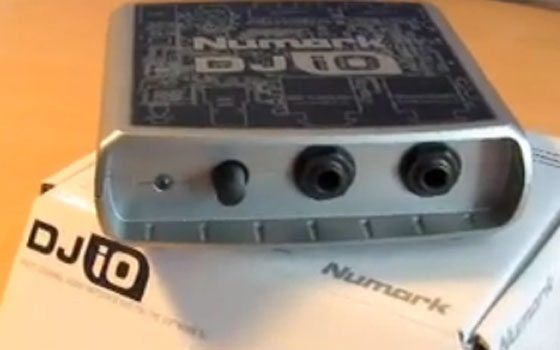
Numark Dj I/O
Price: $95 +/-
Pros: small, light and inexpensive
Cons: plastic, driver issues,
Performance: This is the only card I had serious driver problems with. Performance bellow 5.5 ms was impossible and when the driver crashed it completely crashed forcing a program and then system re-start many times.
Opinion: If you want a simple low price box for home use- this is a easy option. If you need solid performance I would personally shy away from the testy drivers.
Novation NIO
Price: $180-200
Pros: A lot of bang for your buck with gain knobs, instrument and mic inputs and a native effects rack for live jamming. Well made and robust case feels solid.
Cons: A bit heavier and larger than the others. All the knobs and routing possibilities can get confusing if you are just djing. It took me a while to get sound out and figure out how it worked.
Performance: No drop outs or problems down to 1ms
Opinion: Great dj card and well made. I was really excited to see if I could run some master effects on top of the master dj output using the included effects rack with the free focusrite mastering plug ins. The ability to tighten up the whole mix could be a HUGE plus for digital djs. Sadly, the routing does not support that concept right now.
Indigo Dj
Price $130-$180
Pros: Very compact, Stable drivers, Bus operated
Cons: wont work with the new mac-book card slots, 1/8 outputs are a bit amateur. Lower output than the others (-2.5db)
Performance: Good, no drop outs down to 1ms with key lock on in Traktor.
Opinion: This is a great card to start out with if you have the right card slot to support it. Echo has a dedicated line of very high quality sound cards and this was the first dj focused card on the market. its a tiny bit quieter than the others but nothing a little gain adjustment wont fix. I would not play big clubs with this one but for small bars or home its great.
Conclusions
For the lowest price I would go with the maya44 USB but if you can pay more and want to produce some tracks as well get the Novation. For traveling light and trouble free setup the Indigo dj is a great workhorse.
Tnx, now I feel really bad for buying MAUDIO FastTrackPro.
Stable drivers but real pain starts when you get the ground loops, try to connect the ext. power adapter but won’t stop the audio-hum until you cut the GND and +5V on the usb cable. Drivers need restart whenever you change the usb port that it was connected to.
Once you start using the audio interface, there is no way you can change latency or which i/o ports you’d like to use.
It looks like Maya44 has been discontinued, and there’s a new version - the EX5 with 6 outs: http://www.audiotrak.net/products/mayaex5ce/
May not work with Vista. I wonder if it’s the same quality as Maya44
Waiting for the mp3 :)
Correction: there’s Maya EX, EX5, and EX7, all of which seem to have been discontinued, according to AudioTrak’s product archive page. The EX5 CE is the current version.
I updated the posting with links the right sound card. The Maya44 “USB” has not been discontinued and is available all over the net.
hi ean.
this post is great. i can’t wait to see the winner. i need some soundcard like that…
…just you know i am your biggest fan. i love your style and music. :) this blog is really great and dont stop writing it. this the best digital dj site on internet. you are the best. i love you man…bye…greetings from sunny croatia :)
p.s if you need some help about anything just send me mail…
let me know if you want to demo a motu ultralite! even tho its in the next category for price this unit is the shizzle. hmmm lets say i send it to you in exchange for some ean golden face plates!
wd.
this was awesome i wish this was around 2 years ago when i was looking for my first setup! Is there any chance of going a step up, say 200 - 500 range? Also what interfaces are everyone using now (since we didnt have this valuable infor before hand) maybe a poll or just throw it out there if your happy! I am using a fast track pro and firewire 410. I should be a spokesperson for m-audio with all there gear i have. I have only ever had one problem and that is just hitting the reset button in the software mixer on the 410. Other than that i have some pretty creative routing going on with my kaoss pad! Thanks Ean have a good one.
Very nice review. I purchased my laptop with the Echo Indogo DJ in mind, making sure that I had the Type II + Cardbus slot. I guess its time to throw down an order :)
Hi Will Davis! How are you?
I would like to know more about your soundcard MOTU Ultralite! I’m planning to get that one, but I don’t know much of it.
Why don’t you write a review or your experience with it?
Regards,
Frank.
Ean, looks like you’re reviewing a Maya44 USB there, right? Looks like you can still find them around the web. Makes me wonder how the newer ones shape up, unfortunately all of the newer models have fewer inputs (so they’re no good for a full two decks of timecode).
Also, Ean, were you actively monitoring the inputs when you tested the cards’ latency? On some cards, having audio on all of the available channels significantly affects the latency.
your right - this really changes the game so all i was comparing here was output quality and latency, I was not considering that card for its inputs.
Thanks! Its good to know we have fans all over. Its really cool how seriously diverse the reader base is here. We have djs from every single corner of the globe!
yeah, that is a good one to do next! I need a break on sound cards though, it was a lot of work to set this review up.
nice review Ean, I can confirm that the DJIO is quite stable driver wise, even on vista for my laptop, not sure if you used the drivers in the box or drivers from the net, the latest ones are super stable. thanks again for the review.
I saw James Zabiela play last night in Sydney, he blew me away and now I have to get to work becoming a better DJ :) inspirational for sure
if you ever do a round two i’m curious about your opinions on the M-Audio Conectiv. I think the drivers are pretty good on it and for the price you get the software bundled with the control vinyl. the Echo unit - i recently read that it can suffer from some sort of meltdown since it sits in a very hot place inside the laptop.
http://www.kvraudio.com/forum/viewtopic.php?t=205379&postdays=0&postorder=asc&start=15
I own an Echo indico dj for 3 years now and were i come from has a very very hot climate you can fry bacon on my labtop in the summer it gets extremly hot wile i DJ, what you read and say its not true, i DJ for five hours in very hot contisions and nothing happened to my Echo 3 years now, so it might have been the desing of the specific laptop or a faulty Echo unit.
Ean pls do the 200 - 500 sound cards range when your up for it.
Ean i send you a message on your youtube accaunt about midi controlers, so if you have time please answer my question!
thx… :)
true or not for you, the fact that people have reported it is something to consider when buying a dj soundcard. it’s sort of a moot point anyways cause most new laptops come with ExpressCard and not PCMCIA slots
great article! very helpful!
i have a quick question:
would i be able to plug my turntables into the maya 44 and use timecoded vinyl to control torq or finalscratch or something like that?
please help!
thanks,
dj doubleyou
dj doubleyou, you could use a maya44 usb with timecoded vinyl - but there’s some things you have to look out for. You’ll probably need some phono pre-amps to get the turntables up to line level (unless your decks have a line level output). Some software (not all) says it can work without a pre-amp at phono levels, but I can’t tell you how well that actually works. Also, make sure you get the maya44 usb - the newer maya44 EX, EX5, EX7, and EX5 CE all have less than 4 RCA inputs (so you wouldn’t be able to use 2 decks of timecoded vinyl at the same time).
maybe Ean can weigh in on this but i don’t think it’s a good idea to buy the maya44 with the intention of timecoded vinyl cause then you’ll need to find software. ATM i think the only option is ms. pinky running into max.msp - not a user friendly option(and expensive!).
all the other programs like torq and serato are bundled systems even though they use a control record similar to ms. pinky(it’s just a sine wave running on the whole record). so if control vinyl is your goal i think you should look at some of the packages(native instruments has one too).
and DIm just to be clear i hope you didn’t read my comment as me being rude even though it looks like i was being snappy - my apologies.
Great!
when you guys see people playing live- take notice of what gear they are using and any cool techniques they might be busting out and let us know :-)
Thanks For bringing that to our attention. I used the echo indigo for MANY 4-6 hour sets and never had a problem but computers have been getting significantly hotter over the years and now laptops may be producing enough heat to damage a card, I dont know about melting things though that sounds a bit extreme. In any case, regardless of the climate your djing a really hot laptop could feasibly damage a card. I would like to hear more than just one report though before writing off the card.
I agree with the other guys excellent feedback- although you could use the sound card with systems that support third party audio interfaces like Miss Pinky and Deck-A-Dance (confirmation?) it may be better in terms of support and reliability to go with a hardware/software combo that offers vinyl control natively.
You wont be able to use the maya to control torq or final scratch though. Torq requires torq hardware and final scratch software is dead in the water at this point.
You were right no need for apologies, just because it didnt happen to me it doesnt mean it want happent. i wasnt trying to proove you wrong either, just seeing the ammount of heat my laptop genarates i cant imagine what it would take to melt down the plastic of a Sound card.
right i don’t want people to write it off, just consider it a possible downside. the card’s been around for a long time but Ean brings up the great point that maybe laptops function a bit different now? anyways i think it’s a bit dated simply cause your main outputs are 1/8″ on that card and that doesn’t lock in like a RCA connection does.
i guess you have to try them all our for yourself but pay attention to how people report the driver latency cause that’s definitely important.
all in all i’m glad this blog was created cause Ean seems like a super guy and i think it’s helpful for everyone trying to wade through a sea of shit these days.
I can confirm that you could use a maya44 with deckadance, it doesn’t care what kind of soundcard you have. You could technically use a maya44 with torq, but you would still need to have a conectiv or an xponent connected because it acts as a hardware dongle required to run the software. To my knowledge, you could use a maya44 with deckadance, mixvibes, miss pinky, digiscratch, virtual dj (numark CUE), dj decks, and pc dj (and reflex).
But I agree with Mr Tunes, especially for anyone new to digital djing. I would have to recommend buying a timecoded vinyl suite (torq, SSL, traktor scratch) with their hardware, because it’s designed to work together.
You have a lot of options on what will technically work, but I can’t promise any of those pieces of software will work *well* with a maya44. If you bought a complete suite, for example torq, you’d have a piece of software that is designed to work with the soundcard it shipped with. Then you could take the ASIO compliant soundcard and use it with all of that other software too.
zabiela has a pretty standard setup from what I understand.
2 cdj1000’s + mixer (possibly pioneed djm800 + efx 1000) + laptop running ableton live for any custom tune’s other then that I was too low to see what else he has setup.
in regards to sound cards, I was looking at pricier solutions and possibly something that could be dual purpose, ie dj and production.
any opinions on the Digidesign MBox 2 / MOTU Ultralite / Focusrite Saffire / Presonus Firestudio / Echo Audio Fire 4 / etc.. I know these are all in the next price bracket but do some of these even seem relevant for DJ purposes?
a good thing to check for when buying a soundcard that will double up for dj use is to find out if the headphone output has the ability to run on its own output, rather than always play back what’s on the master output.
the reason is cause if it can’t switch over to 3/4, you will have a bit of extra connections going on where you take an set out normal outputs and convert them into a headphone output with something like your mixer or a headphone amp.
imo you should always look to keep things compact cause some dj gigs you have very little room to set up gear(and time!).
mbox - not a fan of this line of cards, even the mbox2pro has it’s problems and that’s on the higher end(i used it for a year). the main allure to these are getting pro tools bundled with it.
Hi Ean,
Here is a photo of Zabiela in action. Can anyone identify his external sound card?
http://www.inthemix.com.au/photos20/080215-james/adr
http://www.inthemix.com.au/photos20/080215-james/adq
http://www.inthemix.com.au/photos20/080215-james/adp
on this one it looks like he has a little korg kaoss pad…
http://www.inthemix.com.au/photos20/080215-james/adj
thats easy. look at the first pic, its the m-audio audiofile
http://www.dolphinmusic.co.uk/shop_image/product/a92afb64c6ba81125f6eb5d608bfb835.jpg
Hey Ean,
Good to see you at NAMM. Impressive performances… TO bad you didn’t include the MixVibes U46MK2 in thsi review. It def has great specs for the money.
peace
P
I knew I had seen it somewhere, thanks Ean you know your gear, so basically that leads me to beleive that if its good enough for Zabiela then its sure as hell good enough for me.
The guy is a DJ god in my opinion so this certainly puts things into perspective. Ultimately its the DJ not the tools…
Hey Ean,
I have had my thinking cap on but i was just wondering what the best method to hook up an external effects unit into traktor? it would be nice to be able to cue the effects from my brand new korg mini kaos pad….at the moment i am just running it in direct mode between my soundcards master out and the amp.
cheers
The MAUDIO FastTrackPro has some kind of send/return TRS connectors but I don’t know if they can be adjusted on the soundcard’s front panel.
BTW: I had the worst nightmare @ the yesterday’s gig. The soundcard died on me 5 time during the performance. Apparently it is vulnerable to the noise(some say via GND) that is comming BACK FROM the amp(as it was directly connected to the PA). I’m puzzled and ashamed….
Try this thread in the NI forum:
http://www.nativeinstruments.de/forum_de/showthread.php?t=56096
that might do it.
that is not good :-(
we need that kind of feedback guys for the other djs around here. Did you have to re-start the computer for the sound card to respond- (was it a complete driver failure?) or could it have been software related?
sitting bored at work today i may have come up with a good answer to my own question…see what you guys think. Route the master out of my soundcard into the effects unit then put the out from the effects unit into an imput on my soundcard then set it as say deck four. That way deck four will be the master sound pluss the effects… then assign decks 1 and 2 to crossfader right (use the up faders to mix like i do anyway) and set deck 4 to crossfader left….now i can crossfade between pure master signal and effected master signal, and cue the effects all with traktor…. as i am still at work I will have to let you know how it all works out. crossfader for effects sounds like it has interesting creative potential.
Too sensitive to the electric noise that comes back trough the sound cables.
Problem with FTPro is discussed here:
http://www.audioforums.com/forums/showpost.php?p=98760&postcount=17
How do you retrieve the abbility to molest people in the club when this happens:
- close traktor (storing collection, closing)
- lower the volume on mixer/amp (because of audible click)
- power cycle the soundcard (off->on)
- check if the M-Audio ctrl. panel states “connected”
- start traktor (checking collection, status report)
That’s about 30-60 seconds of silence if you have not prepared yourself with backup sound.
I currently use a Creative X-fi, 100 bucks, 7ch and a busload of features that all work. I run it on my pc allowing 1ms latency, and no ground loop whatsoever. If you don’t like 1/8 mm adapters, its avail with rca, but works all the same; considering it has enough gain to overfeed my mixer on any song.
Hi guys I’m using a mixer Behringer DJX700, MAYA 44 USB and a Deck A Dance software sometimes and Traktor , now i want to buy two decks and I dont know what kind of timecode software to use with my MAYA 44 and what kind of
timecode vinyls I need to buy, I want an advice from you guys , by the way I am from Macedonia THANKS
Hey, Ean, I just realized that my laptop’s internal soundcard is not powerful enough to drive a pair of MDR V6s and a speaker system (mono set up), so I got a Maya44 USB (from, seemingly, the only site on the web that had them besides ebay)
And somehow I missed the fact that the headphone out actually COMBINES channels 1,2 and 3,4 together (and the inputs too). That means I can’t use the headphone jack for prelistening! (or I can, but then I have no headphone volume / pre-listen control and I’m deafened by the outpu). Or at least I could not get figure out how to set it up.
That means, if you get a Maya44 USB card, you will have to go out and get MORE cables - if you can track down a 2xmale RCA to 1xfemale 1/8″ or 1/4″ jack, that’d be so-so. But I didn’t see one on Radioshack’s website, so that means I’ll have to use 2xmale RCA to 1xmale 1/8″ (already have this) and female-to-female 1/8″ stereo coupler. What an inconvenience! Thought I’d point it out, because it wasn’t obvious to me at first (speaking of which, how the hell do you then use M-Audio’s Fast Track, which only has 2 outs?)
Also, with the 2.8.11 drivers I can’t use the Highspeed mode (1ms), only Rapid (2.5ms). With the 2.55 driver, however, Highspeed mode worked fine, didn’t hear anything weird.
@whiskers:
I most ceratainly doubt that maya44usb can’t separate outputs.
That’s something Ean would most certainly notice.
Please don’t spread SUCH rumours around here before you double check.
Newbish your post is.
I wish I were wrong. I triple checked - in the manual, in the configuration utility, on the web. And then I posted here and sent an email to ESI, here’s what they had to say:
“It is not possible to change which channels are send to the headphone
output
You cannot use the headphone output for individual channel output
monitoring
The headphone output of the Maya 44 USB
Is the mixed signal from analog out 1,2 and analog out 3,4
As stated in the manual
Page 10 /Paragraph 3/Output Level Control Section
“Please note that the headphone output signal is the mixed signal from
analog out 1, 2 and analog out
3, 4. Please also note that the analog headphone output and the digital
optical output share the same
connector, i.e. they cannot be used simultaneously. “
Regards
UK Support
ESI Audiotechnik”
What am I missing here?
Arrogant and unfriendly your head is.
all right Yoda 1 and Yoda 2. Put your Light sabers down :-)
That is a most unfortunate discovery you have made whiskers. Why in the world would they build the card like that??? I know its a pain in the ass but like you said; an RCA to female headphone adapter would solve the problem. On the positive side, its a very stable sound card without much investment but you are understandably frustrated.
That’s what I was wondering… you’d think it would be possible to change it using the ASIO driver, but no. It MAY be possible, if the hardware supports it, but for some reason I think the channels are mixed not on a chip but via soldering - otherwise why wouldn’t they include that option in the driver? Still possible to somehow unsolder the channels… but I’d refrain from trying to do that.
Yeah, I thought “OK, no more fiddling with a rat’s nest of splitter cables, I’ll just spent the $100″ and turns out I still need more cables… The card is really great though, used it for a couple days now and I love it. Light, portable, stable, fast, it sounds good, and the LEDs on the inside are amusing :)
Would be cool if you could configure the inputs as outputs - the integrated nVidia sound card on my desktop lets me output sound on microphone / line in jacks and it seems like most decent desktop sound cards do that these days. Wonder why you can’t do that on a laptop with a microphone jack…
/just rambling
Forgive me for my arrogance. But I am what I am. The stupid hardware solution astounded me so much. I have to ask my friend how he sorted it out with his maya.
BTW, the sound quality of the line output driving a headphones is questionable. I know people build tin-can-headphone amps just to get the sound image right.
I got the FTPro (brought from USA) for ~100eur.
Good price for the unstable soundcard.
Please do… I’m curious as to how this can be…
I asked. He didn’t. He says, plug both channels into a mixer and route from there(via PFL) (which is external mixer mode in traktor). That is not a solution for a cheapo digital-DJ or one that don’t like to be bothered with carrying another (small) mixer/preamp + power supply.
Once again, I’m sorry for my overreaction. I’d be glad to see a hardware hack for maya44usb.
Hi guys I’m using a mixer Behringer DJX700, MAYA 44 USB and a Deck A Dance software sometimes and Traktor , now i want to buy two decks and I dont know what kind of timecode software to use with my MAYA 44 and what kind of
timecode vinyls I need to buy, I want an advice from you guys , by the way I am from Macedonia THANKS, PLEASE FOR HELP I’m sorry for my bad english
hey, we just did a video on this today! it should be posted soon. The best time code vinyls for deck a dance are serato and then Traktor scratch after that.
what about torq
I was wondering if the fact that the Novation is USB 1.1 will cause any problems.
I was wondering the same thing, but apparently all Maya44 USB, M-Audio Fast Track and Fast Track Pro are USB1.1. I had no problems running Maya44 at 5ms over USB1.1
yeah, I think for dj audio the bandwidth is not such a big deal. if I remember correctly, even Serato scratch was running on USB 1.1. Data transfer is where you see a big difference between 1.0-2.0.
Both of the USB 1.1 cards performed well down to very low latencies so I would not be too concerned.
HI Ean!
would it be possible for two people to pre-listen a track when mixing, eachone with an own pair of earphones using the novation soundcard..?
thanks!
Succesfully using 2.5ms ASIO FTPro + Traktor 3.3.1 on a peeled XP for DJing use only.
Specs:
soundcard: outputs 1&2(mstr) + 2&3(pfl), 48kHz, 24bit, 2.5ms
laptop: hp compaq nx7300/CeleronM 440@1.86GHz/1GB DDR2
traktor: internal mixer, ASIO, phase vocoder
I have a couple questions for you:
1. How many processes are running on your XP install? I have a partition on my laptop set up JUST for DJing and the second one is for everything else. I think I have around 40 running processes when idle, but I’ll check for sure next time I reboot (just curious to see what other people have, since you don’t see many XP setups)
2. What’s your reasoning for running 48KHz outputs (as opposed to 44KHz)?
2. None if I recall correctly, I just do…i waste bandwidth.
1. my xp is on a same partition as the “usual” one. I’ve set up junction for traktor directories. that way traktor from both windows is using the same directory for stripes. process count: 21 (numerous services are killed too)
Ean have you ever heard anything bad about the M Audio fast track?
Is the Novation equally well suited for production? I recently got a Roland 505 groovebox and am looking for a card that will allow me to incorporate it in production, djing and live sets. Would the USB 1.1 still not be an issue if your were running say, a midi controller in the midi port, had both audio out channels, and were running a line in recording? Processor power aside.
MAN WE NEED A FORUM. Possibly with a section that is linked to a Blog posts. New blog post->new topic in the section.
Yup- we agree. Thats why one is being built right as well speak. Hopefully it will be up in a few days. :-)
Hello,
I just switched to the MacBook Pro (15″ 2.4Ghz, 2GB RAM). I was using an Echo Indigo DJ previously on my G4 Powerbook (no problems whatsoever, even in a club).
Obviously I can’t use this little handy soundcard anymore… :( :P :) Unless they make a new smaller one (wouldn’t be a bad idea… any day now…)
What would you recommend:
All I need is 1 output (Left+Right RCA) to connect to the club’s mixer, and 1 headphone out to preview the next track. I am using Traktor 3.3.2 and an X-session Pro. I play dance music so don’t really need any jog wheels, The X-session pro works fine for what i need it to do (eq and volume controls, to get a nice smooth mix going for hours, with the extra knobs used for master filters).
I don’t really need mic inputs or anything: basically i need a usb/firewire version of the echo indigo dj (ok, it doesn’t have to be 1/8th inch connectors :)
Thanks… keep that mix going ;)
I just wanted to mention an older usb interface that might work well for some of you.
I have an EMI 2|6 (aka A 2|6) its a 2 mono RCA analog in, 6 mono RCA analog out, USB interface. I paid over $400 for mine back when it was a new product and I see them these days on evilBay for about $40 a pop.
The main reason I thought to mention it was because of people being annoyed with the Maya 44’s hard wired summing on the headphone jack. Thats not an issue with the EMI as it has 6 mono outputs with the headphone doubling 1&2 (might even be software selectable, I forget).
These are really best if you have a mac because it was an Emagic product way back when and so windows driver updates stopped when Apple bought Emagic. However, the windows drivers that exist are stable for me down to 2ms (at least in XP I dont know about vista). They also have pretty good DACs in them and should easily stack up to any of these other ~$150 cards. Being a USB 1.1 product they obviously have flaws so YMMV, but I encourage anyone to look into it as an option.
I forgot about the emi 2/6. that was a good little card! If you can find one then grab it. ;_)
hi ean,
i got a question about the m audio quattro. in the first (older) clip about soundcards you mentioned that u were very happy with it, i have the chance to buy one for about 100€ (160$), what do you think - too much money for the unit? i think 80€ would sound much better ;) but thats not the main question i have…
Do you have any experience with this interface and os x Leopard - because there are no drivers available any more and i don´t know if there might be any driver problems…. by the way - there is no headphone out, is there?
thx