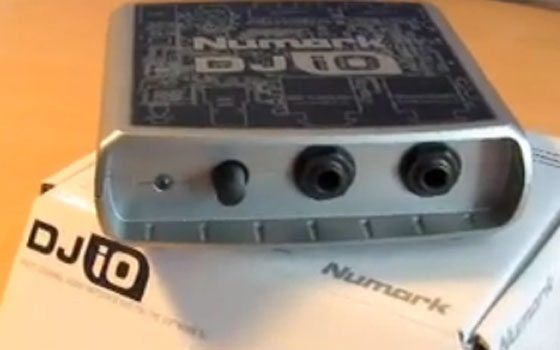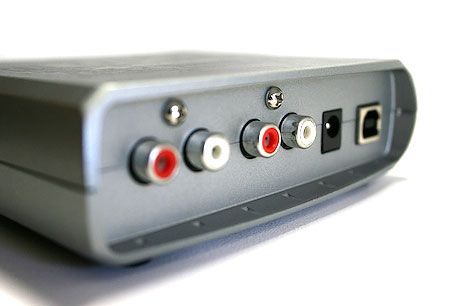
Dj tech tools is working on an extensive comparison of 4 excellent dj sound cards for under $200. We are testing their performance and have created a way for you to listen to the difference between the Numark Dj I/O, Novation NIO, Maya 44 and Indigo Dj.  The video and full reviews will be posted on Friday which brings me to my other point. From here on out we are moving to a regular posting schedule. New articles come out every Monday, Wed and Friday morning with bigger reviews and tutorials published on Friday mornings.  Its very tempting to get caught up in the blog rush of posting small bits every day but we want keep our focus on a few really helpful articles per week and not dilute the content.  So check in on those days OR subscribe to our feed via email in the bottom of the Tool bar.

From the editors desk, on which is piled 50 sound cards-

Ean

  • http://beer2beer.com Kr0n

    Great to hear! Hope you continue also the Dj Lessons!

  • Binho

    Make a review/comparative with DJ interfaces for computers!!!

    Congrats!!

    Binho

    Sao Paulo / Brazil

  • MGyver

    Great timing with this review; I'll be buying one of said

  • MGyver

    Great timing with thos review; I'll be buying one of said under-$200 cards in next few weeks. I'd been looking at the Echo Indigo DJ, as the reviews seem to be favourable for the most part. I haven't seen any comparisons though. Hmm, which gels best with the Ean Golden VCI…?

  • Jens Paul Malone

    Binho, you should have grasped that there is already an inoffial DJ interface ranking on this site…

    1.VCI-100 (Black)

    2.VCI-100 (Silver)

    3.Torq XPonent

  • Chris Wright

    Has the xponent been reviewed using midi cables and audio interface that isn't bottlenecked the usb is? Fire wire 800 would have even been better than USB, but the optimal solution is the likes of a dedicated PCI or PCMCIA audio interface. When it was compared to the vci-100 on dj tech tools was that something that got tested?

    I think Binho meant desktop audio interfaces as opposed to DJ midi controllers. If that's the case and you've got two pci slots I'd highly recommend either a E-MU 1212M or Emu 1616M. I have the 1212M myself and it's fantastic the sound quality is top notch and latency is great I run it as low as 2ms depending on the load using a core 2 duo e4300 and 2GB of ddr400.

  • http://www.myspace.com/djgrbs djgrbs

    -=o)

  • http://tosmts.spces.live.com DJ ToS

    Nice, can't wait to see the review.

    CAN someone mention the MAUDIO FastTrack Pro quality plz(owner)?

  • whiskers

    can i get one of those 50 sound cards, when you're done with them? :p

  • Travism , Philippine

    I'm using the M Audio 410 with my Traktor. So far so good… I'm getting the Audio 8 soon.

  • http://swindle.net/wp/ Greg Swindle

    Looking forward to your review! That's next on my list. :)

  • http://www.djtechtools.com Editor

    <blockquote cite="#comment-914">can i get one of those 50 sound cards, when you're done with them? :p

    ;-) you can buy my echo indigo dj if you want! I have to send all the testers back though :-(

  • Frank

    Nice post! I would also like to see that review.

    Just a couple of months ago, I have started reviewing all regarding "Digital DJ".

    I have watched your videos on youtube, I bought a VESTAX VCI-100, and the next step is buying a soundcard. I'm currently using an onboard card (Soundmax), and of course I cannot use this anymore.

    I would like to learn how to use Traktor, btw I'm using Virtual DJ, it's basic in comparison to Traktor, but it has a more intuitive interface and I could mix like a Real DJ without making too many efforts. (I would like to know if you can configure layers in Virtual DJ as in Traktor)

    As I saw in your video, you recommended the Presonus FireBox, but in comparison to Edirol FA-66 which one do you think is better?

    I also checked MOTU Ultralite, it's another concept of soundcard. I would like to know it's performance.

    I?m going to use the soundcard just to mix, and perhaps to mix in front of an audience. I wouldn?t use it to record from musical instruments.

    Right now, with my onboard soundcard, and my friend's one (SoundBlaster Audigy S.E., that makes all by software instead of hardware), the results are almost the same. Both of them have lag. It consumes about 180MB of system resources (VIRTUAL DJ.EXE), and by adjusting BMP using Key Lock it doesn't sound as clear as it should. Perhaps by buying a good soundcard this things wouldn't happen anymore.

    I also made and adjustment in Windows, just to increase my onboard soundcard performance. I have changed the default value of audio buffer.

    1) Go to ?Device Manager? (Start, Control Panel, System. Then in System Properties go to Hardware, then Device Manager)

    2) Go to ?Sound, Video And Game Controllers?

    3) In ?Sound, Video And Game Controllers?, click on properties

    4) Click on ?mciwave.dll?, then in settings

    5) Change the default value (4) seconds to 9 seconds of buffer. ?You may configure the amount of memory that MCI Waveform driver will use for buffering audio data during playback or record?

    6) Click OK, restart your computer and you?re ready to enjoy.

    By making this little change you can make a big difference. In my experience, it doesn?t lag as it used to be.

    Excuse me for my large post and my possible language mistakes (I?m from Argentina).

    Keep on working with this site, it helped me a lot.

    See you on next post.

    Best Regards.

    Frank.

  • Fatlimey

    I have an Edirol FA66 and it's boringly reliable. Plug, play, sound comes out, it just works. It has 6 outs, but two of them are utterly useless digital ports, so it's just enough for DJing with no spares. The _real_ problem is finding a fast laptop that has 6-pin firewire (IBM T60 has no firewire, Sony VAIO only has 4-pin so you'll need to cart a wall-wart).

    It's also good to know that you can produce balanced outputs if necessary. Bring your own 1/4in and RCA connections to guarantee good quality connections.

  • http://tosmts.spces.live.com DJ ToS

    /ignore Frank

  • gybp

    what do you guys think of the numark dj i/o?

  • Robgoodburn

    anyone help I have nio 2/4 and a vci 100 how do i set them up?

  • 1_Savage_1dj

    I use ni audio 2 dj card on basic core2duo laptop for djing with ableton live i was thinking of steping up to this? http://www.apogeedigital.com/products/big-ben.php would anyone recommend?

  • Tsavda-jr

    I use powerbook g4 with traktor dj studio 3 and i want a souncard. help !

  • Tsavda-jr

    I use powerbook g4 with traktor dj studio 3 and i want a souncard. help !

First Time?

This site is dedicated to digital djs. We develop performance tools and teach cutting edge techniques that enable creative expression. Visit tutorial videos on youtube, equipment reviews in the blog and a very helpful community in the forum. New articles every Mon, Wed, Fri.
Subscribe with one million others

RSS DJ TechTools Forums

Copyright Concerns For Digital DJs

The world of intellectual property law is quite relevant to musicians, especially DJs and producers that sample other people’s material in performance and composition. In this article, we provide some general tips for navigating this confusing, potentially treacherous landscape, so read on as we explain the basics behind laws that apply when remixing in your bedroom or playing a mashup routine live.

Please be aware that this article is written from the perspective of United States law.