DJ TechTools
  • Blog
    • DJ Gear
      • DIY Projects
      • Gear Reviews
      • New Products
      • Controllerism
    • Techniques + Tips
      • Beginner DJ
      • Advanced DJ
      • Producer
      • Finger Drummer
    • News + Culture
      • Editorials + Opinions
      • Artist Interviews
      • Performances + Routines
      • How I Play
    • DJ Software Tutorials
      • Serato Tips
        • Traktor Tips
      • CDJ Tips
      • Ableton Live Tips
  • Store
    • Run by real DJs, not a corporation
    • DJ Controllers
      • Midi Fighter Twister
      • Midi Fighter Spectra
      • Midi Fighter 64
      • View All
    • Accessories
      • Chroma USB Drive for DJs
      • Chroma Caps
      • Chroma Cables Audio
      • Chroma Cables USB-A
      • Chroma Cables: USB-C
      • DJTT Gift Card
      • Midi Fighter T-Shirt
      • Keyboard Covers
      • Earplugs by V-Moda
    • Production Gear
    • Soundcards & Mixers
  • Community
    • Popular Forums
      • General Discussion
      • Buy & Sell
      • Reviews
      • Mixes
      • Music Production
      • Show Your Setup
      • Off Topic
    • Handy Links
      • New Posts
      • Private Messages
      • Register
      • Search
    • Midi Maps
      • Traktor
      • Ableton
      • Serato DJ
      • Midi Fighter 3D
      • Midi Fighter Twister
      • Midi Fighter Spectra
  • Midi Fighter
  • Chroma
No Result
View All Result
DJ TechTools
  • Blog
    • DJ Gear
      • DIY Projects
      • Gear Reviews
      • New Products
      • Controllerism
    • Techniques + Tips
      • Beginner DJ
      • Advanced DJ
      • Producer
      • Finger Drummer
    • News + Culture
      • Editorials + Opinions
      • Artist Interviews
      • Performances + Routines
      • How I Play
    • DJ Software Tutorials
      • Serato Tips
        • Traktor Tips
      • CDJ Tips
      • Ableton Live Tips
  • Store
    • Run by real DJs, not a corporation
    • DJ Controllers
      • Midi Fighter Twister
      • Midi Fighter Spectra
      • Midi Fighter 64
      • View All
    • Accessories
      • Chroma USB Drive for DJs
      • Chroma Caps
      • Chroma Cables Audio
      • Chroma Cables USB-A
      • Chroma Cables: USB-C
      • DJTT Gift Card
      • Midi Fighter T-Shirt
      • Keyboard Covers
      • Earplugs by V-Moda
    • Production Gear
    • Soundcards & Mixers
  • Community
    • Popular Forums
      • General Discussion
      • Buy & Sell
      • Reviews
      • Mixes
      • Music Production
      • Show Your Setup
      • Off Topic
    • Handy Links
      • New Posts
      • Private Messages
      • Register
      • Search
    • Midi Maps
      • Traktor
      • Ableton
      • Serato DJ
      • Midi Fighter 3D
      • Midi Fighter Twister
      • Midi Fighter Spectra
  • Midi Fighter
  • Chroma
No Result
View All Result
DJ TechTools

Double your Controls in Traktor- with one button.

Ean Golden by Ean Golden
February 4, 2008
in Advanced DJ Tips, DIY Project Tutorials, Traktor Tips
Reading Time: 2 mins read
0
Double your Controls in Traktor- with one button.
305
VIEWS
Post on FacebookTweet thisUpvote on Reddit

This one is for the Traktor users out there although some other software may have similar tools. Lets say you are using a VCi-100 to control decks A and B. Everything is working well expect that every control is used up and now you also want to get your hands on decks C or D. How do you do that without buying a 2nd VCi-100? Its easy- and all you need is ONE free button.

MIDI ASSIGN 101
pref-midpages.jpg

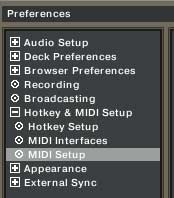
You need have some basic understanding of how to assign midi to functions in Traktor. Theoretically assigning midi to Traktor is quite simple. In Preferences, your going to look for midi setup. All you do is choose the assignment for the feature that you would like to control in the “ADD” drop down menu on the left.
midipages.jpg

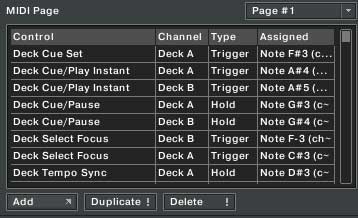
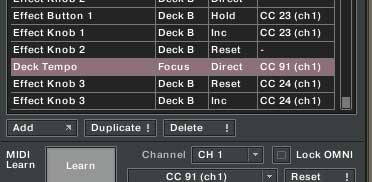
The assignment now shows up and can be assigned. Now you need to hit the Learn Key and twist the midi knob or button you would like to use to control that assignment. If its shaded in red then you have a problem (that knob is also assigned to some other function in Traktor) If its green then congrats you have connected a knob to an assignment.
decktempolearn.jpg

THE PAGES

The trick to getting a lot of function out of a few buttons is Traktors Midi pages. There are 4 different pages and each one will not interact or interfere with the other. So, for example, you could have a jog wheel assigned to deck A on page one and Deck B,C and D on pages 2,3 and 4 respectively. Normally the the jog wheel will only control deck A because pages 2,3 and 4 have to be engaged by pressing and holding a midi button in order to work.
pagesmidilearn1.jpg

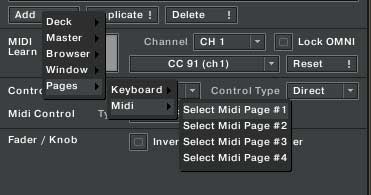
You first need to find the right assignment in the same midi window.

Its under Pages/Midi/Select Midi page #.

In the above example, I would assign 3 buttons to select each page. Hopefully the buttons would be close to my jog wheel so i can hold them while using the wheel. Now I would label each button according to which page it controls, Deck B,C,D for pages 2,3,4. So, finally when I press down the deck B button the job wheel now controls deck B. You can set up as many controls as you want on each page and get a lot of power out of a small space.

REAL WORLD USE

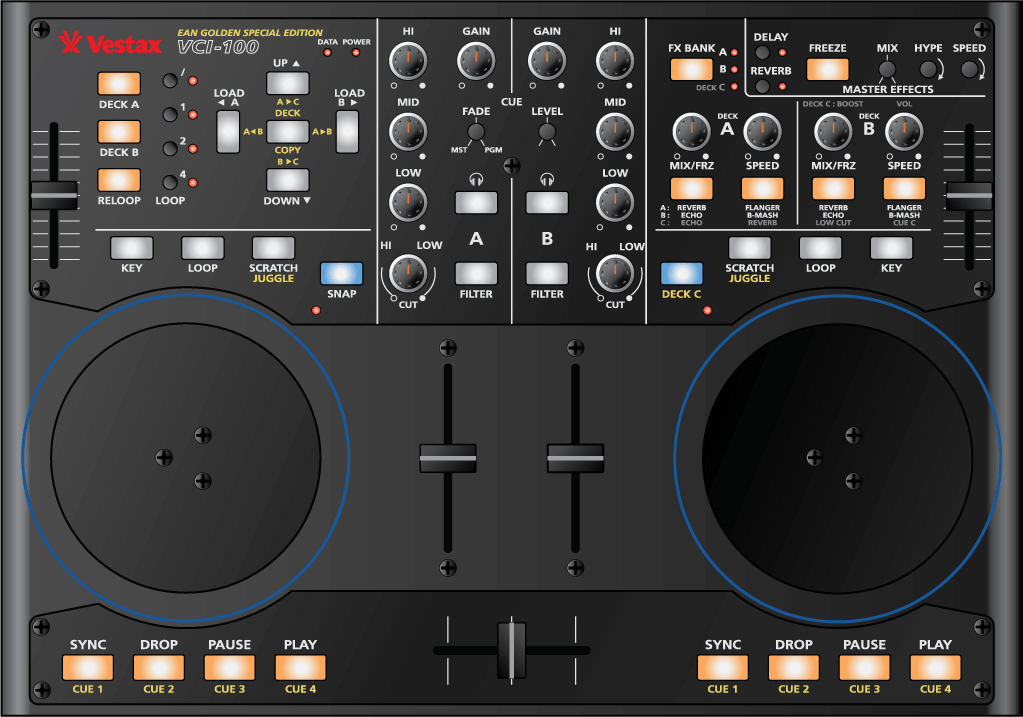
Take a look at the controls on the “Ean Golden VCI-100” there are many instances here that use multiple layers. The deck copy button engages a layer, the deck C button engages a layer and several layers are engaged by foot switches which turn on the cue juggling actions. In the end the TKS for this VCI-100 is HUGE. 4 pages with almost 200 assignments per page!

eangoldenvci.gif

Tags: dj performance tricksDj TutorialsTipsTraktor Tips
Share2Tweet2Share
Previous Post

The VCI-300 lowdown

Next Post

$25 MIDI PAD

Related Posts

traktor-pro plus 3.8 pattern player controls
Dj and Production Tutorials

Review: Traktor Pro Plus 3.8 – After 8 months, is the subscription worth it?

April 20, 2023
Meet the Koala sampler app: a mobile production powerhouse, now with stems
DJ Gear

Meet the Koala sampler app: a mobile production powerhouse, now with stems

February 7, 2023
Tips for DJing in Extreme Cold: DJTT readers share their advice
DJ Techniques / Tips

Tips for DJing in Extreme Cold: DJTT readers share their advice

January 30, 2023
Load More
Next Post
$25 MIDI PAD

$25 MIDI PAD

Want to reach DJTT's audience here?

Shoot an email to advertising@djtechtools.com

DJTT ads
DJTT newsletter
Midi Fighter
Chat with us
  • ABOUT DJTT
  • CONTACT
  • PRIVACY
  • MIDI FIGHTER HELP
  • ABOUT DJTT
  • JOBS
  • CONTACT US
  • ADVERTISE
  • PRIVACY POLICY
  • ACCESSIBILITY STATEMENT

© 2024 DJ Techtools all rights reserved by DJ TechTools on all content unless otherwise noted.

No Result
View All Result
  • Blog
    • DJ Gear
      • DIY Projects
      • Gear Reviews
      • New Products
      • Controllerism
    • Techniques + Tips
      • Beginner DJ
      • Advanced DJ
      • Producer
      • Finger Drummer
    • News + Culture
      • Editorials + Opinions
      • Artist Interviews
      • Performances + Routines
      • How I Play
    • DJ Software Tutorials
      • Serato Tips
      • CDJ Tips
      • Ableton Live Tips
  • Store
    • Run by real DJs, not a corporation
    • DJ Controllers
      • Midi Fighter Twister
      • Midi Fighter Spectra
      • Midi Fighter 64
      • View All
    • Accessories
      • Chroma USB Drive for DJs
      • Chroma Caps
      • Chroma Cables Audio
      • Chroma Cables USB-A
      • Chroma Cables: USB-C
      • DJTT Gift Card
      • Midi Fighter T-Shirt
      • Keyboard Covers
      • Earplugs by V-Moda
    • Production Gear
    • Soundcards & Mixers
  • Community
    • Popular Forums
      • General Discussion
      • Buy & Sell
      • Reviews
      • Mixes
      • Music Production
      • Show Your Setup
      • Off Topic
    • Handy Links
      • New Posts
      • Private Messages
      • Register
      • Search
    • Midi Maps
      • Traktor
      • Ableton
      • Serato DJ
      • Midi Fighter 3D
      • Midi Fighter Twister
      • Midi Fighter Spectra
  • Midi Fighter
  • Chroma

© 2024 DJ Techtools all rights reserved by DJ TechTools on all content unless otherwise noted.

This website uses cookies. By continuing to use this website you are giving consent to cookies being used. Visit our Privacy and Cookie Policy.