VERY IMPORTANT UPDATE**** 1/29/08
Editors note: It has recently come to light that the first run of VCI-100’s that were sent out had a completely different mapping layout than all the subsequent “Firmware V2″ VCi-100. You can find out which version you have by holding down both jog wheel buttons at the same time. If the jog wheel lights turn off and your pitch bend no longer works then you have the NEW firmware and my layout will NOT work with your VCi-100. Your new vci firmware is sending out completely different note values and they will result in NOTHING working as I designed. if you have the OLD firmware then by all means enjoy the layout bellow. Otherwise wait until march when you can get your hands on a VCI-100 that ships with these performance mods already installed
After 2 months of intense button pushing, code twisting and testing, I think its almost done. Here is the near final version of my programming for the VCI-100. In the coming months you will be able to get your hands on a limited edition set of plates (hopefully gold and black) that match this exclusive layout. What is different? Almost everything, but the general idea is to give you hands on immediate access to do really cool things without looking at a screen. This is the testing phase so only people with a Macintosh computer will be able to use the layout. Once the controls are finalized Vestax will make available a firmware update that will give the VCI all of this functionality without any extra programs.
So if you have a Macintosh follow the instructions bellow and PLEASE give me feedback here on this post.
If you have a WIN machine you can try out this patch for BOME Midi translator.
#1 Download MIDI PIPE HERE
#2 Open this FILE in midi pipe
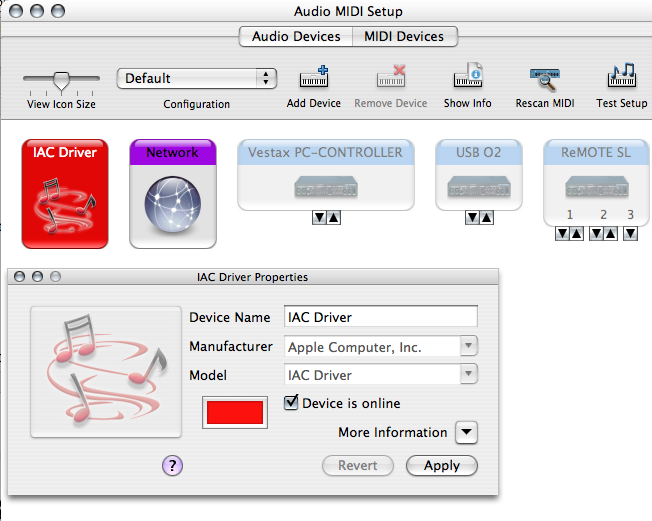
#3 Engage the IAC driver in the AUDIO MIDI SETUP window.
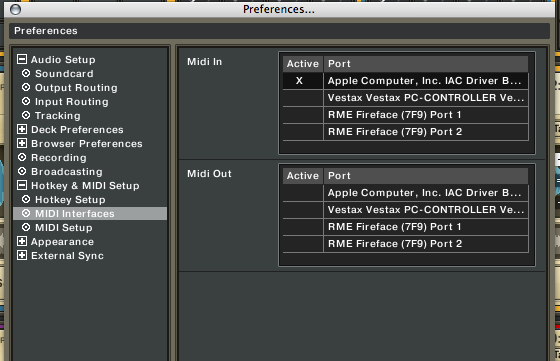
#4 Select the IAC buss as your midi input inside Traktor.
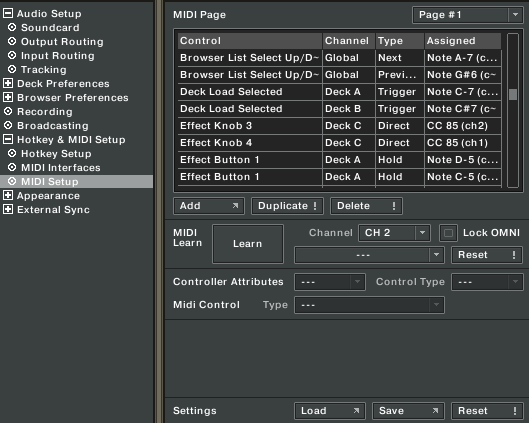
#5 Open this TKS file and load it into the traktor MIDI page settings.
#6 Download the picture bellow so you know what all the controls do.
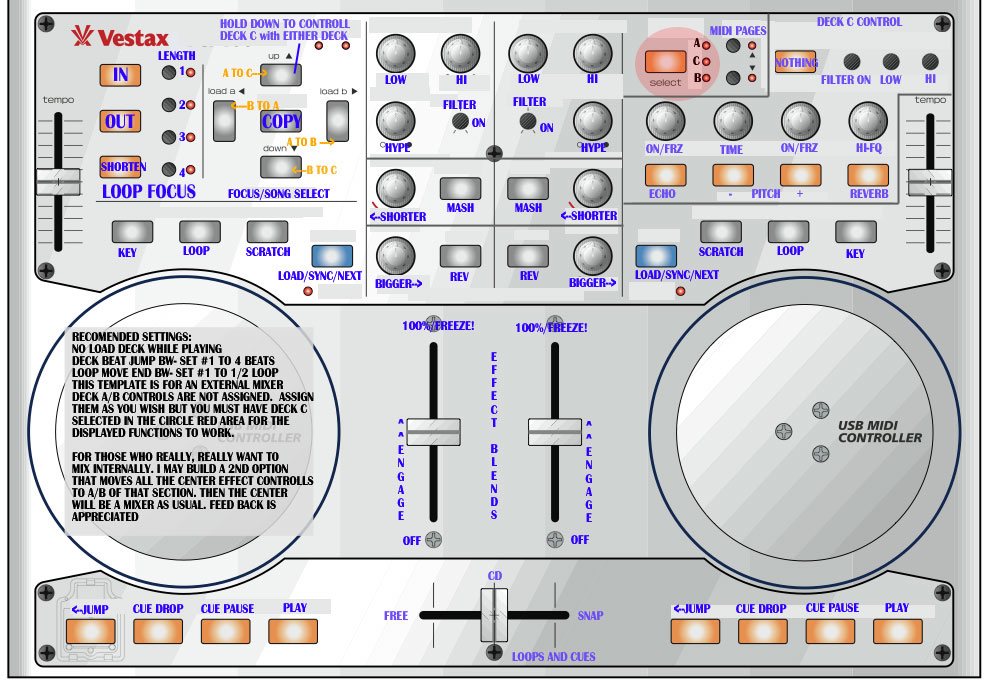
#7 Rock it!
#8 Tell us what you think here on this post!



Hi Ean! Terrific work regarding the VCI-100. A shame that I did selled mine and got an M-Audio Xponent to put my hands deep on it. But I will indicate this tutorial to our readers back on Submusica!
Also, I did noticed you used one of my pics for that soundcard 101 video you made weeks ago. Thanks a lot! :)
Keep up the good work!
Ean-
mad generous of you to put up your personal layout. I want to get a vci and try it out now in addition to getting the vcm-100.
QUESTION: you think if I paired a vci and a vcm I could control all four tracks in traktor?
Thats a good question. Personally, I dont think anyone ever needs tactile control over all 4 decks at the same time. Some will disagree but i really think having control over 3 is sufficient. That being said, this layout offers a pretty straight forward way of moving songs around between 3 decks and then controlling all 3 with one VCI-100.
if you do buy a vci-100 and a vcm-100, you would need to custom build your midi mapping though so they both work together.
good luck!
Nice job man :), I like the way you have mapped the effects. I am working modifing a “hercules midi controller” to use as a live performance unit. will keep you informed :)
ean-
bpm.uk is demoing the vcm-100 right now… when you say I need to mod my midi mapping you mean I need to look at midi pipe right?
Hi Ean,
thanks for all the inspiration. Just landed on your site,
and I am going through all your tutorials and vids..
Great stuff indeed!!
I am very enthusiastic about your customizing, and the VCM - 100
BUT, i would like to ask you this:
Is it possible that you would do this customizing with the M-audio Torg controller?
What would you advice me to invest on, when I plan to use it with Traktor??
Torq or VCM??
Best,
Marc
I have been re-programming the VCI-100.tks for use with Traktor 3.3 since I have found no updated .tks file online anywhere that works with 3.3 as well as the .tks file for 3.2.
I have most of the functions working again, but I’m stumped on how to make LEDs light up. For example, the Cue on each of the 2 Decks works great, but the LEDs in each don’t light green when enabled. (with Traktor 3.2 they Cue buttons lit green when enabled). Does you know which MIDI function turns the LEDs on/off?
I’m happy to post my VCI-100.tks file for Traktor 3.3 when complete. I’m going for the stock layout on this one.
Your custom work is fantastic!
Regards,
Marc
hey Marc, you can certainly do these kind of modifications with any midi controller. With some creative thinking and a little brain power, you could make a midi controller do almost anything you want. Unfortunately,
it does take a long time to figure it all out. Thats why adopting a pre-existing template it the easier route.
Xponent VS VCM…. well, I have reviewed both for remix and they are both good products. The VCM-100 seems to have a bigger user base so chances are you might find more cool things to do with it like my handy mods. They each have their own pros and cons, you may want to read my reviews on remixmag.com for more info.
thanks Marc, that is the only problem with changing the mapping around for the vci-100. The LEDS will not work properly with Traktor as you would want them to. The answer is a long one but basically the VCI-100 itself has to be programed so the lights respond as expected. So, hopefully when people choose to get the firmware update for the “Ean Golden” of the VCI-100 all the lights will work for the new advanced controls. Unfortunately, you cant really do that without a firmware update.
Hi Ean, I amazed with the job you and Moldover are doing, I am too diging into customizing midi controllers thx to you both.
Which is the best way of getting the steel front? How did you do the part where the arcade buttons are hold?
thx again
I let you a link o my proyect of customized midi controller,isn’t finished yet but I am trying and investingatin into adding more things.
http://img150.imageshack.us/img150/3442/imagen001sl6.jpg
Matt
Hi Ean,
I am trying your VCI-100 layout, and am not sure if I am doing it correctly.
I followed all your steps, and it seems my Traktor is not recognizing midipipe or the vci.
My setup is:
Macbook Pro
Traktor 3.3
VCI-100
M-Audio FastTrack Pro
Forgot one more thing… i’m running Leopard
Hi Ean
I hope you can help i have had the Vci for a couple of weeks now and i am really struggling to get to use the monitor function. I can get full play back through the master speakers but can not seem to montor each deck individually with head phones. I have just brought a creative x-fi sound card and i also have a usb sound card and a built in sound card (so 3 in total) but i can only select 1 card to be used. Please any help is geatly appreciated.
P.s im using trakor 3 (full)
Hey Jona, if your not seeing the vci-100 or Midipipe then you are doing the right things. Midipipe is “hijacking” the Vestax signal so you wont see that. Then Midipipe is sending that signal out of the IAC buss not a midi pipe out put so you should only see IAC buss as a midi source in traktor. If not you need to check step #3. Hope that helps!
Hey Dj babbel, you may want to check out my sound card 101 video.
http://www.djtechtools.com/?p=69
First of all you cant use 2 sound cards at once with the current version of Traktor. That was possible once but not anymore. So you will need to pick one card with multiple outputs and then follow the steps at the end of the video.
HI EAN
I PLAY HOUSE MUSIC (ELECTRO, FUNKY) AND I DON’T NO WHICH MIDI BUY???
VESTAX VCI 100 or M-AUDIO TORQ XPONENT????
PLEASE, HELP ME!
WHICH IS BEST
THX
hey we have you covered! By tomorrow we should be posting a GIANT post on VCI VS Xponent “the boxing match”
ean, do you know how to turn on the the reverse crossfader for the vci-100?
you have to do that in traktor unfortunately. There is a midi assignment for Deck X fader assign in the midi window. Assign that to one of the small knobs and you can use them as a hamster switch.
good luck,
ean
Marc:
To let the leds lights up, you have to select the vestax vci-100 as active by “midi out” under “midi interface” by the preferences of traktor 3.3 (if you haven’t done that already). I hope this will answer your question.
Good luck,
Ruud
can you custom map the controls with traktor le.is there an easy way to load samples into the 4 buttons to the right of the big three on the left
Hi Ean,
Quick question for you, i love the layout and noticing this i have had a couple of questions, now that you have changed your on board mixer for a more of a effetcs board how do you get a line out to another mixer? do you just take a line out from your computers soundcard? also would this controller be able to support Vj Manipulation and mixing???
thanks
yes, exactly- normally I take 3 channels out of my sound card into the clubs mixer and mix on their board. That way i can use all the controls on the vci-100 for the different loops and fx functions I need.
yes, this will work for VJ apps for sure!
yes of course! that is exactly what i did when I first got the VCI-100. you can see me demonstrating that on the Vestax homepage under PC Dj videos.
Hi Ean,
Thanks for your work on this. Is there any where that I can get a TKS file (or some basic step-by-step) instructions for Traktor 2.5??
I got the Traktor 3 LE with my VCI, but I don’t want to switch yet to an LE version from the T2.5. I tried loading your TKS and Vestax’s TKS for Traktor3, but they don’t seem to do anything in T2.5, as the device still doesn’t control anything. Any help would be greatly appreciated!
I feel your pain Thor, it took me a long time to make the switch over to Traktor 3. Sadly I don’t have any TKS files for 3.0 or bellow. I would recommend upgrading though, the stability in 3.2 and higher is just as good as 2.6 but now with effects!
Can someone suggest how to get this layout work on PC? Using midipipe analog for PC? will it work?
Hi Ean (and everyone),
the tks file isnt online anymore, is there any-chance someone could put it up on rapidshare or something? would be really appreciated =]
or would you be able to put it back online Ean? Thanks =]
Ross
Hey- take a look on the Traktor forum- a user ported over the controls for a windows program but I cant really promise everything will work.
Sorry About that! It should be up again now :-)
“Can someone suggest how to get this layout work on PC? Using midipipe analog for PC? will it work?”
try it with bome’s midi translator
Here is a direct link to the PC version that will work with bome:
http://www.deeflash.com/temp/
again I cant promise it will work and per the update you need to have the OLD firmware.
Hi,
love your articles Ean (and the rest of DJ tech tools =])
I was wondering if you could do some kind of tutorial or basic guide to how to use midipipe? I don’t know a great deal about midi so im not entirely sure on what each tool does in midipipe and as I have the new vestax (just bought it a couple of days ago) I can’t look at or undertsand your pipe as the midi signals are different (from what i understand) in the new VCI’s
What I want to do is set-up the VCi’s four knobs (+gain/trim knobs) to act as ‘Super knobs’ in Traktor (very similar to what moldover does in his reaktor/ableton performances) controlling various aspects of the FX at the same time, although im not completely sre how to go about this or if it is even possible?
Hope you guys can help me out somehow =]
Thanks,
Shane
Woops i forgot to mention that with the superknobs i would like to set-it up so when i turn it to a certain amount it will activate/deactivate certain settings or automatically start half way etc. which (from what I understand) requires some other midi tool …
Does anyone have the proper MIDI documentation for the VCI-100?
I’m looking for something like the “native mode” Korg PadKontrol document here:
http://www.covops.org/uploads/PadKONTROL%20imp.pdf
(Actually, I’m looking for anything even close to that!)
what behavior are you looking to duplicate?
Hey Ean,
I’m not looking for anything in particular, but of interest to me would be any interesting SYSEX commands for turning lights on and off.
Thanks in advance!
Hey Ean (or somebody else),
I’m trying to find out if somebody has the new updated 1.2 version or the old one.
He doesn’t have the box anymore and I told him you can find out which version you have by holding down both jog wheel buttons at the same time. If the jog wheel lights turn off and the pitch bend no longer works then he should have the NEW firmware, right?
He says he held the jog wheels down and the blue light turned red and the other lights were still on. He probably didn’t do it right…
Does this means the tempo faders should still work? But when you move the jog wheels they do shouldn’t be doing anything at all?
Could somebody please explain a little better how to find out which version one has?
Thanks in advance
If your friend is holding down the Jog wheels then he is doing it wrong. he needs to hold down the jog wheel buttons that engage or dis-engage scratch mode. Holding these down will disable pitch bend only in version 1.2
Yo Ean can you please try to work on a tks file that will work with the V2 firmware? I just bought my vci 100 and I know there are a bunch of people out there with the v2 firmware that want to use these updated controls really bad like I do. Thanks man.
I am working on it but we have to build a few things first. Then it will be ready to go and even better than before!
Love your work, just bought a vci 100 and i am eager to “improve” it. The arcade buttons really look cool!
hi ean! i am very impressed about your perfect assigned traktor..
i played and had a lot of fun with it.. but i have some problems, the deck c control wasn’t work as the picture mentioned..
others work perfectly,, in fact the midi setup can’t set IAC as the only midi in,, because it won’t work. so i set the Vestax as the midi in.. is it a problem?
Hope for your reply.. Thx very much..
Perhaps you are using the new version of Traktor (3.4) that supports virtual midi. Otherwise the only reason for needing IAC was if you are using the midi pipe part of the setup. Thats because Traktor wont accept midi pipe as an input before 3.4
Can’t get the layout to work as its supposed on my Windows XP system.
I installed BOME Midi Translator Pro 1.5 and loaded the eangold.bmtp.
Then i set Midi In inside BOME to the VCI-100 (it only says “USB audio device”).
Then I selected “USB audio device” as Midi-In in Traktor (version 3.32 btw.).
Finally I loaded the “VCI-100_EAN_G_VER.tks” in Traktor.
Now when I hit a button or w/e on the VCI-101 only the Midi-In LED in BOME flashes but nothing happens in Traktor.
What could I be doing wrong?
this layout is for midi pipe, not bomes. We will be releasing a bomes layout in the next 2-3 weeks that will be really killer.
I tried this patch…it didnt work :)
But i’m really looking forward to your bome layout.
I would do it myself but am new to all that midi-stuff (only used the original vci-100 .tks-file with some modifications (exchange line and pitchfader didnt work so well sadly :/ ))
Hello all! I am about to buy a VCI-100 and I am wondering if anyone one here has any experience using a VCI-100 with Traktor 2.6? Any problems with assigning the Jog wheels, Leds, ect???
I am using a 17″ Powerbook G4 1.67Ghz, w2GB RAM, OS 10.4.11 and an M-Audio Audiophile Firewire Soundcard. Traktor 2.6 runs quite solid and comfortably on this system so I have been hesitant upgrading to 3.2 (though my system just meets the min system requirements). Would the VCI-100 work well with 2.6 or should I consider upgrading to 3.2?
Thanks,
A