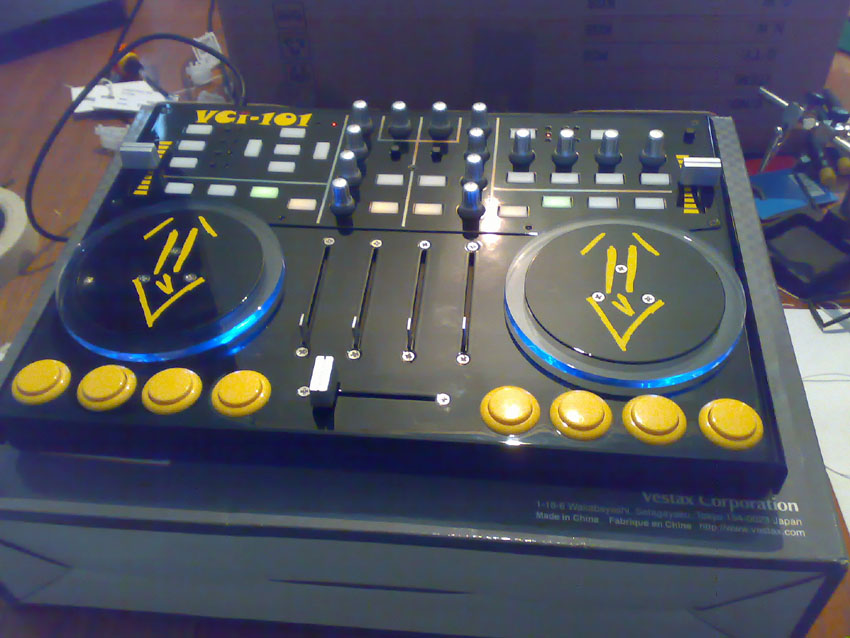
Add arcade buttons to a VCI-100

YouTube Preview Image

This post and video is outdated. For the updated version please visit this page:

http://www.djtechtools.com/2009/07/27/vci-100-diy-arcade-mod/

  • your going to need a cut guide for the buttons. Please email ean from the about page and ask for the latest version.
  • There is also a lip on the top/front edge of the VCI-100 base piece that needs to be cut away. I dont have pictures but its fairly obvious. Not the entire lip (the part in front of the cross fader can stay) just the parts that sit where the buttons are going. The lip is only about 1/4 inch wide so its a easy cut.
  • you dont need to shave the lip if you use the Sanwa 24mm snap in buttons
  • }}}Lead wires- 16 about 3-4 inches long (can be cut from microphone cable)
  • }}}Diodes- 8 50 PRV 200ma switching diodes
  • }}}Shrink sleeve- get about 2 feet so you can professionally protect your connections and not do it the ghetto way (like I did) with electrical tape. Shrink Sleeve is a plastic tube that shrinks down to enclose an exposed wire when heat is applied. Some people have heat guns but a match or lighter works fine.
  • }}}Electrical tape
  • }}}8 Arcade switches from Happ controls- they are the shallow micro arcade switches under the pushbutton section.
  • }}}Some spray paint to make it a cool color (auto trim paint works well) SAND THE UNIT FIRST!
  • }}}Phillips screw driver- One medium and one small tip-
  • }}}Wire stripper
  • }}}Solder
  • }}}Solder Iron
  • }}}Find a machinist in your area (there are a lot of them usually) send them the included diagram and say you need these holes cut out of 1/8″ aluminum. Try for around $50 if possible.

thats just about it! Enjoy your custom bad-ass VCI-100 and post photos when its done!

Good Luck,

Ean Golden

14 Responses to “Add arcade buttons to a VCI-100”

  1. D

    October 19th, 2007 at 10:56 am Quote

    Hey Ean!.. After seeing your controllerism video i couldnt hold back any longer! Sourced the buttons in the UK! Got the tools out and got drillin! (stuck a couple extra faders in there too!) =)

    Heres how it finished up.

    http://www.native-instruments.com/forum/showthread.php?t=55755

    Cheers again man! =)

    D

  2. Anonymous

    October 20th, 2007 at 11:25 am Quote

    Great job!!!!! Its a massive step up from mine. I love the color theme. Did you cut an entirely new case?

  3. D

    October 22nd, 2007 at 10:53 am Quote

    Hey cheers! =). Its not a new case. I filled in the old slots with JBweld and cut new slots all 4 faders. A new case would need a LOAD of work due to way the rotary pots are mounted. Will do a quick how too when i get the time, maybe this week. =)

  4. dddcrose

    August 15th, 2008 at 7:24 pm Quote

    This site prompted me to mod my own VCI and i am pretty fired up about it, “awsome site” but I just opened my hood and I have 12 wires attached to each switch bank and i have no brown cable for ground. Why is it differnet How can I tell what wires are what?

    Cheers
    dddcrose

  5. dddcrose

    August 15th, 2008 at 9:05 pm Quote

    Sorry forgot the LED’s, problem solved.

    cheers
    dddcrose

  6. swords

    December 23rd, 2008 at 4:58 am Quote

    i’ve got the same problem as dddcrosse but am unfortunately not clever enough to solve it on my own…how do you know which one the ground is if all the wires are white? thanks!

  7. Ean Golden

    December 29th, 2008 at 5:05 am Quote

    i’ve got the same problem as dddcrosse but am unfortunately not clever enough to solve it on my own…how do you know which one the ground is if all the wires are white? thanks!

    You can follow the white wire that goes to all the buttons- thats the ground and it should be on the far left or right.

  8. swords

    December 30th, 2008 at 6:38 pm Quote

    [...] Tutorial on adding arcade buttons to a VCI-100 [djtechtools.com] [...]

    thanks ean golden, you da man.

  9. Angela

    January 27th, 2009 at 9:47 am Quote

    Nice work! I’ll have to do a cross post on this one ;)

Leave a Reply

  1. Quote selected text

First Time?

This site is dedicated to digital djs. We develop performance tools and teach cutting edge techniques that enable creative expression. Visit tutorial videos on youtube, equipment reviews in the blog and a very helpful community in the forum. New articles every Mon, Wed, Fri.
In the Store
 

Categories:
Follow us:
You're going to need Flash 8+ and JavaScript to use this site. How'd you get this far without it?

Dig through the Crates

Readers are Saying

  • Conor D.: Generally, the most popular DJ is popular for a reason. I think it is a good system for this specific contest.
  • Anonymous: [quote comment="25614"]Wow, it worked! Although I had to activate FoxyProxy AFTER Beatport had loaded, because...
  • James B: You’re welcome. Glad I could help :) And I don’t mean to say the VCI-100/300 aren’t good controllers...
  • Double DutchDj: I’m chuft I can throw down some scratching, nice one Ean for not making this midi only. Shame about wot...
  • 2010: I agree with dj broken record…popularity contest…ugh.. Ean, you should decide which one of us in the peanut...