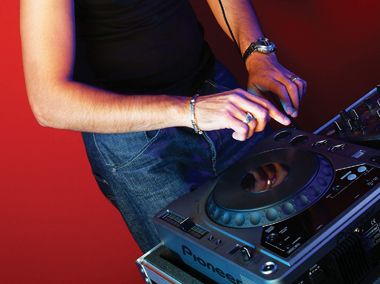
it seems like many of the tools and tricks of the digital DJ world are becoming more and more system exclusive with each company outdoing the other with fancy new gadgets. Unfortunately, unless you are willing to bring your entire personal rig to a gig or happen to be Paul van Dyk and can demand the gear that you need, your live shows are limited to the gear a club has installed. So, for instance, if your entire set is built around the features and effects found in a high-end mixer that very few clubs have, your set will be 100 percent about 10 percent of the time. Not good enough if you want to play with the big boys. It might be wise to have a few universal tricks up your sleeve that you can pull out at almost any gig with a piece of gear that you will find in nearly all DJ booths. Groupies, you may ask? No, Pioneer CDJ-1000s!
ALL ABOUT THE MEMORY
You might be thinking, “CDJs are sooo 2001. Get with the program and buy Scratch Live or Final Scratch. No one actually plays CDs anymore.” Actually, a lot of excellent DJs still use CDJs exclusively in their sets. Besides, you don’t have to choose CDs or your laptop; use both! Very few programs offer the ability to play more than two sources of audio, and there are a lot of situations that call for a third deck. That’s where the CDJ really shines. It can be your universal auxiliary player with go-to samples, loops, airdrops and a cappellas. There are few styles of music that can’t benefit from a little extra flavor to tie the set together. Samples don’t have to be a one-time thing. They can be regularly appearing guest stars that create continuity within your set. They could even become your trademark. When you get inspired to drop that big effected crash, extra drum beat or vocal sample, you need to get at it quickly and intuitively.
Did you know that the CDJ-1000MK2 and MK3 can hold a small memory card that will store all of your loop and cue information? Imagine this scenario: Along with your normal equipment, you bring a memory card and a small booklet of CDs. These take up almost no room at all, but you now have instant, tangible access to a few go-to samples without thinking about it. The cue points have all been stored at the front of the samples, loops set on short drum parts and on key words of popular a cappellas. Everything is ready to go at any time, and you still have two free decks to play from. For example, a timed, one-count loop on the last word or syllable of an a cappella will drive the crowd nuts. Let it ride for as long as you need, working the EQ to make it interesting, and for really dramatic builds, add a delay or transform effect. When you set the loops up in advance, always set them to a beat on the opposite deck. Make sure the a cappella is not pitched up or down, but at zero. Then adjust the pitch of the beat so it’s in time. Now set your loop on the a cappella, store it, and whenever you call it up, it will be in perfect time.
LOOP TRANSFORMATION
Not every sound has to be used in its original context, and the loop function does not just have to loop recognizable passages. You can use it to loop tiny sections of a song or short burst of noise to create a constant tone. Scratch samples, crashes, tones or anything with a lot of high frequencies work great. You can even drop a very short loop on the snare of a full track to get this effect. First set your in and out points quickly enough that the start and end are basically the same sound and are looping as a constant tone. Try switching the pitch range to ±100 and “playing” the sample using big pitch changes. Add in some crossfader transforms to keep it interesting. For more glitchy results, adjust the in and out points on the fly as the loop is playing. Using this technique, we don’t want the beginning and end to be the same all the time but to introduce little chunks of sound in random or rhythmic intervals.
To take it to the next level, we need to feed a rhythmic loop into an effects processor. Fortunately, the Pioneer series of mixers are also fairly common in DJ booths and are loaded with a great effects section including two go-to effects; echo and transform. The fastest way to get the effects in time is to apply them to the backing track you are layering over. Let the mixer learn the bpm of the track and select the appropriate depth and rhythmic settings. Now apply the effects to the channel with the loop, and they will be in perfect time. First, lets try the delay; here you may want to use the input-selector switch to rhythmically feed the delay the constant tone. Play it just like you would the crossfader, cutting the constant tone up and creating builds by increasing the delay depth. Now try the transformer instead. That will rhythmically chop the audio into regular intervals for you, so that you can focus on really warping the sound. Wide pitch variations and platter manipulation work best for that, and when combined with the transform effect, they can create some very lifelike scratching effects and builds.
Those are just a few of the many creative ways that you can use CDJs and other CD turntables to spice up your digital set. Using CDs may be a slight step back in technology, but they are a great auxiliary tool and a dependable piece of equipment that will be around for a long time.